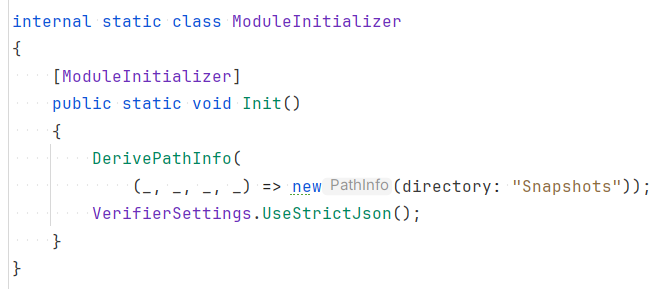
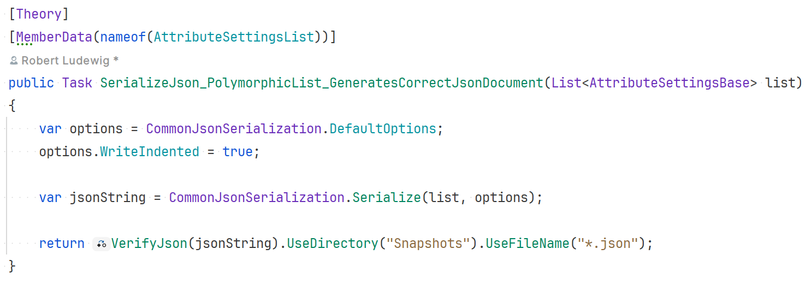
@simoncropp In Verify is there a way to force the extension of the files to be `.json` instead of `.txt` so I get syntax highlighting in the diff viewers? #dotnet #VerifyTests
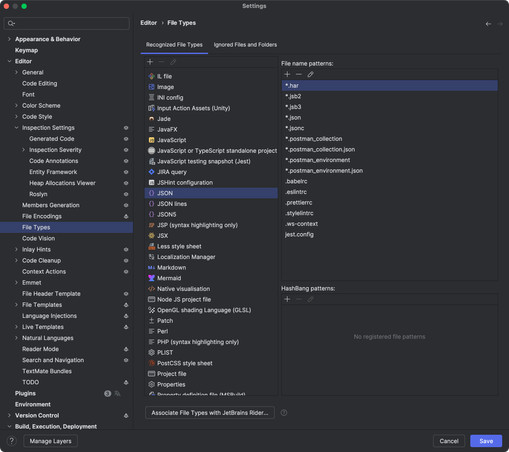
@bitbonk @simoncropp You might be able to a file mask in Rider to tell it the syntax for these files should be JSON.
@bitbonk @simoncropp Yep. Here it is under “File Types”.
@khalidabuhakmeh @simoncropp It’s better than nothing! 👍🏼
@bitbonk @simoncropp I would argue that it’s good!
@khalidabuhakmeh @simoncropp It's good but not ideal. 😊
If I'd map `*.txt` to JSON in Rider, it would
- apply to all txt files anywhere even if they're not JSON
- not work for team members
- not work outside of Rider
@bitbonk @simoncropp - the map would be to “*.verified.txt” or “*.received.txt”
- Team members should switch to Rider (just kidding)
- Always Be in Rider!
@bitbonk @simoncropp I think if you use the setting of UseStrictJson it'll write .json files
@romanx @simoncropp I think this setting may only apply when verifying objects. The above example verifies a JSON string.
@bitbonk @romanx for a json string. use VerifyJson

@bitbonk @romanx yeah i have a bug that is causing UseStrictJson to not apply to VerifyJson.

fix coming soon

@bitbonk @romanx actually no. my mistake. it does seem to work. if u do

[ModuleInitializer]
public static void Init() =>
VerifierSettings.UseStrictJson();

then VerifyJson should produce a json result with the correct extension

@bitbonk @romanx and if u want to put all snapshots in the same dir. u can use DerivePathInfo to take control of the location.
https://github.com/VerifyTests/Verify/blob/main/docs/naming.md#derivepathinfo
so u dont need to do UseDirectory on every test
Verify/docs/naming.md at main · VerifyTests/Verify

Verify is a snapshot tool that simplifies the assertion of complex data models and documents. - VerifyTests/Verify

GitHub
Verify/docs/naming.md at main · VerifyTests/Verify

Verify is a snapshot tool that simplifies the assertion of complex data models and documents. - VerifyTests/Verify

GitHub
@simoncropp @romanx I always want a folder named `Snapshots` in the same directory as the source file that contains the test. This seems to work. Is it the right way to do it?
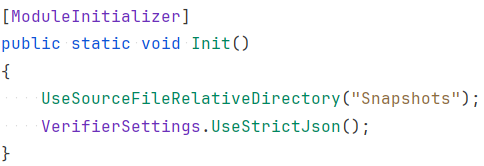
@bitbonk @romanx not exactly. eventually "snapshot" would be resolve to a full path, which would use the environments current directory. and that might be inconsistent in CI. so you should be doing a getdirectory on the sourcefile parameter. and combining that with "snapshot". but given your scenario, i added a new feature that should make it easier for you https://github.com/VerifyTests/Verify/blob/main/docs/naming.md#usesourcefilerelativedirectory
u will need to update your verify ref
Verify/docs/naming.md at main · VerifyTests/Verify

Verify is a snapshot tool that simplifies the assertion of complex data models and documents. - VerifyTests/Verify

GitHub
@simoncropp @romanx So the bug is that `VerifyJson(jsonString).UseStrictJson()` doesn’t work? I have to apply `.UseStrictJson()` globally in the module initializer?
(Can’t test it right now.)
@bitbonk @romanx can u push a stand alone repro to github?
@simoncropp @romanx I will, on Monday.

@simoncropp @romanx Here is the standalone minimal repo that reproduces the issue:

https://github.com/bitbonk/VerifyStrictJsonRepro

GitHub - bitbonk/VerifyStrictJsonRepro

Contribute to bitbonk/VerifyStrictJsonRepro development by creating an account on GitHub.

GitHub
@bitbonk @romanx thanks. the repro is legit. leave it with me
@bitbonk @romanx can u try 25.2.0
@simoncropp @romanx 25.2.0 behaves correctly now 🙏🏻
Verify/docs/serializer-settings.md at main · VerifyTests/Verify

Verify is a snapshot tool that simplifies the assertion of complex data models and documents. - VerifyTests/Verify

GitHub