I think I'm becoming utterly disillusioned on tech stuff lately. I'm hugely aware of the "you like stuff you grew up with" and "you have less patience for stuff as you age" biases, but even so...

Streaming is shit.
Searching is shit.
Researching is shit.
Shopping is shit.
Troubleshooting is shit.
My phone is shit. Autocorrect, touchscreen keyboards, Bluetooth, AI, Android Auto, Spotify, all shit.

It's not even capitalism or consumerism, I'm just tired of arguing and fighting with things I own.

My phone sometimes hangs hard and reboots when I plug it into my car. It's too many taps to navigate to the single digit number of locations I have saved. I'll be mid-playlist, and Spotify will forget and switch to random songs based on the last one it played. People can't hear me on a whatsapp call even after granting it every permission it asks for. The album I had on last week won't play anymore because licensing.

And at the end of the drive it asks me if the fucking sound quality was okay.

You hand over your entire life story to a website for a shipping quote just for it to tell you the thing's out of stock and the product page is just weasel words. Everything you've ever told any website ever has already been sold to other companies and other countries. The thing you buy never arrives because it's possible for a courier company to operate in Australia without delivering to PO boxes. Amazon mixes legit stock with counterfeits but at least your lucky dip item ships free with Prime.
The call centre's scripts are circular and they flat out lie to you about getting a call back or any sort of update or movement happening. The website says it's gone back to the airport but you drive three hours to a courier's warehouse in western Sydney on a hunch and your parcel is sitting on the shelf in plain sight behind the underpaid girl at the counter. You pay extra to refuel your car because you didn't have time to find an app that tells you prices and the pump plays a video ad at you.
Your oven - a device with one moving part, and which functionally can be either "on" or "off" - stops working because a tiny capacitor exploded on the circuit board buried deep in the control panel and it costs hundreds of dollars to get a visit from an authorised screwdriver turner to replace it. The oven still doesn't work until you collectively figure out you have to set the time on the digital clock first, and you're reminded of this needless complication every time there's a power outage.
Your login session at work lasts exactly 168 hours (24*7) and at 168 hours and one minute, you get two MFA prompts simultaneously. You can't click on Outlook yet because the MFA system "didn't hear from you". After logging on, you join your daily Teams standup anonymously, because you don't have time to dig through dialog boxes that ding at you when you click on them to find the one with the working login button. A password prompt appears for a moment, you start typing, then it disappears again.

That 168-hours-and-a-bit slowly cycles later and later into each passing week, and you fucking dread when it reaches late Friday afternoon, because it means Monday morning will be written off by logging in, rebooting, and patting multiple Microsoft applications on the head, and you're useless to your busy colleagues until you do.

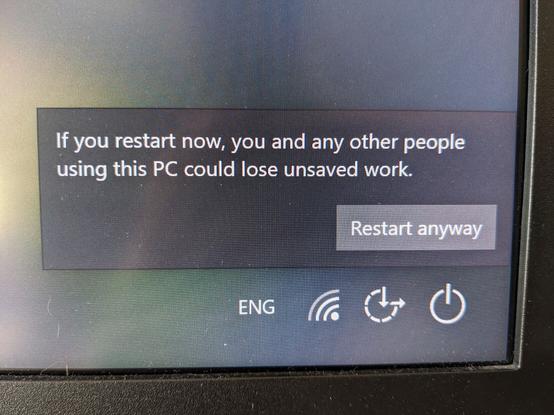
This program with no icon or name is preventing you from restarting. You click Cancel. It restarts anyway.

Also, how likely are you to recommend Teams to a friend?

Your cheap home PC doesn't have the physical space for another hard drive inside, so you buy an external one and your wireless keybbbbbbbbboard starts acting up when you're backing up.

Seriously, USB 3 devices put out a bunch of 2.4GHz interference and it fucks up wireless gear. Put your dongles on cheap USB extension cables and blutack them to the underside of your desk, I promise you'll stop hating Bluetooth quite so much if you do this.

Bluetooth is still shit, but this one's USB's fault.

You buy a second-hand but still quite new wireless gamepad. It dies unexpectedly at the approximate age of 16 months. There's a listing for a replacement battery on Amazon and a disassembly guide on iFixit, so you take a punt on a new battery and swap it in.

The gamepad's still dead, so you email its manufacturer for A) a repair, or B) spare parts, or C) to offer them even more money to fix it, but they don't provide any of those for a device still sold new today.

Get fucked, Steelseries.

And here's the thing: None of this stuff makes me angry. Annoyed, sure, but I've been around computers since I was a toddler, and I have to solve shit problems like these for myself every day.

What makes me angry is: What about all the folks who aren't computer people? How the absolute fuck do they survive in a world where you can no longer function as an employee, a family member, any sort of citizen without encountering this stuff?

Those people are fucking heroes, and I'm angry for them.

This shit is why, when banks announced they were going to stop processing physical checks and a whole wave of elderly folks protested, I understood. It's one of the last fleeting vestiges of anything in their lives that still makes sense, and arguing about the cost of supporting obsolete systems is an absolute red herring.

It's not about the money. It's not about the tech. It's about kindness, and being fucking human to each other.

Do you work in IT? Do you support a system? Do you work on a helpdesk? Do you take calls, answer emails?

Congratulations. That's no longer your job title. From the moment you read this, you're a user advocate.

Process issue holding something up? Bug in the app? Is a particular system always down? Advocate for your users. Go to bat for them with the teams responsible for their struggles.

Folks will say "oh thank christ, it's you" when they hear your voice on the phone if you advocate for them.

tl;dr: In a world where companies will fleece you, scammers will steal your grandmother's savings, your chat program algorithmically charts your gender, and your car's manufacturer sells analytics about the way you drive without a second thought:

The only thing that matters is kindness, and we could all do with a lot more of it.

Also, I'm going to go have a drink or two now. Holy hell, that little rant has been building up for a while now.

RIP my notifications tonight. You folks are alright

Surprise! You're logged out of this website you were using ten minutes ago. Surprise! You're also logged out of LastPass, so first you have to pull down the notification shade, tap the LastPass icon, wait for some boxes to appear and move about, then you can log into LastPass. Then you can pull the shade back down, tap on LastPass again, tap the one matching site in your vault, and finally log back into that website.

Surprise! Would you like to save your login for this website to LastPass?

Dominos Australia's website having a totally normal one today. I appreciate the camelCase in the second screenshot here.

Not even going to address the derangement required to categorise "butter chicken" as a "traditional pizza" - you work with the system you've got, and they probably have decades of marketing research telling them "Traditional" is an incredibly valuable category name.

My wireless keyboard gives me so many varied and wonderful settings to handle what it does when I haven't touched it in a little while. I can make it dim the lights, or pulse them; I can set the brightness of them; I can tell it how long to wait after I stop typing to dim, and whether or not to turn the lights off entirely.

What I actually want it to do is use a $1 sensor to know if I'm sitting at my desk, and light up if I am, and be dark if I'm not. That's it. Where's that option, Logitech?

This description of a wireless gamepad on eBay is AI-generated, right? No human would describe it as weighing "only 1.5kg", that it is "compatible with games and controllers" and "has an unknown cable length" (I repeat: wireless gamepad), and that it "comes with an unknown manufacturer warranty".

This is worse than just leaving the description blank. I can't wait for the day I have to force a seller into processing a return and refund because the automatic lying machine misrepresented an item.

Windows 95: here's the new start menu! It lists all your installed programs.

Windows XP: here's your improved start menu! It also now lists your most recent files and applications.

Windows 7: we've done it again! Now you can hit the windows button and *just start typing* to find your stuff.

Windows 10: we fucked up and filled your start menu with so much shit there's now a delay before anything you type matters. Tepad? Never heard of it, but here's a list of famous filming locations in Africa

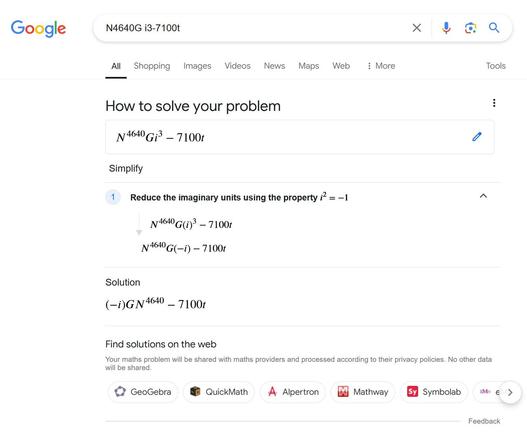
This would perhaps have been a more interesting search result if I wasn't actually looking for information on the Acer Veriton N4640G Mini Desktop with Intelยฎ Coreโ„ข i3-7100T CPU
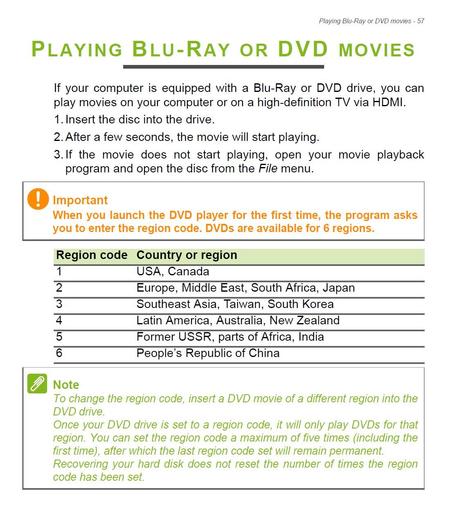
Bonus point to Acer here for not actually publishing a proper service manual for this model. Their support site has a very generic "Veriton Desktop Computer Userโ€™s Manual", dated 2016, which tells you how to use their pre-installed junk software and shut Windows down. It also warns about using wifi on aeroplanes, how to connect to a 3G network, and this page explaining the different geo-regions for DVD players, all of which is utterly irrelevant for this SFF desktop PC. https://www.acer.com/us-en/support/product-support/Veriton_N4640G

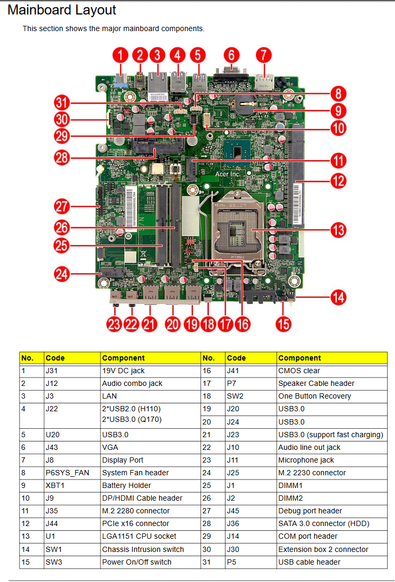
Turns out, in this the year of our lord 2024 Acer do have a service manual for this desktop but do not allow it to be published publicly, but apparently do allow snippets of it to be posted to their user forums? https://community.acer.com/en/discussion/588318/the-acer-veriton-n4640g-spare-parts

Anyhow, all I wanted to know was if the D-sub cutout on the back meant it had a COM port header onboard, and the answer is yes* - it connects to some awful header that's probably proprietary and will mean I'll need to buy an official Acer spare part to use.

the Acer Veriton n4640g - Spare parts

Hi im after some plug in hdmi leads for the acer veriton n4640g

Acer Community

This service manual thing is actually pissing me off more than anything else tonight. Toshiba once threatened to sue me for copyright infringement because I dared to share service manuals for current-model Satellite laptops, and it made me the internet's main character for like a day: https://www.wired.com/2012/11/cease-and-desist-manuals-planned-obsolescence/

This policy by #Acer of hiding perfectly normal information like "which one is the serial port?" makes it needlessly difficult to find uses for older hardware and just encourages e-waste.

The Shady World of Repair Manuals: Copyrighting for Planned Obsolescence

Toshiba has discovered a new way to enforce such planned obsolescence by cutting the repair market off from critical service information. But the cost to society is significant: The e-waste problem is growing; weโ€™re losing thousands of domestic jobs as independent repair shops shut down; and consumers are being forced to replace their hardware much frequently than they should have to.

WIRED
(I know my website's pretty broken at the moment - it was a lot of hand-built stuff in Wordpress and who has the time these days to just rebuild entire websites - but you should be able to find whatever was there on archive.org)
@timixretroplays LOL all I got from my C&D was a (small) legal bill and advice to just take down the Android CPU manuals and stop using them to r/e jailbreaks :)

@timixretroplays I've been following you for so bloody long and only just now I find out that you are Mr tim.id.au!

I've definitely grabbed a manual or two from your site before!

@timixretroplays J14? Poast a photo, thereโ€™s a lot of folks here who love identifying random connectors!
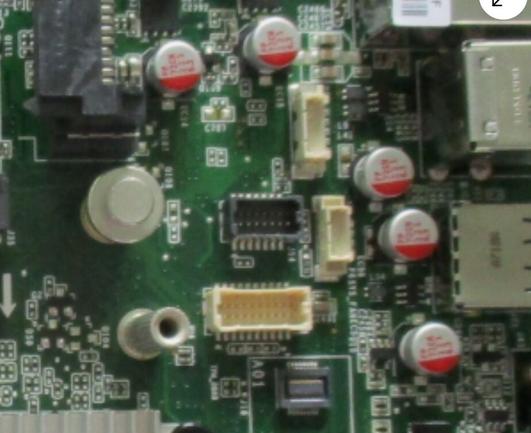
@jpm I don't yet know for sure if this is it, or if my unit even has this port - it hasn't arrived yet, it's currently "Delayed - waiting to be processed for delivery" because of course it is - but if the eBay listing for this model of PC's replacement motherboard happens to be the same, it's this black socket here. I guess they couldn't spare a few extra square millimetres of SFF motherboard space for a more conventional connector.
@timixretroplays aha, gotcha. 14 pins is a bit odd for a serial port even with full hardware flow control
@jpm my uneducated guess there is that this is a particularly high-density series of connectors for boards with limited space (the beige one right below it seems to have 20 pins) and the smallest they bothered making had 14 pins, and a stressed project manager said "fuck it, ship it"
@timixretroplays this is also quite possible, because the shape of the shroud looks identical on the narrow ends with key slots and tabs

USB type C absolutely solved the most terrible aspect of type A by making the plug work either way up. It did, however, introduce another entire issue that is just as frustrating - they've made the sockets smaller and harder to see, and every type C device is just unquestioningly manufactured in jet black on matte black.

Proximity-sensing LED lighting inside USB type C ports might be too much to ask for, but could I at least have a light-coloured outline to aim at by lamp light at 11pm?

(Those of you finding yourselves with the reflex to reply "maybe you need glasses?" to this are A) possibly not entirely incorrect but also B) missing the point that these things are designed by humans, for humans, and making them more difficult to use than they have to be is just the most pathetic own-goal possible.)
@timixretroplays Glasses won't help you if you're trying to plug something in the dark. My refinement: the glow should occur only when the cable end is within a certain proximity of the socket.

When I go to switch apps on my phone, Google Lens wakes up and puts a big Lens button on any app in the list that appears (to it) to contain an image I might want to view in Lens.

That button goes *exactly* in the spot on the screen I like to tap to select an app, and only fades in once you've stopped scrolling through apps, so about 25% of the time my phone offers to copy, share or save the image instead of switching to that app.

I often won't see the button appear under my thumb to avoid it.

There are no settings in Lens or the Google launcher where I can move the button or turn this feature off. I could probably disable it by uninstalling lens, but I use it quite frequently to quickly translate text.

I guess that means it's not fit for purpose and I should replace it. Any recommendations for non-google image translation apps for Android? Will pay a few bucks for a good one.

Translate anytime, anywhere with DeepL apps and extensions

Boost productivity with DeepL apps and extensions. Translate with desktop apps, mobile apps, browser extension, and integrations.

I used to enjoy seeing this photo. It meant "oh cool, this computer runs Windows 10! That's two better than Windows 8!"

Now it means my PC crashed or an update didn't work right and it just didn't bother firing whatever process picks and fetches a new login screen wallpaper as a result.

I've come to resent this image, because seeing it means something beyond my control went pointlessly wrong and there is nothing anybody can do to fix it. It's an error message without a message or a purpose.

This message has been an outright lie for several years. It appears if you start your Windows 10 computer, and then go to restart it again (for whatever reason).

I am the only user of this computer and am not even logged in yet, so there are no actual people involved here - at some point, Microsoft started firing this message off if you restart while Windows Update is working in the background.

Microsoft believes an automated update process is more important than what actual people are doing.

Windows 10 was freezing for 5ish seconds every time I dragged a file to my desktop. Granted, I had probably a couple hundred desktop icons, but this is a computer built this decade, displaying files in a folder should not vex it.

I went on a clean-up spree, deleting most of my desktop icons (usually one-off photos and memes), and lo, performance has returned.

Immediately afterwards, though, searching in my start menu stopped working. Did I do too many file things, Windows? What the hell?

I deleted more files, this time from my downloads folder, and suddenly my desktop went black behind my remaining icons. I thought I'd deleted the image I was using for my wallpaper, but that popped back into existence a few moments later.

Importantly, searching my start menu suddenly works again. So... Windows decided to restart something in the background and that fixed it?

Any day now I'll make good on my promise to quit IT forever and go herd goats on the Isle of Man.

@timixretroplays bizarre. But it worked! ๐Ÿคฃ
@timixretroplays sounds like explorer.exe ground to a halt and got restarted. It's not too uncommon.
@timixretroplays filesystems were a mistake (also do not, under any circumstances, ever, enable NTFS compression)
@jpm brb, going back in time to smack the inventor of the transistor in the face with a large trout
@timixretroplays I've noticed that any version of Windows eventually starts doing this. Especially once drives start to fill up - I'm working on clearing out a couple of mine, why I bought a thumb drive the other day. Something else that helps that I found somewhere online - delete anything you can out of your Temp folder, the one at C:\Users\(user)\AppData\Local\Temp. It'll prompt you for some that you'll have to skip. But I regularly delete stuff from there, it can get VERY full.
@jake4480 yeah, it's about time I took some digital garbage out - the thing with the start menu is, it went from working totally fine to search in, to just being blank with the blue dots streaking across. It's not struggling to list search results, some crucial part of the service has just very suddenly snapped in half and it just sits there waiting forever. It's bizarre.
@timixretroplays ugh. Yeah, sounds like a memory thing for sure. My Windows 7 machine was so laggy and then the other day it was time. It went. But one with Windows 10 should be significantly faster than something as old as with 7 on it. Bizarre. With every new release, Windows gets less and less stable, it seems
@timixretroplays this message appears because the last connected user is pre-logged-in when the login screen appears after a restart, to save time

@timixretroplays I'm working on switching to a Linux distro - Pop! OS. Not because Windows 10 has been awful to me, but because I'm concerned by the ever-increasing invasion of my privacy and the looming specter of Windows 11 (which seems like Microsoft's excuse to be even more invasive).

It'll be a tough move but I think I can do it.

@3DPrintingDad I'm doing a deep dive into Linux Mint at the moment for similar reasons.

@timixretroplays That's another decent one. I had picked Pop! OS only because of the fact that it was rated as something that runs well with Steam and many of the games.

I've already verified it will run Windows games from Steam on an old laptop.

Still the same old routine with apps, though. Yes, there are app providers with pre-compiled binaries but they can often be out of date. Then one is left hunting for the right place to get a binary, or left to compile it from source. Sigh.

@timixretroplays This is my main complaint that I've had over the decades with Linux and it hasn't gotten much better. If one is willing to live with the caveats, however, the OS is solid and it is easier than ever to use many of the distros out there.
@3DPrintingDad the perspective I'm swiftly growing on that is that I'm happy to put in a bit of work to install a bit of software someone written in the hope it'll be useful to someone else, vs installing something fully expecting to be hit with an unadvertised "demo" limitation that cripples what I wanted to do with it, and which would've made me decide not to install it otherwise, or clicking through the installer watching like a hawk for extra tickboxes that try to install malware or adware.
Foone๐Ÿณ๏ธโ€โšง๏ธ (@[email protected])

Attached: 1 image I mean, they make a good argument. Source: https://www.tumblr.com/ejacutastic/752960889515294720/

digipres.club
@timixretroplays *stares in Windows 8*

@jpm Windows 8: the start menu, now with METRO and โœจtouchโœจ!*

*(Compatible hardware required)

@timixretroplays notes on ongoing Stockholm Syndrome

@timixretroplays @neckspike

Windows 11: hey look, we got rid of it. But here's some advertising space and a list of apps you don't have installed but Copilot likes.

@timixretroplays we use Windows 10 at work and I can't stand the default "increased pointer precision" setting that messes with the sensitivity, so when I log into a machine, disabling it is my priority. every time I hit the start menu and type "mouse", it'll default to showing me online results for "Mickey Mouse" and will only display local settings results after about 30 seconds.
@timixretroplays It's insane to me that eBay offers built-in tools to LLM generate the description. Who would do that unless it's some kind of scam?

@krystman I guess someone trying to offload a crate of ancient electronics with zero interest in what they are, and who assumes people won't notice or won't care.

Cheap shit gamepad with zero redeeming or interesting features that was basically e-waste when brand new, being sold used on a site that's barely been updated in 20 years and described poorly by an LLM because it wasn't even worth the seller's time to investigate. Bask in the glory of capitalism, ye bargain-hunters!

@timixretroplays ugh. Yeah, they offer this now as a service within eBay. No thanks hahaha
@timixretroplays ๐Ÿ“ข๐Ÿ’€๐Ÿ’€๐Ÿ’€๐Ÿ’€๐Ÿ’€๐Ÿ’€
@timixretroplays my bug bear is when something like the Chromecast doesn't work and then I'm expected to trouble shoot for hours resetting and rebooting and restarting and reinstalling. I don't want to spend my evening doing that. I get paid for that kind of stuff. On my time, I just want to watch the damn TV show.

@timixretroplays This thread is gold.

I'd like to add gesture typing and autocorrect changing the words you tried to type (and saw briefly displayed correctly) only to have it come back at the end of the sentence and complain that the words that it decided you were typing are grammatically wrong or are spelled wrong.

Come on computer, you decided on the words and then decided the words you picked don't make sense. Of course they don't. And this problem seems to be getting worse.

Maybe only Android does this but in the old days, I could turn off autocorrect. This is what we need AI doing.

@human3500 I only need autocorrect because I can't buy a phone with a physical keyboard anymore. It's a solution to a problem that only exists because it was forced on us - it's not obsolete tech by any means, the basic form factor of a laptop computer hasn't changed in decades and there's an absolutely thriving market in customised mechanical keyboards for your desktop.
@timixretroplays @human3500 I would pay obscene amounts of money (well, within reason) for a good modern version of the HTC Desire Z. Gimme a little keyboard. Gimme a little phone while you're at it.
@lunarloony give me windows mobile 5 with modern hardware features, i'll be happy forever.
@timixretroplays Thank you so much for writing this.
@timixretroplays You're not the only one that feels that way. Oh wow, you are *definitely* in good company there.