 Mark Smith
#SwiftUI knowers: can anyone tell me why an existing Thing instance isn't deinitialzed when thing is set to nil? It's only deinitialized when a new Thing is assigned to thing.
This makes no sense to me. And it's bad if Thing is managing a resource.

#SwiftUI knowers: can anyone tell me why an existing Thing instance isn't deinitialzed when thing is set to nil? It's only deinitialized when a new Thing is assigned to thing.
This makes no sense to me. And it's bad if Thing is managing a resource.
@marksmith Interesting observation! I’m not certain but I suspect it has something to do with SwiftUI’s view diffing - after the old and new states are compared, the old state isn’t immediately released.
Hopefully someone else will have a more definitive answer.
@groue @humblehacker The behavior is certainly subtle (to me anyway).
If you run the code below in a preview window,
make a Thing with the top button,
then set the state var to nil with the bottom button,
then set it to nil again with the bottom button,
the object only gets deinitialized after you set the state var to nil twice.
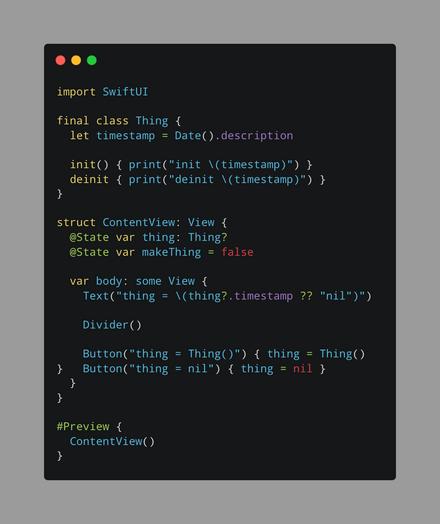
@marksmith @groue Yep, seeing the same thing. And if I don’t reference thing in the view (comment out Text), it takes a third tap to get it to deinit.
Oddly, the same code on macOS deinits on the first nil tap, but with Text commented out it takes two taps. So exactly 1 fewer tap for each scenario.
I nested ContentView, and when dismissed everything was cleaned up, so that’s good. But I agree with @groue that this looks like a bug.
Tested in a playground.
@fsousa Right, but setting it to nil should remove the only strong reference, no?
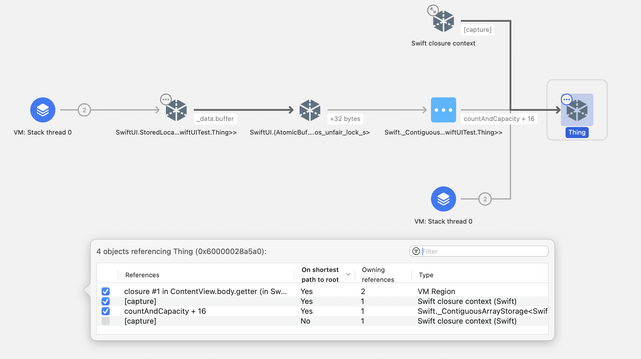
Here’s what the Memory Graph looks like if you create it, set it to nil, and then stop at a breakpoint just before replacing it with a new one. It’s still alive:
@toddthomas Say I have a stupid simple app with one view that shows a Thing. It has a popup menu that lists the names of different Things. When an item is selected, a new Thing is created and becomes the one displayed.
If I understand you, @State can’t be used to hold the only reference to the current Thing if I want the normal ARC lifecycle. I need some long-lived ThingMaker class instance outside of the view to hold the reference instead. Is that correct?
@toddthomas Thanks Todd. The issue I see is in between persisting long enough and leaking: the objects can last much longer than expected, because they seem to be held by SwiftUI itself after the application code is done with them, for some internal reason.
cont’d…
@toddthomas In UIKit, if an instance variable in a UIViewController is the sole reference to an object, setting it to nil will release that object. I can use the Resource Acquisition is Initialization technique to free resources in a timely manner. That seems not to be the case with SwiftUI.
I’m not arguing it’s a bug, just that it’s (to me) unexpected behavior. A leaky abstraction maybe.
 David Whetstone
 Gwendal Roué
 Fernando Sousa
 Todd Thomas