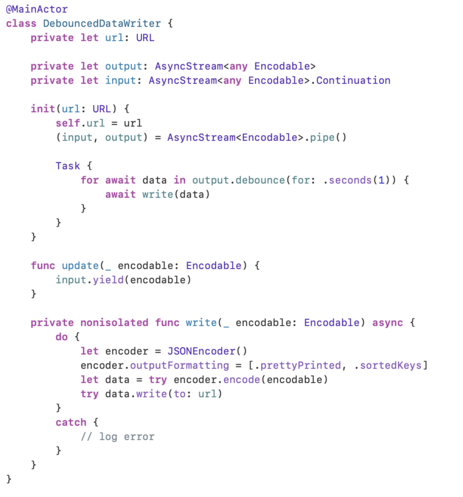
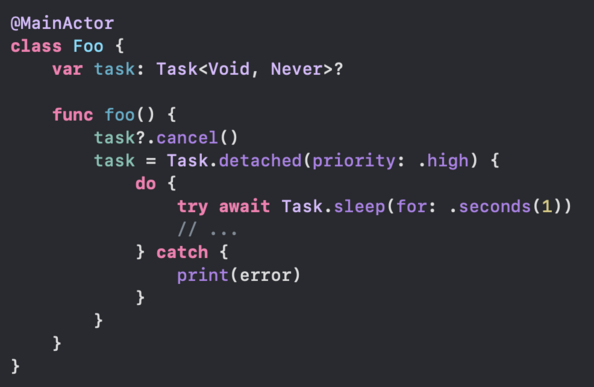
Is this a good way to do simple debounce? Will Task creations take too much resources? šŸ¤”

#Swift #iOS

swift-async-algorithms/Sources/AsyncAlgorithms/AsyncAlgorithms.docc/Guides/Debounce.md at main Ā· apple/swift-async-algorithms

Async Algorithms for Swift. Contribute to apple/swift-async-algorithms development by creating an account on GitHub.

GitHub
@mattiem feel more uncertain. 🫠

@libei You know, you are right. Requring the AsyncSequence makes this more complex…

Ok back to this original, maybe just drop the detached and priority? It’s async, so you won’t be blocking. Keep it real simple. You just have to make sure that cancel can actually stop the work in flight.

@mattiem This is what I'm actually want to achieve, store table view content offset to disk. I assume I should do file writing in detached task since it may be time consuming and blocking main thread.

In my experiments, this code snippet work good for debounce, I do only get the last result every time the table view scrolls.

Order seems good too since task creation and cancellation all happens on main actor.

My only concern is how much resource will cost by those task creations.

@libei @mattiem Doesn’t `detached` mean there could potentially be multiple of these tasks executing concurrently? Imagine in the first task some hiccup causes JSON encoding to take 2 seconds and so the next task ā€œcatches upā€ and writes the new offset, but then the first task overwrites that with the old value.

I think you should avoid `detached` so the tasks all run on the same actor. If you want this off-main then you could move the logic to your own `actor OffsetPersister`.

@libei (Now I sit back and wait for @mattiem to tell me I’ve misunderstood something šŸ˜…)
@jjoelson @libei Ha! You are totally right this is racy. But I don’t think the issue is the detached, it’s that you have multiple states (idle, loading, etc). I think modeling this with a state enum could work well here.
@mattiem @libei I might have to think about this more, because I don’t see the race so long as it’s all the same actor. Everything after `sleep` is synchronous, so how could the second task overtake the first task and write the offsets in the wrong order?

@jjoelson @libei the issue is the cancel is unable to stop that synchronous work. It would go like this:

- sleep completes
- big, slow sync operation *starts*
- new value comes in, cancel doesn't stop in-flight work
- new value isn't slow, gets written out
- finally the big slow sync completes, overwrites
@jjoelson @libei ah wait, you are right that if you keep the synchronous work on the same actor it will resolve the issue!
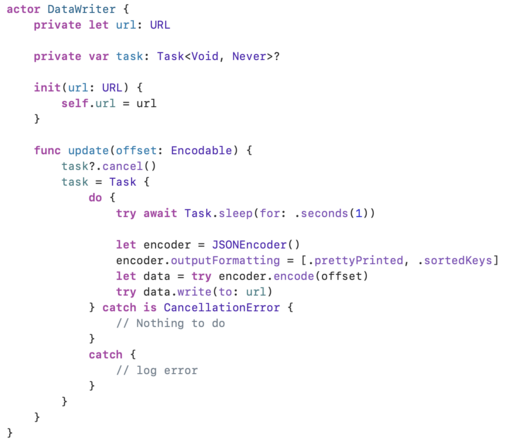
@mattiem @jjoelson OK now we got these:
@libei @mattiem I think you may want the actual task storage and cancellation in the actor, otherwise you could hit that logic race that Matt mentioned with the task getting cancelled while a write is in progress.
@libei @mattiem Basically your original code, except it’s all on a separate actor and no `detached`:
@jjoelson @mattiem Will this be affected by the actor execution order issue? I roughly remember that actors have no guarantee for execution order.
@libei @jjoelson @mattiem I don't think it would be. Task.init's closure is marked @_inheritActorContext (https://github.com/apple/swift/blob/main/stdlib/public/Concurrency/Task.swift#L666), so after sleep returns, the actor is running the synchronous code in the task and anyone else calling update(offset:) would suspend until that's done. and Task.sleep checks for cancellation immediately after it unsuspends, so even if another update(offset:) call occurs while the current task is sleeping—and that new call executes first, before the synchronous code in the closure—the current task will end early when it unsuspends
swift/stdlib/public/Concurrency/Task.swift at main Ā· apple/swift

The Swift Programming Language. Contribute to apple/swift development by creating an account on GitHub.

GitHub
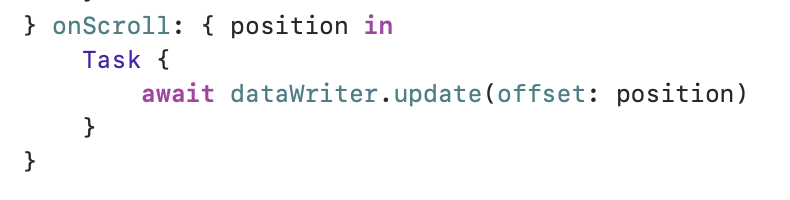
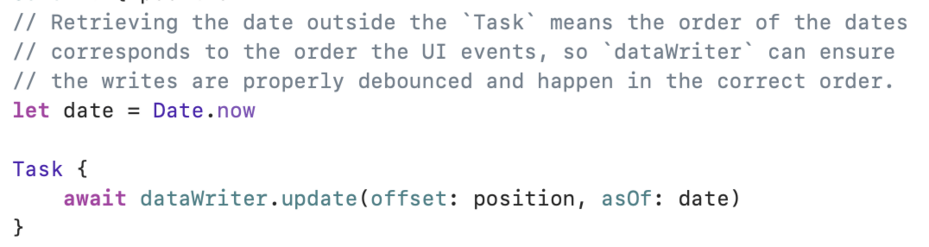
@shadowfacts @libei @mattiem Now I’m having doubts actually, because in order to call `update(offset:)` you need to do something like this in the UI, and as far as I know there’s no guarantee as to the ordering of these MainActor tasks if they’re being generated very quickly by scroll events:

@jjoelson @shadowfacts @mattiem Even you somehow get these tasks executing in order, if I understand correctly, the actor has also no guarantee for the order of awaited `update(offset:)` calls.

> This is conceptually similar to a serial DispatchQueue, but with an important difference: tasks awaiting an actor are not guaranteed to be run in the same order they originally awaited that actor.

https://github.com/apple/swift-evolution/blob/main/proposals/0306-actors.md#actor-isolation
swift-evolution/proposals/0306-actors.md at main Ā· apple/swift-evolution

This maintains proposals for changes and user-visible enhancements to the Swift Programming Language. - apple/swift-evolution

GitHub
@libei @shadowfacts @mattiem I’m starting to suspect there’s no way to do this with correctly with Swift Concurrency except by using AsyncStream šŸ¤”
@libei @shadowfacts @mattiem After some more thought, you can make it work with silliness like this, but at some point this is probably the wrong tool for the job.
@jjoelson @libei @shadowfacts Yeah I think you are probably right that if you want this off the main thread AND you want to guarantee the latest data is never overwritten you need a queue of some kind.
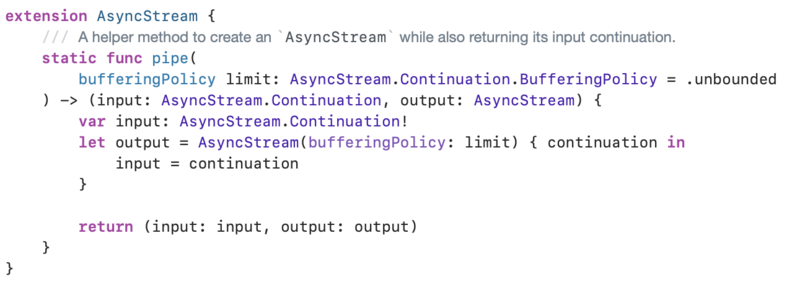
@mattiem @libei @shadowfacts This is the best I got using `AsyncStream`:
@jjoelson @libei @shadowfacts Have you seen AsyncStream.makeStream? It’s kinda new.
@mattiem @libei @shadowfacts Ah nice, I was thinking that method probably should have existed šŸ˜…
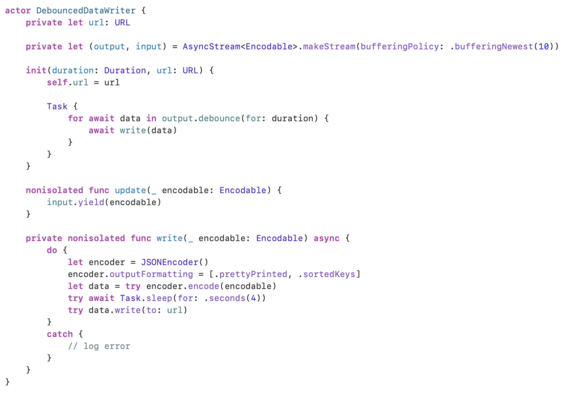
@mattiem @libei @shadowfacts You can generalize this beyond MainActor by making it an actor with `update(_:)` `nonisolated`. I’m actually coming around to this approach being Not That Badā„¢.