I'm trying to pay my Virginia income taxes online, and they have disabled paste in any field of consequence. Paste in a password? Nope. Your bank's routing number? You're gonna have to hand-key that. Your bank account number? You better believe you're typing that in.

If you wanted to force people to create crappy passwords and cause them to accidentally siphon money out of strangers' bank accounts, this is how you'd do it. And somebody went to extra effort to make it be like this!

Browsers should refuse to respect paste-disabling. This is not something that any user wants.

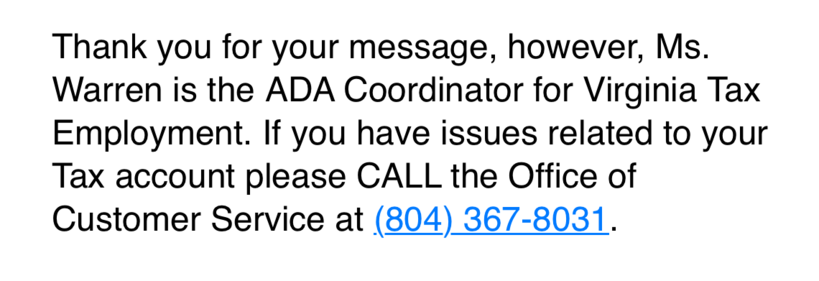
I emailed the Virginia Department of Taxation’s ADA coordinator about their site’s inaccessibility, citing WCAG 2.2 chapter and verse.

This is the response that I got. :(

Life of Brian - scene 3 - People's front of Judea

YouTube

@waldoj you may want to check out StopTheMadness by @lapcatsoftware

https://underpassapp.com/StopTheMadness/

StopTheMadness browser extension

StopTheMadness is a web browser extension that stops web sites from making your browser harder to use.

@waldoj oh, you want erroneous input? OK!
@waldoj “Right-click has been disabled on this website.” 
@elefant @waldoj
And usually f*%$g douchebag scum of the js-monkeys, who coded these bloatsites are too dumb to disallow shift-rclick and it can be circumvented even without thinking.
@waldoj My "favorite" is when I can paste into the first field, but not into the "confirm your ____" field where the values must match.
@watters I understand the reasoning behind that one, at least. It’s so you don’t make a mistake in the first field, then copy-paste that error into the confirmation field.
This breaks when I’m copying from someplace reliable, like my contacts app or password manager.

@arensb Having two fields is asinine in the first place. Why not 3?

It's there to catch mistakes by people who cannot accurately *type* a value they know by heart.

This was something that sorta made sense in 1995 because using computers to enter the info was novel and most people were unskilled.

It has become anachronistic.

@watters @waldoj I will sometimes type into the second and copy/paste into the first. But usually just have this madness disabled in firefox settings.
@watters omg I encountered this for the first time last week. Nearly bounced off whatever service I was signing up for
@watters @waldoj
Tip: security theater webfolks who implement that kind of crap usually are too lazy/incompetent to go the last mile: they let you select the first field then Ctrl-drag in the confirmation field, which copies the text. This requires using the mouse however, and therefore not available on most phones.
@waldoj browsers really have stopped being agents of the user and are deeply tied to the wants of the service provider, you are right that users wouldn't sign off on this feature

@raven667 @waldoj Bingo. That’s the heart of the issue right there. The user’s app should serve the user and no one else.

IIRC there was a scandal with Palemoon browser blocking some ads but deliberately not others.

I once reported the bug of browsers showing users a padlock when negotiating SSL with a Cloudflare site no different than any other site, which deceives the user. The user should be informed when there is an obvious partial tunnel (not e2ee). I think it was Tor Project devs who said the browser should serve the webmaster not the user of the browser. They said something like the website should be experienced the way the website intends.

@waldoj because of this I've been using the "Don't F*** With Paste" Chrome extension for a long while.

https://chromewebstore.google.com/detail/nkgllhigpcljnhoakjkgaieabnkmgdkb

Don't F*** With Paste - Chrome Web Store

Prevents the blocking of copying from & pasting into input fields

@tim is there a firefox version?
Don't Fuck With Paste – Get this Extension for 🦊 Firefox (en-US)

Download Don't Fuck With Paste for Firefox. This add-on stops websites from blocking copy and paste for password fields and other input fields.

@waldoj I just downloaded an Edge extension that purports to disable paste disabling, will see if it works
@waldoj isn’t there an extension for that?

@masek There is an extension for that.

That doesn't diminish @waldoj point: Browsers (implicitly: *by default*) should not respect paste-disabling.

@masek @waldoj there are.extensoons for firefox, but they don't always seem to work :(

If anyone could recommend one, that would be great :)

Don't Fuck With Paste – Get this Extension for 🦊 Firefox (en-US)

Download Don't Fuck With Paste for Firefox. This add-on stops websites from blocking copy and paste for password fields and other input fields.

@masek thanks, I will check them out!
@waldoj and pastes should act like key presses.
@vathpela @waldoj making paste act like key-presses would probably be a bad idea as it creates unintended side effects, it'd need to hook into the keyboard/input system instead of the clipboard system and that has very different security needs as keyboard input is considered evidence of a user present whereas paste can more easily be triggered programmatically independent of the user. What do you do when the clipboard contains invisible control characters (eg CTRL-X), exit the app? Surprise!
@raven667 @waldoj it doesn't need to be all the time, it just needs to be when it's filling in usernames and passwords ;)
@waldoj makes one want to run the page in a vm and use the paste as typing from the host machine
@Paxxi @waldoj I have done exactly that. I use a Windows VM for good measure (host is Linux), because some sites demand to be used from Windows. In 2024.
@ankitpati In case you haven't explored that yet, you can more than likely just use an extension that changes your user-agent instead.

@sky Thanks for the tip, although I have explored that and it works. Mostly.

Except for that one time my stubborn ex-employer insisted on using IE-specific sites with ActiveX and BHOs.

@waldoj AMEN! It is the most disastrous idea ever to be invented. I can fimd absolutely zero reasons as to why this is usable.
@waldoj Copy-disabling too for that matter. You already gave me the stuff. Don’t make me go into developer view to fetch it.
@waldoj And browsers should always allow to mark and copy text. Encountered the issue several times in Discord UI for example.
@waldoj or, at least, give an opinion to ignore
@waldoj
I can't think of a single use case where pasting needs to be disabled

@realn2s @waldoj I can think of one: an app that consumes your input for non-text purposes. like in 2048 I don't want accidentally pasting "awawawa" to just instantly move several steps to the corner (potentially losing the game if it is close to being full)

of course, there are definitely better ways to implement this that aren't really "disabling paste" (e.g. not using a text box so paste isn't a thing to begin with) but the lack of paste is important for this type of keyboard input.

as for just text inputs, where "pasting" as an action makes sense? I agree, it should never be disabled.

@realn2s @waldoj The browser can't really tell the difference between "Let me handle this paste programatically, I know better" and "I'm not going to handle this paste at all".

I've had to implement formatted input fields before, and those do need to handle paste themselves.

I do agree that just "disabling paste" is an antifeature, but so is preventing applications from ever implementing custom paste-handling.

@nordern @waldoj
Thanks for the explanation.
I wasn't aware. 🙏🏻
@waldoj control over which hotkeys can or cannot be highjacked while we're at it!

This is one of several functions that should never have existed in browsers in the first place.

A browser should not let a website break any part of the browser UI.

@waldoj I agree. Luckily (unless you’re using Google’s Chrome) there’ll always be extensions for that!

https://underpassapp.com/StopTheMadness/test.html is available on Safari and Firefox

StopTheMadness test page

Test page to demonstrate the madness stopped by the browser extension StopTheMadness.

@waldoj "Your password must be secure, contain letters number and symbols and not be a recognised word in any language"

Also we've disabled paste so your password manager won't work.

@waldoj

Yes! Its annoying when you use a password app for security so have long complicated passwords and then some clown disables paste on the password or retype password field.

@monkeyben @waldoj i use 30 character long randomly generated password. If i have to type one of them i wont have a computer at the end. I had to type a bitlocker recovery key one and it was awful

@waldoj Oh, you're one of those weirdos that believe our software should serve the needs of the users?

Oh sweet summer child.

Waldo, the problem is that it's hard to detect. What if a website wants to accept the pasted text but do something else with it instead of putting it into the currently focused text field? Then nothing is preventing it from accepting it and doing nothing.

@waldoj and while we're at it, all financial statement PDFs should use real pasteable characters

For example, I might copy what looks like "123.45" from a statement only to find it pastes as ")£_†k-"

@scruss @waldoj That's a much harder nut to crack as PDF is focused around making a printable document that _looks_ right visually, PDF generation tools often do nothing to preserve a document's _structure_ (lines, paragraphs, columns, tables, etc.) and are just using carefully positioned glyphs/images to match the look. It's incredibly difficult for the PDF reader to work its way backward programmatically to reconstruct the semantic meaning of a jumble of letters so copy/paste works sensibly.

@raven667 yes, I know: I was a prepress nerd for some time. Quite why these PDF libraries subset/re-encode text so badly, I will never understand. They will be breaking accessibility requirements.

I used to have to render my bank statements as bitmaps and run OCR on them to make them even slightly searchable

@waldoj almost all government websites are like that

@waldoj any breakage from the basic behavior is bad. I use a site that loves to select a whole paragraph when I double click. Same site also uses an editor implemented in JS that loves to fsckup the clipboard. In the vein of 'name the sin, not the sinner'¹, we're talking about #JIRA and #TinyMCE:

https://github.com/tinymce/tinymce/issues/4182

¹ unless they really deserve it.

secondary clipboard overwritten with %MCEPASTEBIN% · Issue #4182 · tinymce/tinymce

Do you want to request a feature or report a bug? bug What is the current behavior? Pressing MMB(middle mouse button) on Linux after a Ctrl+V, shows the dialog Please use Ctrl+V/Cmd+V keyboard shor...

GitHub
Paste Enabler – Get this Extension for 🦊 Firefox (en-US)

Download Paste Enabler for Firefox. Addon that allows to paste into a web page, even if it is blocked. When you are on a web page that prohibits it, click on the extension icon. It will force the possibility of pasting.

@waldoj this plus disabling of right click
@waldoj I wanted to say something about copy-disabling but then I remembered that at least in Firefox you can Alt.
@waldoj Specifically, paste should be indistinguishable by websites from a manual input method. The text coming out of paste as a unit should look exactly like text coming out after entering pinyin then picking the characters you wanted.