Look! A #LibreOffice feature you may not know about 😉 When exporting a #PDF the "Hybrid PDF" option embeds the original file. Then anyone with a PDF reader can view the file – and LibreOffice users can edit it too: https://wiki.documentfoundation.org/Faq/Writer/PDF_Hybrid#What_is_a_hybrid_PDF_file? #foss #OpenSource
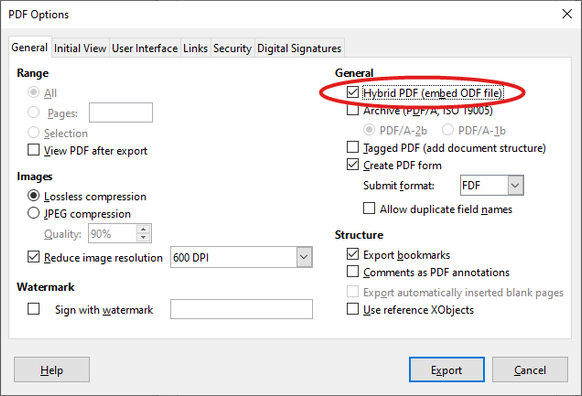
@libreoffice A couple notes. I created a .docx in LibreOffice (recipient required .docx), exported as Hybrid PDF. Opened the PDF in LIbreOffice. It correctly opened it in LibreOffice Writer! Made some changes and re-exported. Can do this multiple times, hooray!.
Note when you open a .docx Hybrid PDF and do a Save or Save As, it wants to save it as .odt. This is fine, but something to note if your recipient is expecting a .docx.
Thanks for a great feature.