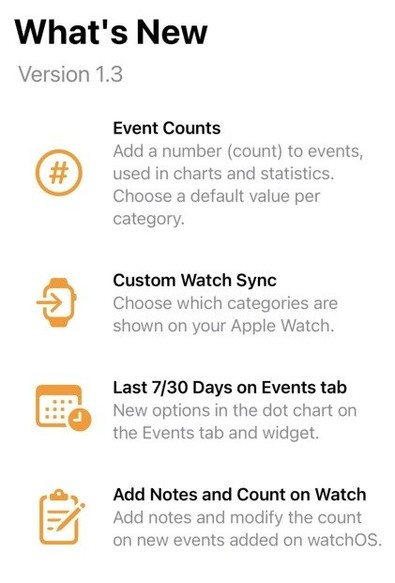
#️⃣ It’s been a hectic few months personally, but I’m almost ready to release the next @chronicling update.

It adds an optional count to events, with a default value per category, and some other improvements in charts and the watch app. I’ve had fun setting up automations using the new field and look forward to hearing what other people do with it 😊

@beccaowen @chronicling Can you please explain the optional count feature? I’m trying to wrap my head around it.
@anthonyvardiz sure, I’m still working on how to communicate it (and maybe a different name than count). Think an integer field alongside notes - you could use it for minutes, miles, litres, or whatever makes sense for the category. It’s summed for charts and stats.
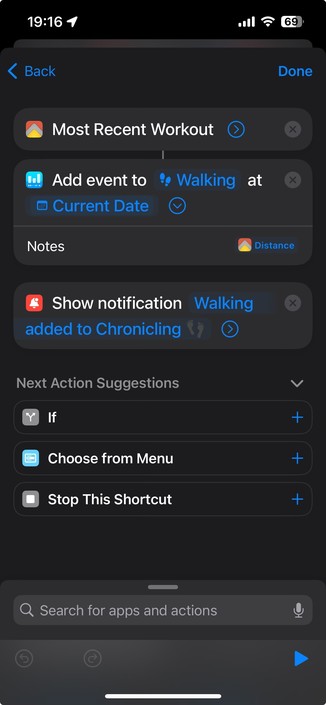
@beccaowen Interesting. Will it tie in with shortcuts at all? Would be nice to have Shortcuts automatically run an automation after a walk with the miles I walked in addition to the fact that I completed a walking workout.
@anthonyvardiz yes, it is available in the add event action. Unfortunately I don’t think you can directly access workout data natively using the end workout automation trigger, but @personalbest does have an action to fetch the most recent workout I want to play with
@beccaowen @anthonyvardiz let me know if you do and get stuck - tbh I kinda hacked that together in a weekend two years ago and have been meaning to revisit and make it more robust
@personalbest @beccaowen Gonna have to try it out on my next walk 👀