Thank you for your continued support! I’m pleased to announce the next big upgrade, Mona 6, will be globally available on the App Store starting February 26, 2024.

Mona 6 includes a redesigned picture description editor, improved post composer with post scheduling and automatic thread conversion, and also, a long list of new shortcut actions for automation and the Action button on iPhone 15 Pro. Please stay tuned. https://geo.itunes.apple.com/app/id1659154653

Mona for Mastodon‑App – App Store

Lade Mona for Mastodon von Junyu Kuang im App Store herunter. Sieh dir Screenshots, Bewertungen und Rezensionen, Benutzertipps und weitere Spiele wie Mona for…

App Store
Get ready! Mona 6 arrives in 24 hours. All new features, no extra charge if you already own Mona Pro. https://geo.itunes.apple.com/app/id1659154653
Mona for Mastodon‑App – App Store

Lade Mona for Mastodon von Junyu Kuang im App Store herunter. Sieh dir Screenshots, Bewertungen und Rezensionen, Benutzertipps und weitere Spiele wie Mona for…

App Store
Mona for Mastodon‑App – App Store

Lade Mona for Mastodon von Junyu Kuang im App Store herunter. Sieh dir Screenshots, Bewertungen und Rezensionen, Benutzertipps und weitere Spiele wie Mona for…

App Store
@MonaApp already installed across my devices.
@MonaApp Loving the app so far. thanks.
@MonaApp Will I lose my drafts if I upgrade? 😀
@MonaApp What’s new for those who don’t yet have an #iphone15pro?

@MonaApp Way to go!

I am, though, seeing a new bug with notifications. They all now send a generic message, regardless of content or type.

@mattiem If there’s no extra error message displayed on the notification, then it’s a bug of the operating system. Please restart your device. After restarting and unlocking your device once, new notifications should be displayed correctly.
@MonaApp Being able to see the image when writing the description is a huge improvement!
@MonaApp Thanks for your continuous work. Just sent a tip 💰
@MonaApp That is some cool features!! Thank you!
@MonaApp Where is the new feature to filter out users who appear on your lists? I can’t find it anywhere. It was mentioned on MacStories. Thanks.
@lioncourt Hi, you can set it on the list editor page. When opening a list, tap the upper right Actions button, then select Edit.
@MonaApp Not only customizability: for me simply the most usable mastodon client on iOS, due to these:
- best scrolling
- sync across clients
- more actions available directly on each post
@MonaApp I can’t get used to the new send button. It’s so tiny! Is it possible to get the old one back?
@mikec415 I think the size is the same. Could you send me a screenshot of what you see?
@MonaApp Here. It just seems less noticeable, especially in light mode.
@mikec415 I see. I’m planning to revert it to the old icon.
@MonaApp hi 国区下架了啊

@MonaApp Here's a fun question... The feature to split your post and send them as a thread is very interesting but how does it get handle if you, say, go 3 times over the character limit, but you write your post in such a way that hashtags are all at the end?

Especially if the first post is public without hashtags, but all subsequent posts are unlisted, with the last ones having the tags?

How does that work?

I always write hashtags at the end as this makes it way easier to read a post.

@MonaApp Thanks for the update! Any chance you could add a return key to the post editor (for the ability to make posts with multiple lines)? I don’t understand what makes the return key show up and disappear but it definitely never lets me add two lines right now.
@alannorbauer Hi, you can reveal the Return key (for inserting new lines) by first tapping the 123 key. If you want the Return to appear persistently on the keyboard, turn off Social Keyboard in the Accessibility Settings.
@MonaApp I’ve got the updated app now. Only 1 issue. If I try to share a linked article from my RSS app, nothing happens after I select Mona from the Share options. Only option is to copy the link, then switch to Mona and paste the link into a new post. It’s not a huge problem, but I thought I’d better mention it.
I have shut down my phone & restarted it, but it made no difference.
@BlindGordon This will be fixed in the next update.
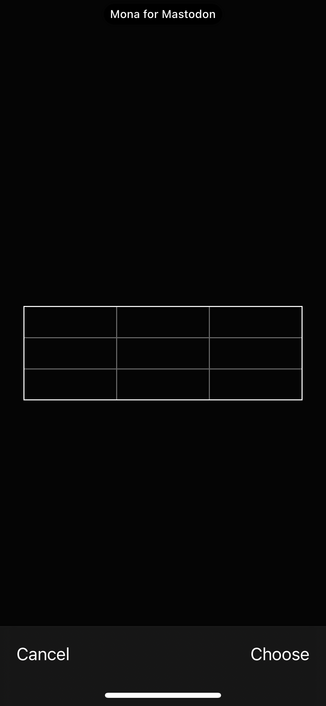
@MonaApp For some reason my banner profile got borked with the update. I don’t see anyone else with the issue so I’m wondering if I screwed something up. If I try to set my banner profile I get this. I can select a photo but then I get this screen. I can’t see the photo I selected or press choose. I’ve restarted and tried a bunch of things but can’t figure it out.
@MonaApp Can you maybe change the default sound for notifications? Status Update could replace it. The current one's just a bit long.
@kev @MonaApp You can customize the sounds if you have pro.
@MonaApp Hello, I am trying out your app now on a #sharkey #fediverse server and everything seems to be fine. But when I want to post a message I only have 160 characters available? There should be 3000. Is this due to a limitation of the free version? I am willing to pay for Mac, iPad and iPhone support :-)

Thanks for the answer ...

@MonaApp Looking forward to it.

Will we be promoted for a download, or just do it manually once it’s available?

@MonaApp Yay!
Didn't know there was a desktop version.
Totally worth it. The customizability is impressive, convenient, yet not in the way in day-to-day usage. Some other clients feature customization options more prominently than needed. Mona just has the right balance.

(Edit: Solved. Thanks!)
[One question though... I tried really hard to find it, but didn't succeed. Is there a "local timeline" option? For browsing the instance-local-feed (not the federated one).]

Thanks for the great work!

@nblr @MonaApp You can find this on the Communities tab.
@MonaApp Can’t wait to see what is new.
@MonaApp yea! This is going to be awesome! I have Mona pro and love it.
@MonaApp New Zealand gets Apple Music and Spotify releases first, but not app updates, given it to 26th.