 Happy Striker
 Jenni Leder ( ͡♥️ ͜ʖ ͡♥️)
OMG i just learned something mindblowing with SF Symbols. You can create a custom symbol and combine it with other symbols and badges 🤯🤯🤯🤯🤯
 J. Blake
@jenni wut. Thanks for sharing this!
 Brian
Brian@jenni Game changer. I don’t recall them even mentioning this in a session. Thank you for posting!
 Axel Le Pennec
@bgannin @jenni they do. Check my thread that mentions the session: https://iosdev.space/@alpennec/110614991752597899

Axel Le Pennec (@[email protected])
Attached: 1 image Learn more about symbol components from the #WWDC23 "Create animated symbols" session. It seems really powerful as we can edit the composition to move paths using offset and length. Link: https://developer.apple.com/wwdc23/10257?time=610
 TheNomadChris
@jenni wait how did you access these symbols ?!
 skry
skry
@CHRISSYABOYY there’s an SF symbols Mac app! You can search and then copy/paste the symbol into Figma when you have the SF Pro font selected

 Chris Wu 🪐
@jenni I think I vaguely remember somebody mentioning this but I had no idea it was this easy. Wow thanks for sharing.
Axel Le Pennec (@[email protected])
Attached: 1 image Learn more about symbol components from the #WWDC23 "Create animated symbols" session. It seems really powerful as we can edit the composition to move paths using offset and length. Link: https://developer.apple.com/wwdc23/10257?time=610
 gullevek ☢️ 🇯🇵
 Joshua Kaden
@jenni oh you saw my post on X?! 😉 cc @stroughtonsmith
https://x.com/alpennec/status/1760318962523336796?s=46&t=-nyFXQnEoX8AFl0_7itfUg

Axel Le Pennec (@alpennec) on X
@SebJVidal @pixelmator How to do it the easy way directly in #SFSymbols: 1. Choose an existing SF Symbol (book.fill) 2. Right click + "Duplicate as Custom Symbol" 3. In Custom Symbols, right click + "Combine Symbol with Component" 4. Select the component your want (https://t.co/mXUhNvUBpw) Voilà! 🪄
 Steve Troughton-Smith
@stroughtonsmith @jenni no worries, it was a reply to a post on X so I haven’t thought about bringing it to Mastodon.
But I already shared this same tip months ago here after WWDC23: https://iosdev.space/@alpennec/110614941214441940
And see Apple video on this topic: https://iosdev.space/@alpennec/110614991752597899

Axel Le Pennec (@[email protected])
Attached: 2 images It turns out I don't need to build my own! I discovered we can combine components directly from the SF Symbols app. I just had to duplicate the existing "house.fill" symbol as a custom symbol, then combine with the slash. Perfect! 🤩 This can be done for other shapes too like circle!
@alpennec @stroughtonsmith How was I supposed to see a reply to a post on X from you when I don't know who you are?
The way you're replying makes it seem like once you have shown something, no one else is allowed to also find out about it and share it, too.
But good for you for being quick to see a cool thing and post about it months ago?
Happy Friday
@jenni @stroughtonsmith you’re totally free to share your discoveries to others too, and thanks for doing this so more people are aware of this nice tip. The timing just felt strange and funny to me as you shared it just few hours after I posted on X.
Have a nice weekend.
@alpennec for what it’s worth, I’m using these for a project and someone in real life showed me. But maybe they saw your thing?
@alpennec @stroughtonsmith I didn't see your post on X, sorry
 Jonathan Hendry
 Gernot
@jenni Badges I knew, but how can you combine symbols with other symbols?
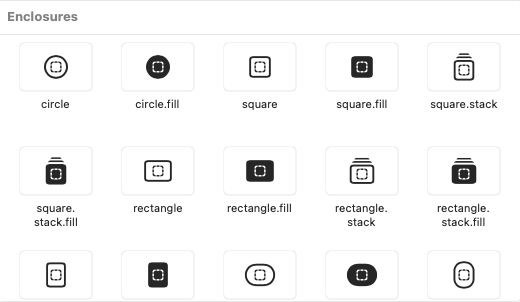
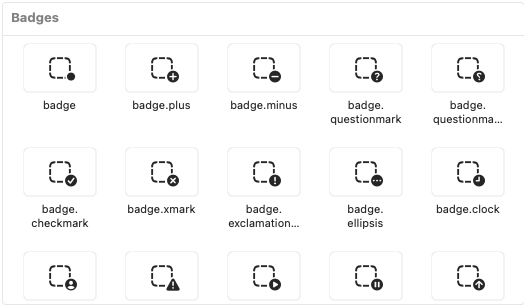
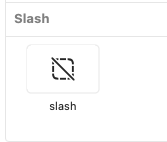
@gernot symbols was too broad. It’s just "enclosures,” “badges,” and a slash
 Cesare Forelli
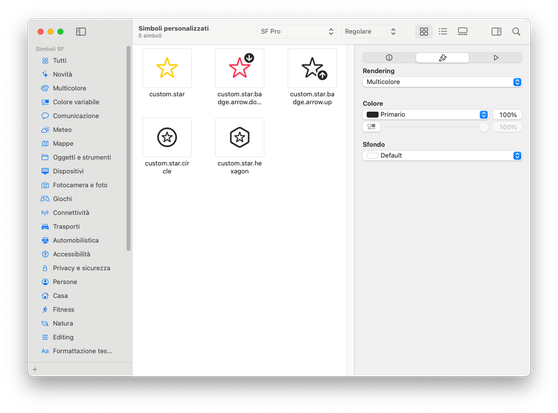
The SF Symbols tip from @jenni you probably saw in your timeline in the last couple days (https://mastodon.social/@jenni/111977430007456898) is just amazing…
 Eaton
Eaton@jenni YES! I love sf symbols so much; it’s turned into a go-to for quick presentation graphics for me, as well…
 John's Art
@jenni So nice of you to share 👏👏