"How to bypass and block infuriating cookie popups" 🙄🤦🏻‍♀️🤦🏻‍♀️

Oh the hilarious irony. Can anyone recommend an up to date Firefox addon that gets rid of these fucking popups, automatically declining all but necessary? I've looked at a few but I remember folks here recommending some that I can't now for the life if me remember what they were. Thanks!

https://kbin.social/m/privacyguides@lemmy.one/t/814332

"How to bypass and block infuriating cookie popups" 🙄🤦🏻‍♀️🤦🏻‍♀️ - privacyguides - kbin.social

Oh the hilarious irony. Can anyone recommend an up to date Firefox addon that gets rid of these fucking popups, automatically declining all but necessary? I've looked at a few but I remember folks here recommending some that I can't now for the life if me remember what they were. Thanks!

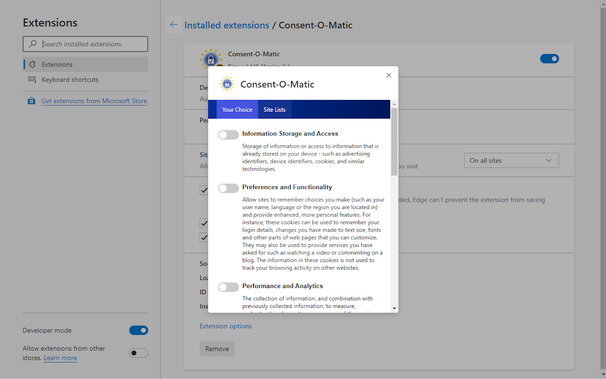
Consent-O-Matic – Get this Extension for 🦊 Firefox (en-US)

Download Consent-O-Matic for Firefox. Automatic handling of GDPR consent forms

And please, if you use consent-o-matic, report the pages it doesn't work on. It's very easy to do and results in shit getting fixed.
uBlock Origin – Get this Extension for 🦊 Firefox (en-US)

Download uBlock Origin for Firefox. Finally, an efficient wide-spectrum content blocker. Easy on CPU and memory.

Yes, but preferably go over the list of enabled filterlists in it’s settings and tick a few more boxes.

This is the best way. If the cookie popup isn’t blocked, go in ublock settings and enable the adguard annoyances lists

If it’s still not blocked do it yourself with the element picker (not zapper), takes a second

maketecheasier.com/ultimate-ublock-origin-superus…

The Ultimate Superuser's Guide to uBlock Origin

While uBlock Origin is the most powerful and versatile ad blocker available, its design is also a little obscure. Here we'll show you how to get the most out of uBlock Origin.

Make Tech Easier
Thanks, was not aware of this one 👍
This is the way. I just zap anything that bugs me if it’s not caught by the lists
🔝 I didn’t know, thanks!!!
I use one called “I don’t care about cookies”, seems to work well.

Avast bought it.

There is “I still don’t care about cookies” which is a fork of the original or use any other plugins mentioned.

Why is it that even when you refuse necessary cookies the site still seems to be 100% functional
All the “necessary” cookies are login stuff. If you never log in, it won’t affect you. And even if you do login, it simply won’t keep you logged in on subsequent visits.
You shouldnt be actually able to refuse necessary cookies as the site needs to function even if you click 'decline all' by law.
If a site does break, report it to the supervisory authority of your country.
If you are in the US.. hahahahah.
Why report if a site breaks? It’s not illegal to have a broken website, as long as it still respects your choice.
The site is not really allowed to bother you with the cookie popup either.
If you clicked whatever, the site has to make sure your choice is kept for a reasonable time.
Asking again can be seen as trying to force you to allow more cookies, just so the popup doesnt appear again.
That choice wouldnt be freely given and thus not valid as thats required by the regulation.
In case you want to share you data for them to sell, so not 100% functional
Cookies banners is only a thing because the website operators are such pigs with your data.

I use I still don’t care about cookies, which blocks the banners; and NoScript, which blocks JavaScript and other crap that would bring up the popup in the first place.

I may stop using IDCAC, however, as some other comments have shown me that I can just use an annoyances blocklist in uBO instead. The fewer extensions I have, the less fingerprintable I am, or so I’m told.

I still don't care about cookies – Get this Extension for 🦊 Firefox (en-GB)

Download I still don't care about cookies for Firefox. Community version of the popular extension "I don't care about cookies" https://github.com/OhMyGuus/I-Dont-Care-About-Cookies

Also “I still don’t care about cookies” will automatically accept cookies It can’t reject.

When it’s needed for the website to work properly, it will automatically accept the cookie policy for you (sometimes it will accept all and sometimes only necessary cookie categories, depending on what’s easier to do).

Better use uBO and if It can’t block the cookie banner for some reason, that site is not worth your time and effort !

I wasn’t aware of this. Thanks for the tip!

If you try to use a pihole? Or a DNS that block your wanted domains?

privsec.dev/posts/knowledge/badness-enumeration/

Badness Enumeration

Badness enumeration is the concept of making a list of known bad actors and attempting to block them. While it seems intuitive at first glance, badness enumeration should not be relied on for privacy or security. In many cases, it actually does the exact opposite and directly harms the user. This post will attempt to explain why badness enumeration as a concept is flawed and give some examples of its failings in practice.

Doesn’t blocking JavaScript brakes most websites nowadays?
@peregus @hellfire103 Yes and no. Yes: Some poorly programmed websites require JS. No: Nonetheless you can employ NoScript to fine-grained block JS from evil domains. No harm is done when you allow the main domain (if necessary) but block crap such as doubleclick or google-analytics as "not trustworthy" (NoScript language).

The popular ones, yes, but most of what I’m looking for would still work in Dillo, though it would look a little janky in that particular browser.

For everything else, I selectively unblock certain domains. If I trust the site, I make this persistent. If I don’t, this is temporary and Librewolf clears any cookies, settings, caches, or tokens that the site may have given me when I close the window.

Homepage - Dillo

Welcome to the Dillo Project! What is Dillo? Dillo is a multi-platform graphical web browser known for its speed and small footprint. Dillo is written in C and C++. Dillo is based on FLTK, the Fast Light Toolkit (statically-linked by default!). Dillo is free software made available under the terms of the GNU General Public License (GPLv3). Dillo strives to be friendly both to users and developers. Dillo helps web authors to comply with web standards by using the bug meter. Project objectives The democratization of internet information access. Personal security and privacy. High software efficiency. [more info] Current version Dillo follows an evolving software model where each new versionRead More →

Dillo

For me, this is what works best now:

Librewolf

  • uBlock Origin

  • CanvasBlocker

  • raindrop.io not as an extension but a pinned tab, mostly for convenience to keep my saved websites and articles in one place, if anyone knows anything better, or more useful, or open source, let me know

That’s good. I prefer using the ol’ Firefox hardened.

+ raindrop.io — not as an extension but a pinned tab, mostly for convenience to keep my saved websites and articles in one place, if anyone knows anything better, or more useful, or open source, let me know

If you’re a selfhoster, try Wallabag (open source)

Yeah, I’ve started searching for options and now I am thinking about it, there is LinkAce too…
I still don’t care about cookies (not to be confused by i don’t care about cookies, that one got sold to some company and the “still” one is a community fork from before the sale)
@Thorned_Rose On a side note on those cookies: "all but necessary". Even with 0 cookies, the website will open, nothing will explode, everything will be OK 😅