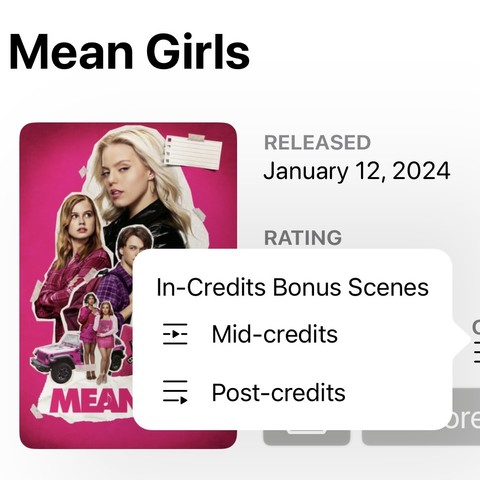
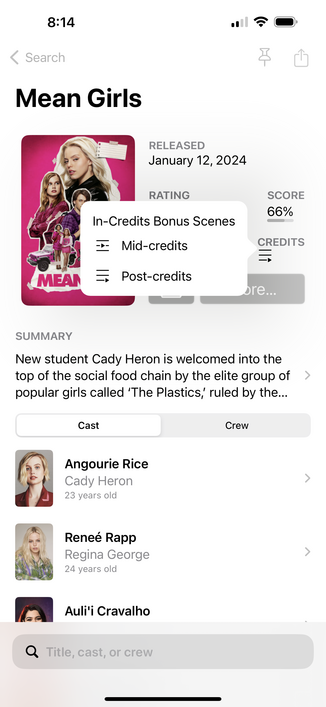
The “Credits” button in Callsheet by @caseyliss is worth the entire subscription price alone for me. No more frantic googling and scrolling through ai copy to see if I should stick around to the bitter end. https://apps.apple.com/us/app/callsheet-find-cast-crew/id1672356376
Callsheet: Find Cast & Crew App - App Store

Download Callsheet: Find Cast & Crew by Limitliss LLC on the App Store. See screenshots, ratings and reviews, user tips, and more games like Callsheet: Find…

App Store

@dancramer @caseyliss

I’m sorry…. What?

Credits?

I don’t see that pop up as shown. I’m not even sure what it is supposed to do, much less how (or why) to summon it.

Maybe it’s something that only happens in some adjunct I’m watching a movie on my iPad mode with a floating Callsheet window to the side mode. Maybe only a data field for certain actors? I don’t know.

I have absolutely no idea what you are talking about, but I’m sure it’s nice.

@dancramer @caseyliss

Okay, I see it in the Mean Girls example, but… what does it mean? Pre credits? Midcredits? Post credits? In-Credits? Bonus scenes?

@Chancerubbage @dancramer in this example, mean girls has a post-credits scene. It does not have a mid-credits scene.
@caseyliss @Chancerubbage @dancramer I’m genuinely confused here. How does that pop-up indicate that there IS a post-credits scene, but NOT a mid-credits scene? If there’s a post-credits scene, shouldn’t there be a check mark by that text or something?
@park @Chancerubbage @dancramer that’s a legend. Dismiss that popover and you’ll see only one of those icons is shown.