So this is the touch zones for the actions buttons. I’m trying to understand why they could feel small
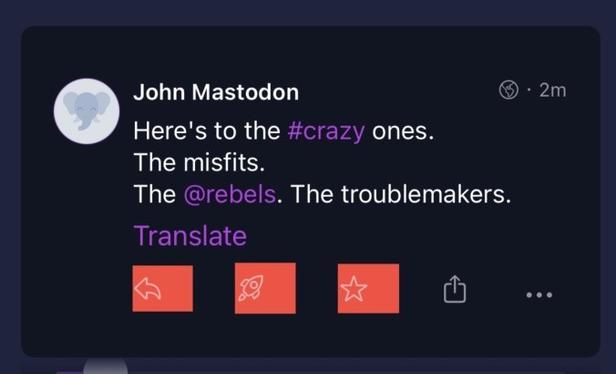
Okay so I have a few more fixes coming to this that will make the touch zone bigger.
Okay here we are!
Done! That was a live-fixing session for you. The button’s content is now in the center of its touch zone, and it’ll probably solve all of your issues!
@IceCubesApp so cool, thanks! Left-handed favouring works for me now 😊
@MissScott01 @IceCubesApp ah is that what is was? lol I am left handed as well, didn’t think of that. Lefties unite! We want scissors that work, too!
@box464 @MissScott01 @IceCubesApp Another Lefty confirming the issue - and welcoming the fix. 🤚
@box464 @IceCubesApp
I‘m not even a leftie. Holding my phone in the left hand so that my right hand is free too tap, download, cite or hold a drink or vape 😂
@IceCubesApp yup, feels like I’m missing the button far less often 👍
@IceCubesApp Seems to me that layout wise, you could even give them all the same height. Not likely to make a huge difference, but still a little bit more consistent.
@slothdude Yes but then I need to adjust the outer padding to 0 for the bottom vertical spacing and depending of where a status is shown it’s a whole other mess :/
@IceCubesApp thanks for working on this. It has been an intermittent issue for me however when it occurs it is definitely frustrating. I have noticed it seems to occur more with large images/videos at the bottom of a post. Could it be that the touch are of the image is somehow overlapping with the touch area of these controls?
@IceCubesApp please, change the AirPlay icon so near of the Close button. Better on the other side (check the Safari iOS player)

@IceCubesApp That’s definitely not what I’m experiencing. The favourites in particular is further over to the left and doesn’t extend to the right past the star symbol.

Edit : What size are they ? Shouldn’t they be centred on the symbol?
@IceCubesApp I think it’s the left hand side for boost and star being so close to the buttons. I consistently miss them
@IceCubesApp now that this is pointed out, I actually just realized I primarily miss them when using my phone left handed (where I’d be more likely to veer left of the button), and rarely when using it right handed (where the opposite is true)
@IceCubesApp not centred on the icon?
@senorganso Well you need the icon to be aligned with the leading border of the post. But I can fake it. Looking into that actually.
@IceCubesApp the icon, yes. But not the touch zone.
@senorganso Good luck doing that with a custom button style in SwiftUI 🤡
@IceCubesApp well not with that attitude 😂
@IceCubesApp Padding inside the button, negative leading padding (or offset) to the whole button?
@slothdude Yeah I think this is what I’ll do, add horizontal padding to the inner button and offset it.
@IceCubesApp Worst part is a miss takes you to the profile.
@IceCubesApp Because the touch zones should be centered on the icon. I don't understand why they could be on the right. That's why.
@IceCubesApp clicking boost about 50% of the time just opens the post. Maybe extend the zone padding leftwards?