
McGill: Microsoft says server farms are destroying the planet, so we're limiting the institutional cloud disk space we're giving you to 20 GB only

CIHR: You're still required to keep all your original data sets for all your research until 5 years after the end of the grant though

Me: If you and Microsoft want to actually do something about the planet, maybe pull the plug on OpenAI instead

McGill: If you have questions about the new policy read the email again good luck bye!
This isn't a joke

Microsoft instituted a new policy limiting academic accounts to 20 GB only

FOR ENVIRONMENTAL REASONS

McGill has no internal, local research data storage service because they went all-in on Microsoft services

And yes, CIHR requires that researchers hold on to original research data for 5 years after a grant ends

Meanwhile Microsoft is boiling the fucking oceans with its AI bullshit

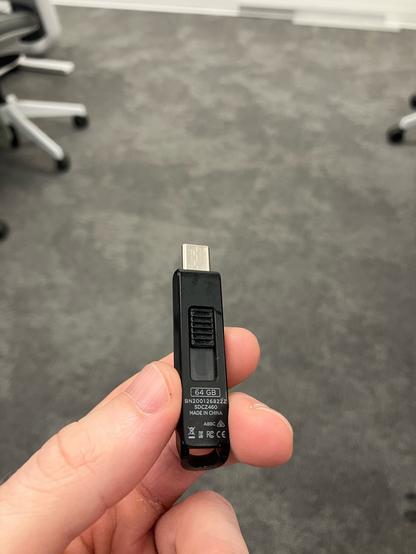
For reference

McGill University provides less than 1/3 of this amount of data storage now thanks to outsourcing all its IT stuff to Microsoft and having no backup plan for when they inevitably fucked us over

Important: OneDrive and McGill Outlook email storage space reduction.

Students! Please read carefully since the information contained in this announcement will affect your ability to store files in your OneDrive account and may affect your ability to send emails from Outlook after May 31st 2024. Microsoft is introducing changes to our service offering across our Microsoft 365 Education suite that require us to place limits on storage. As of May 31st, 2024, students will have 20GB (Gigabytes) of OneDrive storage space, in addition to 20GB of Outlook email storage. Microsoft’s storage reduction is driven by security risks associated with large amounts of potentially forgotten confidential or sensitive information and data. Consideration must also be given for the financial and environmental cost of maintaining the space allocated for unused files in student's accounts. Sustainability is an important consideration that drove Microsoft to make that decision. Billions of unused files, and hundreds of Petabytes, stored on OneDrive cloud servers all around the world, have a very real, negative impact on our carbon footprint. They require a lot of electrical energy for the billions of files to be kept available 24/7 as well as ensuring their security. This electrical energy generates more and more excess heat, and we need to curb this dangerous trend. The MIT published an article about the impact and power usage of cloud computing and storage. You can read it here, but here is a quote from the article: “The Cloud now has a greater carbon footprint than the airline industry. A single data center can consume the equivalent electricity of 50,000 homes.”  For these reasons, Microsoft has decided to take drastic steps to reduce the carbon footprint of their data centers by making sure the data stored within them is not simply sitting there. And this is why we are asking you to reduce the data stored in your OneDrive and in your Outlook email. For OneDrive: During the Winter 2024 semester, email reminders will be sent to students who store more than 20GB worth of files in their OneDrive asking them to reduce their storage to the allotted limit before May 31st. If your current storage exceeds 20GB, empty the recycle bin, remove shared items and application installers. Move older, unused and large files such as videos, PowerPoint presentations or picture libraries, off your OneDrive to another secure, non-cloud-based location right away so you are ready for May 31st storage space reduction. Please be advised that if your OneDrive exceeds 20GB after May 31st, you won’t be able to store new files on it until you have reduced its size appropriately. (Just like when your voicemail is full). Please consult this article if you want to check your current OneDrive storage. For Outlook email: In the case of Outlook, if your storage exceeds 20Gb after May 31st, you will not be able to send or receive emails until you have reduced your storage below the limit. Please consult this article if you wish to know your current Outlook storage status. If certain emails contain valuable but storage hungry attachments, we suggest you use the “Save as” drop-down option to download it. Once it is safely saved locally, you can remove it using the Remove option from the same menu. (Please note: these options are only available on Outlook for PC, not on the online or Mac versions. If you only have access to these platforms, download the attachments then delete the email.) If you have questions, please visit the IT portal. where multiple Knowledge Base articles on the subject will provide answers to most of your questions (simply search for OneDrive to find them). If you need more than 20GB, please investigate alternative storage solutions. For special storage needs, please contact the Service Desk. Examples of appropriate extended storage space requests: Collected research data or video content related to research project or class projects exceeding allotted storage. Storage requirements will be evaluated on an individual basis and supplemental storage can be refused. If you store data on a non-McGill-approved storage platform, please review McGill University’s data storage guidelines and policies.

Polling @ McGill

And the implications for research integrity are massive

We are REQUIRED by CIHR to keep original data sets for research for at least 5 years

This is so that if re-analysis is required, or if something needs to be audited, we can go back

And we can't just have people putting this data on personal hard drives or Google Drive or anything because some research data includes private, personally-identifiable information

So it has to be on the McGill-approved data storage

@researchfairy McGill officially saying that if you have produced 20 Go of data, you are not required to work until some of it expires.
@researchfairy LOL, I do get the sentiment. This is why I run free software, and encrypt my data with age. But I'm a “privileged” fuck with a terrible resume; this knowledge is accessible to humanities folks, but there's no institutional interest in sharing it.

Like, this is bullshit of course, but the entirely opposite route, 10c/GB encrypted backups on hardware you own, by using free software, is relatively easy to implement and just works, which, of course, raises the question of academic funding and our dependence on Microsoft's academic corruption
@researchfairy I still can’t get my mind on how Microsoft, who’s been spying on individuals for decades (and sucks tons of emails via Outlook 365), gets to be a trusted solution when it comes to research, education, etc…
Also, 20GB of storage for years of research (or any other field) sounds ridiculous. Good luck with this nonsense 😓
@researchfairy tbh even if it isn't required to keep the original data for 5 years, I feel in a huge number of cases across all disciplines, it probably makes sense to keep lots of original data for much longer than 5 years anyway (if we think in terms of "good practice").
@researchfairy We have also gone all in on Microsoft Cloud storage at RISE, although I think we are on an Enterprise solution rather than an educational one and our stuff is in group folders rather than linked to our individual OneDrives, but still it leaves us vulnerable to the whims of MS, and has had all sorts of knock on effects in our daily work (like handling data from large models having to be localy synced and so suddenly becoming impractical on our laptops making things much harder).
@researchfairy Nice example of why an instituut should never depend on some #cloud #SaaS company without a proper exit strategy. Especially when dealing with some #BigTech company that has #enshittification as primary business model.
#ExitStrategy
@researchfairy Ironically everyone’s storage at UCL has been increased to 5 Tb per person. We are completely tied in to Microsoft…

@researchfairy

They should not apply undergraduate storage policy to postgraduate researchers or staff. Your supervisor or union should be able to help arrange a meeting with the IT department.

@celesteh Grad students and postdocs are considered students at McGill

My conversation with IT suggests that the policy will apply to us as well, but we might be able to appeal

Even if it can be resolved, it has created a lot of work for me because the research in my lab is all led by students or "students"

@researchfairy

This is why I suggest getting faculty or a union involved. The default for you (/especially/ postdocs, ffs) should be to be treated as researchers!

@researchfairy hmm, you can't use Google Drive but shall use Microsoft stuff to store personal data? Wouldn't it be better to not store data at all on such systems?