 Vincent Arel-Bundock
🚨 I'm excited to release the 𝚝𝚒𝚗𝚢𝚝𝚊𝚋𝚕𝚎 📦 for #RStats ! Convert R dataframes to beautiful tables in HTML, LaTeX, PDF, Quarto, Markdown, etc. Easy to learn; minimalist interface; concise syntax; ultra-customizable tables; and zero dependency. 🧵 https://vincentarelbundock.github.io/tinytable/
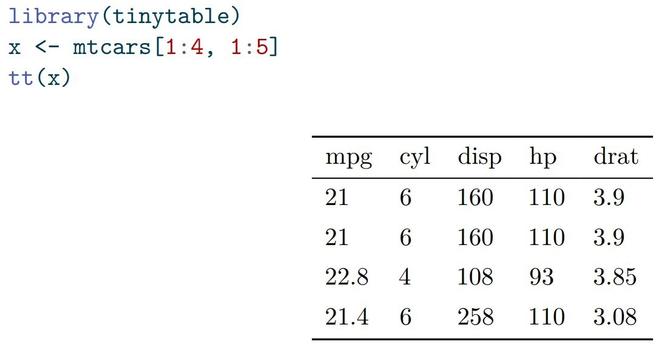
Drawing simple---and beautiful---tables couldn't be easier. All you need to do is load the library and call `tt()`. If you are working in a Quarto or Rmarkdown document, the correct output format will be detected. Otherwise, you can pick the destination of your choice.
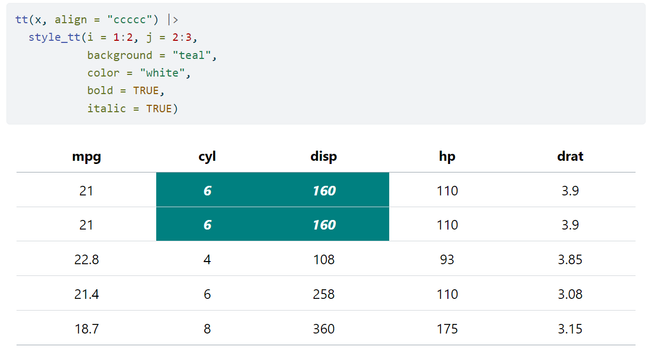
To customize cells, rows, or columns, use the `style_tt()` function. The i argument identifies rows, and j columns.
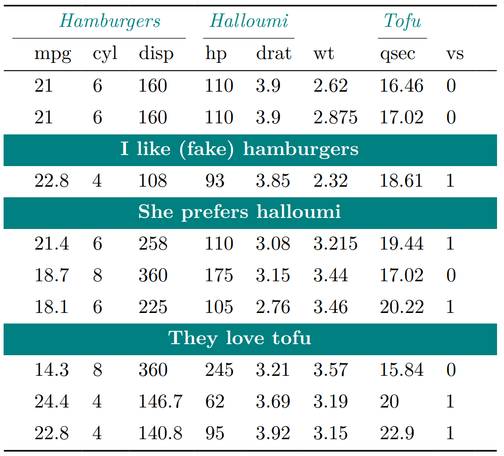
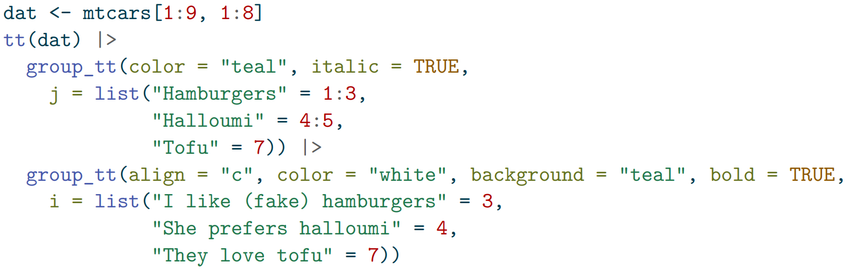
The `group_tt()` function creates spanning labels to group rows and columns. With just a few lines of code, we can create complex LaTeX/PDF tables like this one:
`tinytable` gives you convenient access to the Bootstrap framework to customize the appearance of your tables. You can pass choose different bootstrap themes, style specific cells or rows with CSS, or define whole new CSS rules:
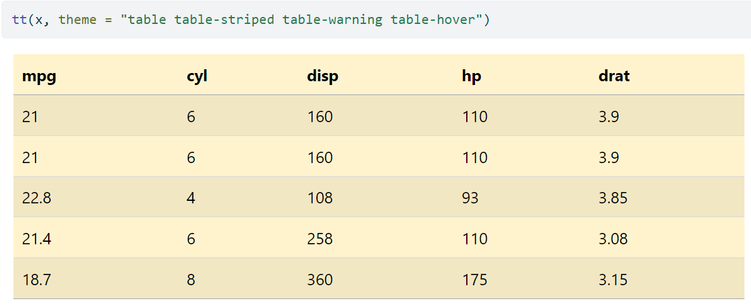
For LaTeX tables, tinytable builds on the amazing tabularray package, which allows a bunch of ridiculous things:
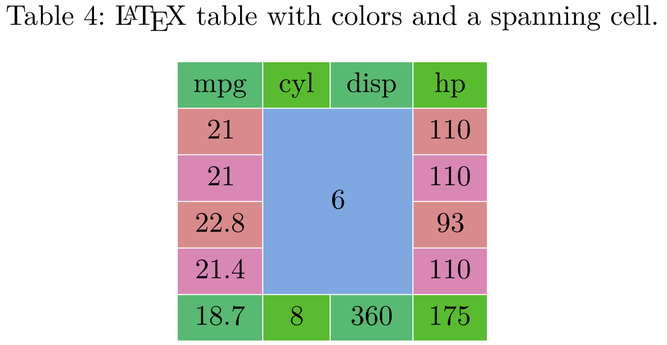
I promise: all of this is very easy to use! Check out the detailed tutorial on the package website. And leave a note or a bug report while you're at it ;) https://vincentarelbundock.github.io/tinytable/
 Jonathan Hanson
@vincentab This looks great, Vincent!
 Adrian Gadient-Brügger
@vincentab Wow, this looks very promising!
@adriangadientbruegger Glad to hear! Don't hesitate to ping me if you try it and run into problems, or if you have feature requests.
 erdirstats
@vincentab Looks very nice!
@erdirstats glad to hear that! Let me know if you try it and run into issues or have feature requests.
 Athamanatha
@vincentab You missed a trick here: it could have been one of those plastic 3 legged pizza box anti-collapse tables
@athamanatha OMG THIS IS SO GOOD
 Ergative Absolutive
@vincentab Nice! I love the ability to use groups in rows and columns. Can it handle model summary outputs?
@ergative We can think of two tasks: Extracting info from models + Drawing a table (the lines and colors). For model summaries, I recommend you use my other package: https://modelsummary.com Currently, `modelsummary` supports 100+ model types, and creates tables using kableExtra, gt, flextable, etc. Eventually, I want `tinytable` to be the main drawing platform for `modelsummary`. So they should work well together.
@vincentab aaaaaaah you thought of everything!
 Joe Roe
@vincentab I really like the syntax of {gt}, but keep having problems with its very heavy dependencies. This sounds like exactly what I need, will definitely be giving it a go!
@joeroe Glad to hear it! Let me know if you try it. I'm very interested in hearing what people think so I know in which direction to take this. I plan to work and maintain this for the long run, so feedback will be essential.
 Gianluca Baio 🛵
@vincentab looks pretty cool!
 Jim Gardner
@vincentab Wow, so cool! I’m very interested to try this when I get some time.
I have a question that picks up on the spirit of this being a 0-dep package. It’s come up a few times that as much as we all love the capabilities of {gt}, the tables add quite a bit to document filesizes, in particular static gt tables in HTML docs. Is this something you have considered or attempted to benchmark at all?
@jimgar Yeah, I have run against this issue myself. It's annoying, but I don't think it has much to do with the number of R dependencies per se. If you bundle a bunch of images/plots/code-blocks/etc in a single HTML file, it's going to take space, unfortunately. And I don't think the gt devs (or me) can do much about that.
@vincentab Sorry, I seem to have confused things.
I know it’s not about the dependencies taking up space in the generated file. I only mentioned deps because of the spirit of reducing bloat.
Regarding file size I believe there are certain things that can be done - or at least I’ve got vague memories of Rich Iannone saying so. And a few people here have switched to other packages in order to reduce the file size of their HTML docs, most recently see thread https://fosstodon.org/@jackdavison/111589346867827080
Jack Davison (@[email protected])
Does anyone have any advice for lowering the file size on self-contained #quarto HTML reports? They can end up pretty huge, even when zipped, which makes sending them to clients tricky. Not using embed-resources isn't ideal as people will inevitably leave half of the resources behind when they send the report on further. Just wondering if there's any collection of tips & tricks out there to minimise the size of your final output?
@jimgar Oh thanks, that's very interesting! I opened an issue and will take time to investigate this when the package is a bit more mature and I have a better sense of where the bloat might come from.
 Peder Engelstad
@vincentab wow this looks incredible. Can't wait to give it a spin!
@pederengelstad Let me know if you do! Always eager to get bug reports and feature requests.
 Nabeel Siddiqui
@vincentab Great package. Thank you for creating this.