 Eler
Eler Miru
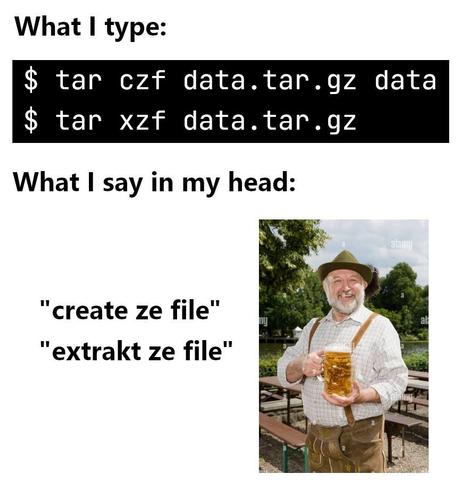
Mirutar -xzvf. which stands for eXtract Ze Vucking File
 CrankyOldBugger
@miru good mnemonic. I might use it.
 asnev
asnev@miru this is legit a good mnemonic wtf (thank you)
 Riley Catelynn "aviumcaravan" Ambers 🐇
@miru what if i do xvzpf?
 Talen Lee
@miru oh it's dutch?
 Steven D. Brewer 🏳️⚧️
@miru Why do people always use -v? Do you do ssh -v? Or use "verbose" mode on *anything* else? 🙂
 Cysio
Cysio 
@stevendbrewer @miru the list of files scrolling looks nice
 Tuchowski
 Jan B.
@adipoeserPursch @me @stevendbrewer @miru This way you can pipe it through grep and filter for file names you have been looking for because this is not the first nor will it be the last archive you are extracting on your never ending search for that one f***ing file from, like, 10 years ago. 😁 (And yes, there are more efficient but less entertaining ways.) 😂
@stevendbrewer It's nice when running interactively, to keep tabs on what it's doing.
 Jernej Simončič �
@stevendbrewer @miru With tar I usually use either two v's, or none, almost never just one.
 Lohikäärme 32
Yes.
Yes I do.
Why wouldn't a rational person do that? (yes, I'm questioning your rationale.)
- I also feel that people who try to cover up the boot sequence - directing it to some form of the void - are potentially causing self harm.I have NO problems with directing it to a file - a temporary file, even - and putting something interesting on the screen. I also have no problems with trying to reduce the time it takes to start things (my machines get to a working prompt from boot faster than I could have any form of interesting animation, koska "I do not use systemd, the slow thing people say is fast, which hides things through failed overengineering")
But, yes. Yes I do. And I question why someone would NOT do that.
I also FULLY accept there are VALID reasons not to, and actually, would like to hear them (:
Because BOTH cases are SENSIBLE in the RIGHT situation. And a mixture is SANE.
@mjd @miru Whoa, whoa, whoa, dude. I was makin' a joke.
But, I will point out the "unix way" is to have the normal output of an operation be nothing. When you move or copy or uncompress a file, you just get a prompt back. It's "verbose" mode for a reason: that's abnormal.
Maybe you do do "ssh -v -v -v" but I'll bet you don't (Try it!) But you can do unix however you like. I just think it's funny that people always use -v with tar and with none of the other utilities that accept it.
I rarely use 3 verbose switches with ssh. Occasionally with other items... tcpdump normally 2, for example. Having multiple levels of verbosity is something I find good (:
 egyp7
egyp7@mjd @stevendbrewer I often use two or three -v with ssh for long running proxy process like
`ssh -nNTvv -D 1080`. Watching the scroll is useful to see when a client starts or stops sending traffic.
`ssh -nNTvv -D 1080`. Watching the scroll is useful to see when a client starts or stops sending traffic.
@stevendbrewer @mjd I feel like it's a similar psychological situation there as with tar. Verbosity shows you if you've made a mistake. Tar and rsync are both very error prone commands.
@stevendbrewer @[email protected]
Yep, use that one constantly.
Because when I don't, I can't tell if the large files are moving. And I have a LOT of large files I move.
- there are several other ways I determine this, but -v is the quick one.
- It would be nice if the "amount left" was visible, but I understand why that's difficult with the way it works (:
I suppose it's really a matter of "how much feedback do you need" and I am, almost without exception, "all the feedback" whereas you are "none of the feedback." Which works well for both of us, I imagine (:
 Tony Yarusso
@stevendbrewer @miru Look, if we’re not making the pretty lights dance, then what are we even doing here?
 Gruik
Gruik gnarf
gnarfI have trust issues. If the command doesn't seem to work right away I'll add three -v to that bad boy like a pastor doing the sign of the cross to drive out a demon.
And I used it on ssh to debug configs just last week :D
 Hyperlink Your Heart
@stevendbrewer @miru Only when something is wrong, usually 😅
 Bèr Kessels 🐝 🚐 🏄 🌱
@miru did you know that the T in tar stands for T-800, the modelname of famous robots with a thick Austrian accent?
 mbd
mbd@[email protected] I prefer to use tar -pxzvf, which stands for Please eXtract Ze Vucking Files.
 Marcin Juszkiewicz 🙃
@miru If it is GNU tar then "-z" is not required for several years now.
 Florian Schroiff
@hrw it’s a solid joke tho… no need to explain.
 Mg. Gamer
@[email protected] hate how if u fuck up the order the command implodes your computer
 Andreas S.
 Ludovic :Firefox: :FreeBSD:
@miru you Can ommit the z
 Andres Jalinton
 Benoît B.
@miru czf: create ze file
 MOVED TO @
@miru
If it's a bzip2 archive, eXtract Je Vucking File
If it's an xz archive, eXtract JE Vucking File
If it's a bzip2 archive, eXtract Je Vucking File
If it's an xz archive, eXtract JE Vucking File
 ezra
ezra 
@miru from now on whenever i use the tar command i will imagine a vampire unpacking a box with all the files and folders
 fops Now On Merping Synth Download
@miru this is actually how i remember this lmao
saw it in a reddit comment once or sth and remember it ever since
eXtract Ze File
Compress Ze File
v for verbose as always
saw it in a reddit comment once or sth and remember it ever since
eXtract Ze File
Compress Ze File
v for verbose as always
 Jalil
Jalil@miru `tar pfx file.tar` tar, please fucking extract
`tar wtf file.tar` tar what the fuck (is in this file)
Thanks @fasterthanlime
 amos
amos Khleedril
@miru ls -lrt. List, you leery retarded turd.
 Andy Herd
@miru please enjoy this timeless classic (which I have to look at every. Single. Time) https://howthefuckdoitar.com
 Carl
Carl@miru Newer systems allow for `tar axvf` which is Always eXtract Vucking File