 flackr
Just finished prototyping a set of CSS feature proposals that aim to enable authors to create responsive carousel experiences with pure CSS. Try it out at https://flackr.github.io/web-demos/carousel/
This is still very much a work in progress, and the features will continue to evolve as we work through the details and consider alternatives. Feedback is welcome!
 aMe
aMe@tyrrha Thanks! I haven't made an archive view yet but you can play previous days by putting ?day= in the URL, e.g. to play the first one https://crosswordle.serializer.ca/?day=0
Cool idea!
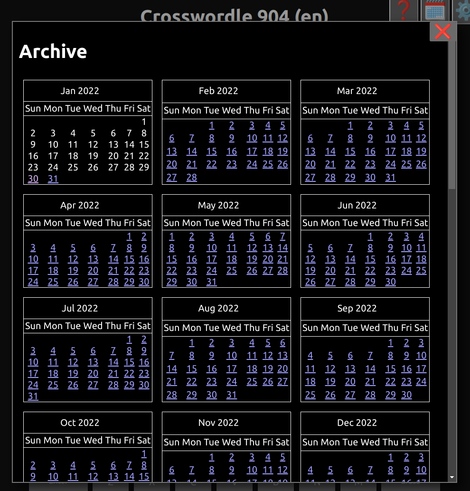
@tyrrha Done, there's now an archive view and it'll track your progress through the historical puzzles now.
 Roma Komarov
@flackr (but yep, I see that the explainer itself is not that new, just didn't see it before)
The prototype looks good! Seems to recalc the fragments too often when resizing, but understandable for the prototype, haha.
What I am happy to see: any work on fragmentation. Could that mean that multi-column block element breaking is a tiny bit closer? (I know it is outside this particular explainer and prototype, but whenever I see fragments, I think of multicol and how it needs more love).
@kizu Heh, yes it is still very early. At this point I'm mostly hoping to check how well the overall idea seems - rather than any specifics.
@flackr I'll need to spend more time thinking about all of this, but one quick thought:
I don't like the idea of having the interactive elements created as pseudo-elements, or a need to manually place elements and then somehow associate them with the fragments etc.
But what if (wild idea incoming)… an ability to declare a `<template>` which would be used for every fragment? Maybe even with some built-in slot content that could be used, like for the markers, “page count” etc.
@flackr Like, having some way to merge declarative shadow DOM, fragment creation from CSS & custom interactivity from an element… I can see how things like that could be potentially done in a way that could also be adapted to other use cases.
I immediately imagined a way to provide a `<template>` to a `<details>`, as a way to override its built-in layout, for example.
But an ability to map automatically created fragments to templates… would require some containment probably, but so alluring!
@kizu To make sure I understand, you're suggesting instead of just having a :fragment pseudo to style, each fragment would be an instantiation of your template with the content in some slot?
This is an interesting idea, my main concern would if this DOM needs to be reflected to the developer?
@flackr Yep, I think you understood correctly. Can you elaborate on the “reflected to the developer” concern? Is it “providing access to it”, or something else? I can see how if it is created “automatically” based on the layout and some CSS, it might be either something read-only, or private maybe?
Disclaimer: I did not work a lot with web components and the JS part of DOM a lot, so might be wrong in some of my assumptions about how things might work and what is viable or not :)
@kizu Yes exactly. The original DOM should still be able to be modified (e.g. nodes inserted / replaced) and everything needs to update automagically, but the instantiated templates probably need to be private or at the very least read-only. One of the nice things about the pseudoclass strategy is that it can still be exposed / updated via JS as the original DOM.
 Mia (web luddite)
@mia @kizu I've created https://github.com/flackr/carousel/ as a place for these specific feature explainers and where alternatives can be discussed in issues.

 Ryan Townsend (old account)
 Alexander Harding
@flackr Nice work! What happens when you use touchpad to swipe when mouse is hovering over one of the forward/back buttons? That's one UX issue I've found with many carousels (esp. if the website uses oversized buttons)
@alex Thanks! Would you expect it to still scroll normally?
@flackr Yeah. I typically work around this by (ab)using `position: sticky` to place the buttons within the scroll container.
It would be cool if there was a `pointer-events: click` or something so that scroll gestures fall through to the underlying view!
 Johannes Odland
@flackr Nice 🤩. Would love to see pure css carousels replace JS implementations :)
One wish, since it's almost Christmas:
Some carousels add space around the content so that every "snap-point" can be reached.
One example is the Codepen carousel. There is space on the left and the right side so that all codepens can be scrolled to the center. (Not scroll-snap, but still)
Would it be possible to extend the scrollable overflow, so that all snap-points are reachable?

[css-overflow][css-scroll-snap] Introduce mechanism to extend scrollable overflow area to make snap points reachable · Issue #7885 · w3c/csswg-drafts
Problem It is possible to define unreachable snap points. The used snap position will then be the position resulting from scrolling as much as possible towards the snap position. But, in many compo...
 devolute
@flackr I spent a chunk of time yesterday adding these things as JS-enhancements to an otherwise pure-CSS carousel. Feels so close to being really lovely.
If this happens like you say, then there is a special place in heaven reserved for you. Unless it results in more use of carousels, in which case… I wouldn't like to say :-)
If this happens like you say, then there is a special place in heaven reserved for you. Unless it results in more use of carousels, in which case… I wouldn't like to say :-)
 Thomas Steiner
@flackr Tiny bug on Android Chrome: the dot indicator for item 8 stays stuck at position 7.