
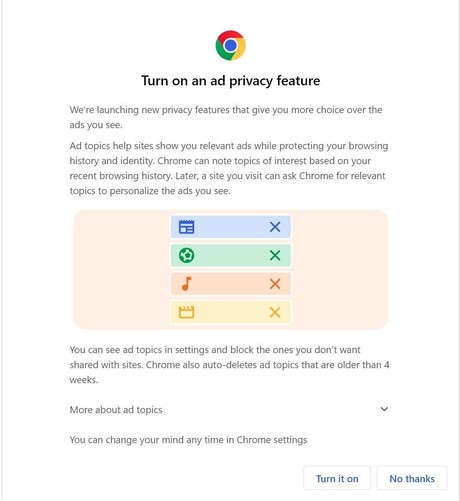
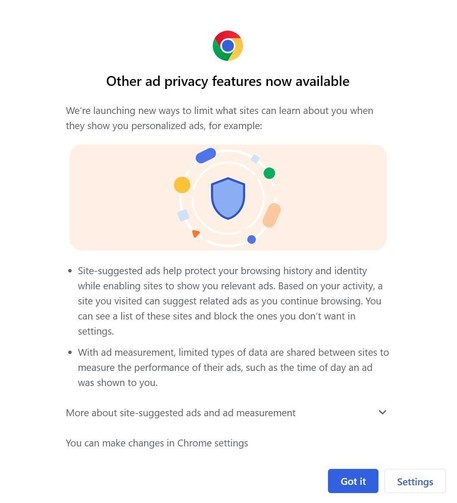
A new low, even for #Google. Giving Google permission to share information about you with third-party websites is being falsely advertised as an "ad privacy feature". This is privacy washing at its most extreme. But it gets even worse.

There is a dark pattern on the second screenshot. It isn't just informing you about the fake privacy features. Clicking on "Got it" actually turns on these features that allow Google to use your recent browsing history for ads on third-party websites:
@protonmail I don't understand how choice of ads you see is a selling point.
@Noptisun @protonmail
There’s a lie being told in marketing circles that people want personalized ads. They don’t want personalized ads. They don’t want ads. A small few people think that if they have no choice but to see ads that they should be relevant to them. But they falsely assume they are required to see ads. They aren’t.

@jrod3737 @Noptisun @protonmail

This 💯 !!! This new action by Google is a very good reason to #DumpGoogle.

Did it yesterday, and very happy.

Check out this short thread >>> https://mastodon.online/@mastodonmigration/111158313968879384

Here is the new Google surveillance limited system:

- Firefox (change search to DuckDuckGo)
- Bitwarden
- ProtonMail
- sync.com
- LibreOffice (Desktop)
- Collabora Office (Android)
- ProtonCalendar
- ProtonVPN

People also speak highly of Nextcloud...

#DataPrivacy #DataSecurity #Proton #Google

Mastodon Migration (@[email protected])

So, planning to phase out Google and looking for recommendations. Data security and data privacy are key concerns. Current thinking is: - Firefox - ProtonMail - sync.com - LibreOffice Thoughts? [Edit: Got it set up today, and absolutely loving it so far. See below. Thank you for all the suggestions!] #DataPrivacy #DataSecurity #Google #DumpGoogle

Mastodon
Syncthing

@mathew @mastodonmigration oh, please be very careful with syncthing. Make backups on both sides of the sync folder pair before setting up the sync or you might easily loose data. It works very well and is snappy, but you can just as snappily delete many files at once, if you're not careful during setup, not understanding how it works.

Example: if you want to sync some file directory to an empty directory another device, be sure to start on the device with the files. Don't start from the empty directory.
Also, don't sync two directories with each containig different files. Only one set of the files will be retained and all the other files will be deleted.
Always start from the place containig files and always sync to an initially empty directory. You can add files on either side after sync is set up, the initial sync is completed, and the system is idle.