

Hello interactive widgets on macOS Sonoma!

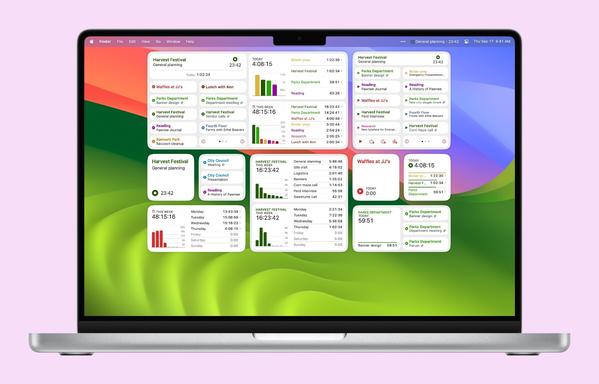
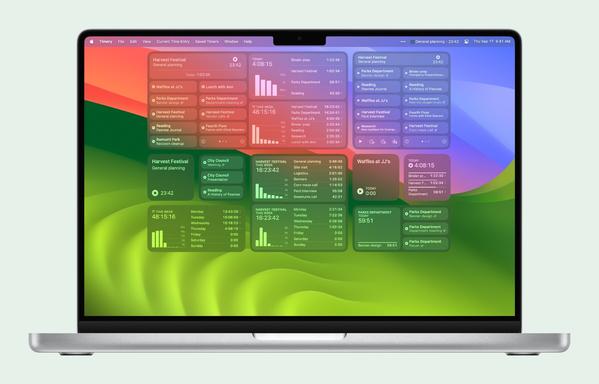
Timery 1.6.2 brings Widgetpalooza to the Mac now too with interactive widgets, two new widgets, new widget sizes, and several new widget configuration options.

Interactive widgets:
• Start & stop time entries
• Start time entries minutes ago and at the last stop time
• Page through more timers than can normally fit
• Show time-tracked details
• Switch report time periods
—all without having to open the app
https://apps.apple.com/us/app/id1425368544

Also new: Saved-timer toggle buttons!

In the app and widgets, timer buttons now both start *and* stop timers. When the timer is running, pressing the button again will stop the current time entry.

In the app, context menus and swipe actions for buttons will show actions to stop the timer and stop it minutes ago. And in widgets, if start controls are enabled, the timer can be stopped minutes ago as well.

Check out the release notes for more details.

Thank you for using Timery and being part of the Timery Club. I really appreciate your support!

Happy time tracking!

https://apps.apple.com/us/app/id1425368544

@timery Hi, love the app. A small suggestion for this feature: invert the colours of a running timer button and show the current entry in its button (Harvest festival button would be green with white text). This would make it easier to see at a glance which timer is running esp. in widgets that don't show the current entry.
@Mattahan Thanks for the suggestion! I’ll add this to the list of things to look into. I did release an update today that adds new background appearance options for widgets to use the current project color in the background. Not exactly what you’re looking for but along the same lines to have a visual indicator of what the current timer is: https://indieapps.space/@timery/111568744230052409
Timery (@[email protected])

Attached: 3 images Home Screen and desktop widgets have new configuration options for the background appearance—project color and project color gradient—to set the background to the current or filtered project color (like watchOS 10 Smart Stack widgets). Check out the video to see them in action. There’s also a new Live Activities option to set the Lock Screen background to match the system, always dark or black, project color, and more.

Indie Apps