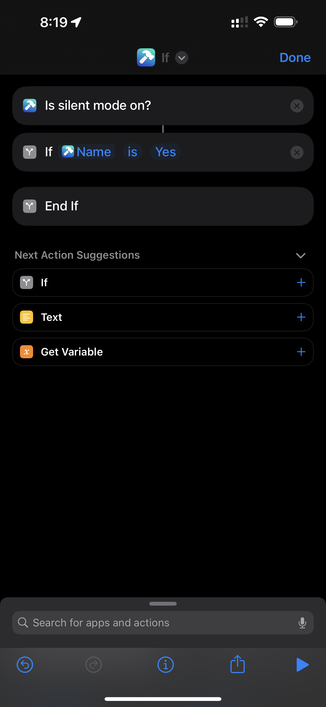
Created a “Super Mute” Shortcut for the Action Button, with the help of @ToolboxProApp!

When ran, it gets the current mute state, and then toggles mute + device media volume. Download it here: https://www.icloud.com/shortcuts/b8c998c5708f40fbbc2944e478f7650a


Shortcuts

@stephenrobles Nice, but can’t shortcuts get the silence status natively?
@magdogg @stephenrobles No, it can’t, but it should! The #ShortcutsApp is missing *so* many obvious actions that we depend on 3rd party tools like @toolboxpro, @sindresorhus’s #ActionsForShortcuts app, or @GizmoPack to do the simplest #shortcuts 😓
@stephenrobles Action Button really seams to spark the creativity in people. Love it 😍
@stephenrobles FYI, if you want to pass the words “Yes” or “No” to an IF statement when it’s expecting a number without using a Text action, have the IF statement connect directly with the Is silent mode on action, tap the variable in the IF statement and change it to Name. Now it’ll pass the word vs the number.
@iBanks amazing. Thank you!
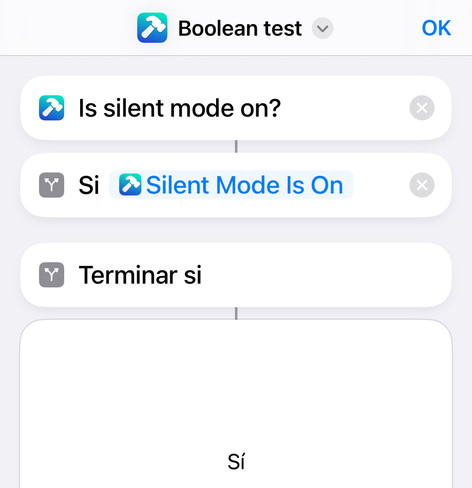
@stephenrobles @iBanks You can also change its type to “Boolean” and your #shortcut will work in non-English devices 😎