
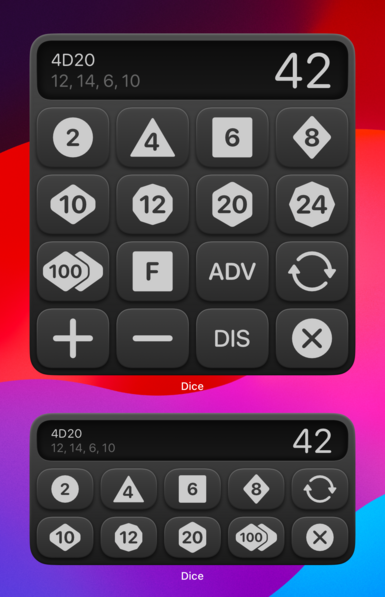
Dice by PCalc 2.7 is out now with full support for iOS 17 and macOS 14, complete with fully interactive standalone dice rolling widgets!

iOS:
https://pcalc.com/store/dice

Mac:
https://pcalc.com/store/dicemac

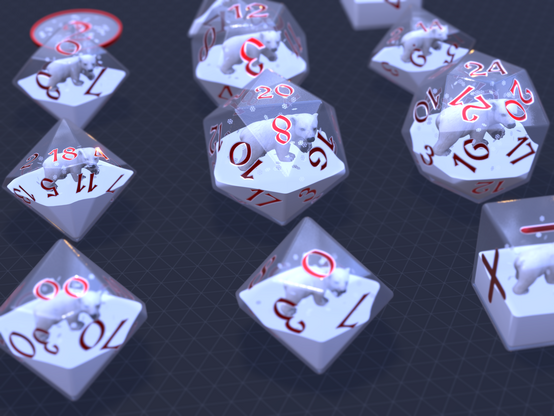
It also comes with some adorable new baby polar bear dice. The bears definitely do not get dizzy when you roll them. They love it!
‎Dice by PCalc

‎Dice by PCalc, is a physics-based simulation of polyhedral dice for use in tabletop role-playing games with dungeons and/or dragons. Featuring near-photorealistic 3D graphics, it comes with a variety of gorgeous dice sets. Throw multiple dice with advantage or disadvantage, and any given modifier,…
App Store
@jamesthomson I waited for this since Widgets started. Now I only need iOS 17 ... My the dice roll more!
@jamesthomson - if there is ever a way to make a fidget spinner for the Vision Pro, Dice by PCalc has to be there first… like toss dice and they just come back, or “roll dice” just right and you get haptic feedback on your wrist, Darts by PCalc, PaperFootball (ask Marco) by PCalc, Toss Sheep by PCalc, PaperShredder by PCalc…
@continuousorbit I could not confirm nor deny that I've been playing with the Vision Pro SDK :)
@jamesthomson I wasn't worried about the bears until you mentioned it! 🐻‍❄️❕
@aj My "I'm not making polar bears dizzy” t-shirt has people asking a lot of questions already answered by my shirt.

@jamesthomson Maybe I’m a complete dope, but recently I needed to roll a bunch of D100 and see the individual results, but I could only see the combined total. Did I miss an obvious setting?

(Also—sorry I didn’t lead with this—congrats on the release!)

@Dataless There isn't a great way to do that right now. I was thinking the "breakdown" display would do it, but it's actually showing the two component dice separately, which I think is a bug. I'll make a note!
@jamesthomson looking forward to trying out the iOS 17 widgets! Unfortunately I think the updates broke widgets in iOS 16, they all just show as blank for me now.
@mario Try a restart or reinstalling the app, they seem to be working here on iOS 16 for me at least!
@jamesthomson that restored the Home Screen widgets, thanks! The Lock Screen widget is now missing completely, but I’ll see how it all works when I upgrade on Monday. 😁
@mario That one I will look into more, as I see it here too, thanks!
@jamesthomson The tiny widget's cool. Is there a way to reset to 0?
@reppep Thanks! The buttons on that one just clear and roll one dice in a single action.
@jamesthomson A way to reset to 0, even from the app, would be welcome. I don’t want to leave a 6 onscreen forever. ;)
@reppep Not something I’d considered! I could maybe make it so that the other button could be switched to a clear button, which would do it.
@jamesthomson I wanted to thank James for his years of developing PCalc but the app doesn't have a tip jar feature. Dice does. Buy Dice and give the guy a tip. He deserves it.
@jamesthomson
I like the "D2" in the upper left corner 😉