 Till Konitzer
@simonbs @lextar @steveshepard Curious if you experience the same: When setting the new inlinePredictionType to yes, the prediction is triggered via setAttributedMarkedText. But when setting the marked range, the insertion caret disappears and does not re-appear even when removing and re-adding the UITextInteraction.
@simsaens forgot to tag you
@simonbs @steveshepard @lextar @simsaens When not updating markedTextRange but my own separate property it seems to work as expected. Feels wrong though.
 Simon B. Støvring
@knutknatter @steveshepard @lextar @simsaens Thanks for keeping us updated! 🙏 I’ve been a little scared to tackle this change. It looks kike something that could cause headaches 😄
@simonbs @steveshepard @lextar @simsaens no Problem! Except for the caret disappearing it was pretty straightforward. But also unsure how to incorporate the property while also supporting prior OS versions.
@simonbs @steveshepard @lextar @simsaens another update: I believe “refreshing” the UITextInteraction by removing and then re-adding it does not work at all. The caret does not appear. Anybody experiencing the same? This may be connected to the issue of switching between non-editable and editable.
@knutknatter @steveshepard @lextar @simsaens I’m removing the UITextInteraction and re-adding the editable interaction when the user initiates editing by tapping the text view. That causes rhetorical caret to be hidden until the user taps a second time. That sounds a lot like what you’re seeing.
 Alexander Blach
@lextar @simonbs @steveshepard @simsaens I can confirm. Who would be interested in working together on our own TextInteraction that we can all use in our projects. I’m really hesitant on having to handle the gestures, but at the same time it would be nice to have it working the way it should. Just a thought…
 Sim
Sim@knutknatter @lextar @simonbs @steveshepard I have an implementation from the pre-UITextInteraction days, not sure if would be useful
@simsaens @lextar @simonbs @steveshepard I’m sure it would! And btw I had an implementation of UITextSelectionDisplayInteraction in mind. What was your experience with implementing the gestures like?
@knutknatter @lextar @simonbs @steveshepard I think I have mostly repressed it
Hah but yeah it was ok — a lot of little details to copy from iOS. I did the selection / loupe / handle rendering too
@lextar @knutknatter @steveshepard @simsaens I believe I have a fix for the caret not appearing on iOS 17 when using UITextInteraction.
The issue seems to be that the UITextSelectionDisplayInteraction that's automatically created when using UITextInteraction isn't activated when the editable text interaction is added to the view. Manually activating it resolves the issue.
Unfortunately, this uses a bit of private API 🤷♂️
You can see my workaround is here: https://github.com/simonbs/Runestone/pull/314

Adds workaround for caret not appearing on iOS 17 by simonbs · Pull Request #314 · simonbs/Runestone
This works around an issue where the caret does not appear when editing starts on iOS 17 until the user have tapped the text view again. This is a regression in UITextInteraction and other develope...
@lextar @knutknatter @steveshepard @simsaens This fix just made it past app review and is included in Runestone 1.3.20: https://apps.apple.com/dk/app/runestone-text-editor/id1548193893

 Steve Shepard
@simonbs @lextar @knutknatter @simsaens Happy New Year! Thought I'd revisit this issue on iOS 18. It turns out the UITextSelectionDisplayInteraction is (now?) available in the interactions array which avoids using private API, and removing/adding the text interaction is no longer necessary.

@simonbs @lextar @steveshepard @simsaens Genius!🙏 are you ok if I use it in Essayist? Will keep a proper mention of you in the code base. Will try to submit as well.
@simonbs @knutknatter @steveshepard @simsaens thanks a lot for sharing! The released version of Runestone on the App Store seems to work fine. In Textastic I switched to using an editable UITextInteraction on iOS 17 only, which seems to work without problems, too.
@lextar @knutknatter @steveshepard @simsaens I considered that too but the people cannot select text without editing like they can in Notes. I wanted to replicate that behavior for Runestone.
@knutknatter @lextar @steveshepard I haven't had a chance to look into this yet but will let you know what issues I run into when I start digging in.
@knutknatter @simonbs Seeing the same thing. The caret disappears after inserting the attributed marked text. For me, it reappears after a tap. It looks like _UICursorAccessoryHostView is hidden after this call. I'll file a Feedback tomorrow AM.
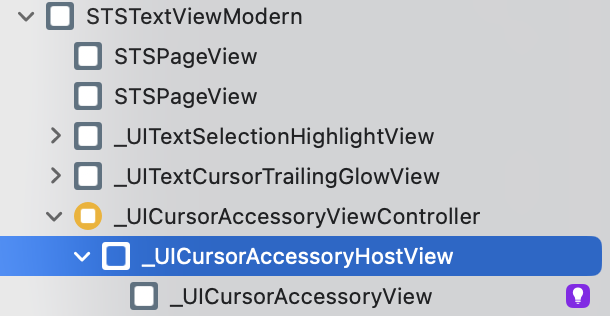
@steveshepard @knutknatter I wonder if we avoid these bugs if we adopt the new UITextSelectionDisplayInteraction iOS 17. I’m going to try that one of the next few days.
@simonbs @steveshepard Wondering the same. Really didn’t want to have to go this route. I might try the same.
@knutknatter @steveshepard The "What's new with text and text interactions" session from WWDC seems to suggest that using UITextInteraction is still preferred.
On adopting the redesigned UI of the caret and text selection, the engineer says “If you have a highly customized UI for displaying text, it can be challenging to keep up with these changes in your own implementation, especially if you aren't able to adopt UITextInteraction”.
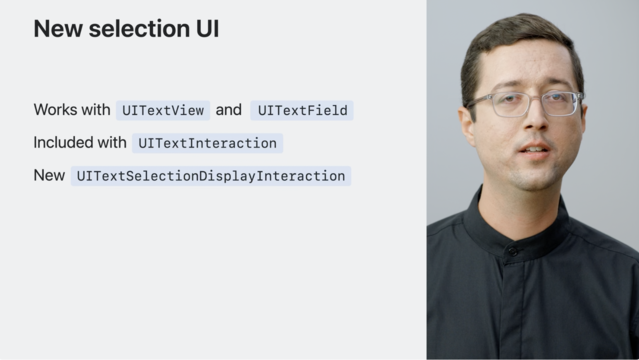
@knutknatter @steveshepard I've just made a quick test with UITextSelectionDisplayInteraction and with the new API I'm no longer seeing the bug where the text selection handles are placed incorrectly on visionOS: https://mastodon.social/@simonbs/110903512345493534
So Apple is suggesting that UITextInteraction is preferred but it's exhibiting bugs that UITextSelectionDisplayInteraction isn't. Now, I have yet to discover which bugs UITextSelectionDisplayInteraction exhibits 😄
@knutknatter @steveshepard For some reason UITextSelectionDisplayInteraction draws selection handles and the caret below the text though. That's a bit awkward. I'm also not sure how to combine this with a non-editable interaction that allows users to select text only.
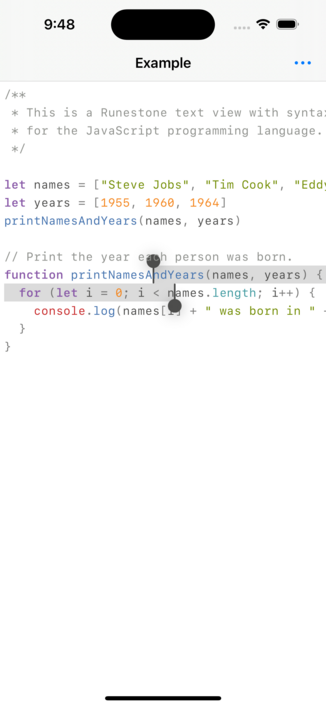
@knutknatter @steveshepard Apparently UITextInteraction also places these views below the text on iOS 17 so maybe this is an issue in my side.
@simonbs @knutknatter Are you providing a selection container? If not, this might help:
- (nullable UIView *)selectionContainerViewBelowTextForSelectionDisplayInteraction:(UITextSelectionDisplayInteraction *)interaction;
@steveshepard @knutknatter I was playing around with that but never got the views to be on top of the text. It seemed like even if I returned a view, the caret and selection handles were added to the same view as the interaction. Anyway, I think I’ve already given up on UITextSelectionDisplayInteraction as it seems there are a few gestures we aren’t getting for free like we do with UITextInteraction.
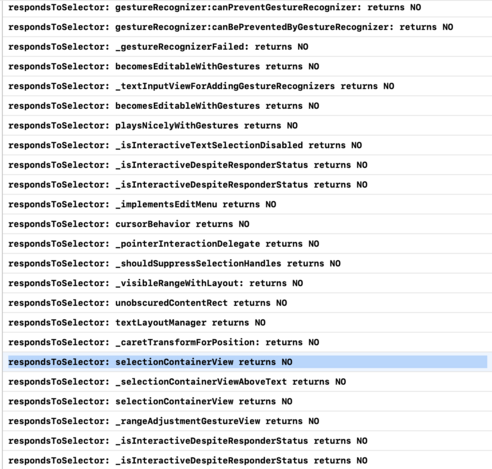
@simonbs @knutknatter The interaction also tests for the private vars "selectionContainerView" and "_selectionContainerViewAboveText". Worth a try?
Per the earlier discussion, note also the "becomesEditableWithGestures" and "playsNicelyWithGestures" private vars. It looks like there is a rats nest of compatibility code in UITextInteraction. I feel bad for James.
@steveshepard @knutknatter Ouch. It’s a frustrating situation right now. I really can’t figure out what we’re supposed to do. UITextInteraction has some new and bad bugs in iOS 17. If these aren’t fixed before the release, it’s really bad.
@simonbs @steveshepard I’m curious what gestures did you notice were missing?
@knutknatter @steveshepard I didn't spend a lot of time with UITextSelectionDisplayInteraction and I don't remember the exact results. However, I seem to recall that gestures such as moving the caret and adjusting the selection weren't provided for free -- though as I’m writing this, I it would seem odd that those gestures were absent 🤔
@simonbs @steveshepard That does seem strange. But so is the disappearing caret in UITextInteraction. Haha. Considering having a look at this myself...
@simonbs @steveshepard “ If you want to implement the selection gestures yourself, but still want to indicate text selection using the standard system UI, use UITextSelectionDisplayInteraction instead.” https://developer.apple.com/documentation/uikit/keyboards_and_input/adopting_system_selection_ui_in_custom_text_views

@knutknatter @steveshepard Right, I also remember that the WWDC session mentions that using the new interaction means giving up on some gestures. I really don’t want to implement these myself.
@simonbs @steveshepard agreed. Keeping up with potentially new gestures year after year would also be pain.
@knutknatter @simonbs Feedback is down for me, so I'll try again later. A quick update to say that _UICursorAccessoryHostView was a red herring. The real issue is that _UITextCursorView is removed after setting the attributed marked text.
@steveshepard @knutknatter I'm seeing the same thing. _UITextCursorView is removed from the view hierarchy when setting the marked range.
@steveshepard @knutknatter I see that this has been an issue for me before and I have this code snippet to work around it. I call this function at the end of setAttributedMarkedText(_:selectedRange:) but as Till said, even this doesn't address the issue on iOS 17.
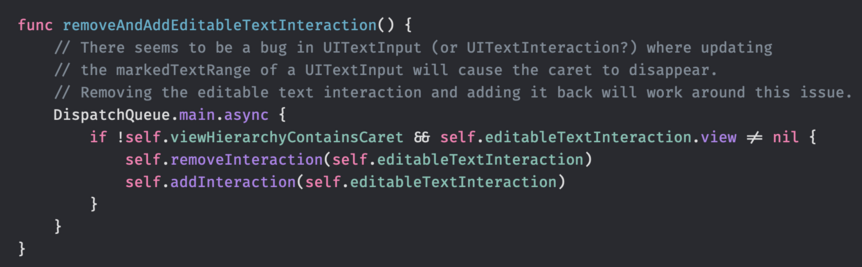
@simonbs @steveshepard Still does not work in latest beta, correct?
@knutknatter @steveshepard Yes. Both the issue where the caret does not appear when swapping out an non-editable UITextInteraction with an editable UITextInteraction and the issue where the caret disappears after setAttributedMarkedText(_:selectedRange:) seems to be present in beta 7 too 😞
@simonbs @steveshepard nothing fixed in beta 8 it seems
@knutknatter @simonbs I don't see any action on the Feedback I submitted (FB13024851), It's still open with no similar reports. Let me know if you filed one too, and I'll add a reference in my report.
@steveshepard @simonbs FB12622609
@steveshepard @simonbs sorry that was Simon’s. Here’s mine: FB12968285
@knutknatter @steveshepard One one hand it's great that Apple is repurposing the -setAttributedMarkedText(_:selectedRange:) for the new inline prediction but I think it's awkward that we don't get to differentiate between text being marked because it’s part of an inline prediction or for other reasons. This information could be contained in the provided NSAttributedString. I filed this feedback about it. Just in case you want to duplicate it 🤗 https://github.com/simonbs/AppleFeedback/blob/main/FB13017385/README.md

 Amy Worrall
@simonbs @knutknatter @steveshepard Hmmm, do the attributes Apple hands us in this method matter? Currently I’m discarding the attributes because Lexical’s data model doesn’t store arbitrary attributes.
@amyworrall @knutknatter @steveshepard At the moment they only seem to provide a foreground color, at least when supplying the inline prediction. The color is always UIColor.systemGray, so I'm discarding it as that's not guaranteed to be readable.
I'm suggesting they should supply an attributed string with an attribute that indicates why the text should be marked.
@simonbs @knutknatter @steveshepard Ah, gotcha. That is a good idea, as long as it’s documented (and not “you must round trip a bunch of private attributes”)