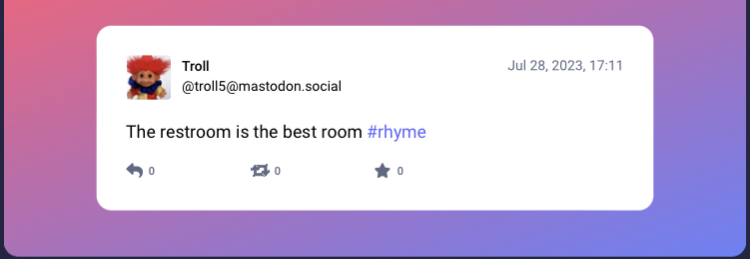

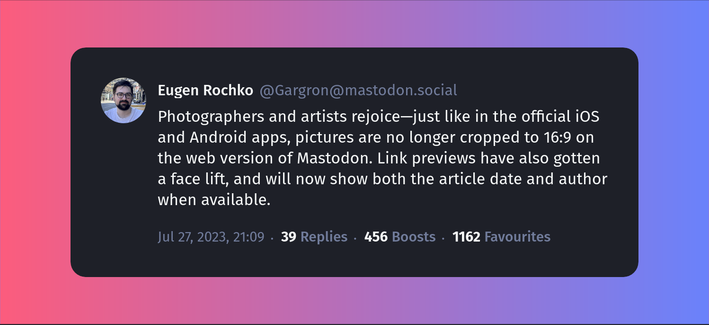
I'm so excited to share Mastopoet, a tool made by @raikas that allows you to capture Mastodon posts as beautiful images and share them across the Internet. This makes posts much more eye-catching in other social medias for instance.  

Use the tool: https://mastopoet.ohjelmoi.fi

Browse the source code: https://github.com/raikasdev/mastopoet

Mastopoet supports #MastodonBirdUI and options to show metrics in textual or icons or hide them completely.

Please note: If you use this tool to share toots, remember to copy the post text as alt text, thank you!

#Mastodon #MastodonTools #Mastopoet #Tools #MastodonTips #Fediverse #OpenSource
Mastopoet - Beautiful Mastodon post screenshots

With Mastopoet you can create beautiful and clean Mastodon post screenshots

@rolle @raikas Very cool!!!!! I'll maybe send a PR sometime
@rolle Very handy!! Would love to see something like this baked into an app… cc @ivory 👀
@jgillman We've already designed it awhile back. Just need the time to implement it.
@ivory Amazing! And take your time. Huge fan of the quality of the app 🙏
@rolle Thank you! This is great. I could swear I saw someone asking for this on reddit recently (the same way threads generates pics for sharing on insta), but no-one understood what was being asked for.
@rolle @raikas hey @lucasggamerm , could you please make Mastopoet to be built-in in @moshidon ? Thank you in advance.
@rolle @raikas Wow, this looks fantastic. Bookmarking immediately!!
@rolle
Tagging @fedilab - this would be a useful feature.
@raikas
@rolle @raikas I love that! Is there a way to pass the URL of the post in the URL through a parameter or something?
@mike @rolle Not currently, but I'll add that to the todo list! Thank you 
@rolle @raikas very nice tool, have you considered creating one for Lemmy?

@igni5s Nope. But as Mastopoet is open source, someone could fork it for Lemmy. @rolle

https://github.com/raikasdev/mastopoet

GitHub - raikasdev/mastopoet: The Toot screenshot tool for Mastodon.

The Toot screenshot tool for Mastodon. Contribute to raikasdev/mastopoet development by creating an account on GitHub.

GitHub
@rolle @raikas ugh, this is awful, it removes the ability to directly interact with the toot
@mirabilos It doesn't remove anything. You can always link to the post, and you should. @raikas
@rolle @raikas very good tools.

But, it is support for Misskey/Calckey instance? I would rather to contribute if that project is open for contributing.
@thatismunn No, not currently! Yes, the project is open to contributions: https://github.com/raikasdev/mastopoet, I will try to add development guide soon... @rolle
GitHub - raikasdev/mastopoet: The Toot screenshot tool for Mastodon.

The Toot screenshot tool for Mastodon. Contribute to raikasdev/mastopoet development by creating an account on GitHub.

GitHub

@rolle @raikas one small non-issue I noticed: the output file is named "mastopoAt.png" instead of (the probably intended) "mastopoEt.png".

See also: https://github.com/raikasdev/mastopoet/blob/8d442f505b8db7be73c88fc6451c5f607ac7f495/src/App.tsx#L57

On a sidenote: Is there a reason the output is PNG instead of - let's say - WebP?

mastopoet/src/App.tsx at 8d442f505b8db7be73c88fc6451c5f607ac7f495 · raikasdev/mastopoet

The Toot screenshot tool for Mastodon. Contribute to raikasdev/mastopoet development by creating an account on GitHub.

GitHub
@mihawk90 @rolle PNG is more widely supported by social media sites for uploading. WEBP is used more for content delivery in my opinion.
@raikas @rolle makes sense. I must admit I am not huge on going to various social media places so I wouldn't be able to judge the level of support.
@MrFrety @rolle What browser are you using, and are you on mobile?
@raikas Fennec F-Droid version (firefox for android), so yes, mobile
Did we really need to add extra steps to screenshotting, though?
@rolle @raikas Suggestion: "Remember to copy the post text as alt text" could be made easier by the tool itself. (GitHub issue here: https://github.com/raikasdev/mastopoet/issues/12 )
Suggestion: Add button to copy post text for Alt text · Issue #12 · raikasdev/mastopoet

Hi, I just learned about this nice tool of yours! The post I read pointing to it goes on to suggest that one should "remember to copy the post text as alt text". Mastopoet could make that easy for ...

GitHub

@rolle @raikas Aaaand it's implemented! Thank you!

(Implemented *and deployed* to the Demo website, no less.)

https://github.com/raikasdev/mastopoet/commit/00ccc1e0548d72465d164b6be0c94fc28d70b2ec

Add ALT text button · raikasdev/mastopoet@00ccc1e

The Toot screenshot tool for Mastodon. Contribute to raikasdev/mastopoet development by creating an account on GitHub.

GitHub
@seekraft @rolle No problem! Thank you for leaving the issue 
@raikas @rolle My pleasure 🙇 I wish I were as responsive and responsible a developer 😉
@rolle @raikas Also checked this out yesterday! Well done! 
@rolle @raikas This is brilliant! Thank you for making it!
@rolle @raikas
Interesting tool. Any thoughts or plans to offer this as a browser plugin?
@hybridhavoc I might in the future, I think it would be a pretty good idea  @rolle
@rolle @raikas
Also, thoughts on supporting custom emoji present in display names? My display name as an example in this image.
@rolle @raikas Thanks. Looks great - but It doesn't embed or include images or my avatar.

@Gotterdammerung @rolle That's sadly due to CORS, and I can't do anything about it. You would need to contact your instance admin and have them allow anonymous cross origin on the server that serves the media for your Mastodon instance.

A workaround could be to look up your profile on an another instance, and use that instance's link to the tool 🤷

Like this:
https://mementomori.social/@Gotterdamm[email protected]/110677108790619423

🇪🇷Götterdämmerung (@[email protected])

Attached: 1 image In which I force my characters to shill for my Patreon @ https://patreon.com/AwetMoges

G L I T C H

@rolle @raikas

looks very cool - but:

hmmm … this tool supposedly jas CORS issues at the server - and I should contact the admin … sorry, but I don’t know what that means ..?
@ruud

@wigbert @rolle @ruud CORS is a security feature of browsers, that is used when a website wants to use a resource on an another website.

Your instance you are on (mastodon.world) has a person that manages it on the serverside, the admin. For your instance it's @mwadmin. They can make the changes required to make the CORS requests work.

Here's a great video about how it works, but it's bit technical:
https://www.youtube.com/watch?v=4KHiSt0oLJ0

CORS in 100 Seconds

YouTube
@raikas @wigbert @rolle @ruud I will look into it. We did enable CORS for lemmy.world too, before the lemmy had something for it.

@mwadmin @raikas @rolle @ruud

Thank You for the friendly explanation & for “looking into it“

@rolle @raikas says “CORS issue detected!” Before i enter a url. Works great when i ignore it and put in a url.
@AlexGizis @rolle Before? That's weird. Should be fixed now 🤷
@raikas @rolle i visited, backed out of the page, and then came back and then got it. might be important. But it's really cool, nice work!
@AlexGizis @rolle The CORS issue alert is shown if a image load fails, which usually happens due to CORS, but might be fired also accidentally due to other errors.
Thanks for the report!

@rolle @raikas That’s funny, just this morning I was thinking that Mastodon should come with its own built-in screenshot tool.

Not because it’s the only way to share stuff outside the walled garden (as with most other networks) but because sometimes a screenshot is all you need. Instant, in your face, fleeting, occasionally beautiful.

I see plenty of Twitter screenshots on Instagram without finding that a limitation.

@rolle Hmm, I've been posting less and less on other sites, but this could be a good way to raise awareness of The Fediverse and the posts I've been enjoying.