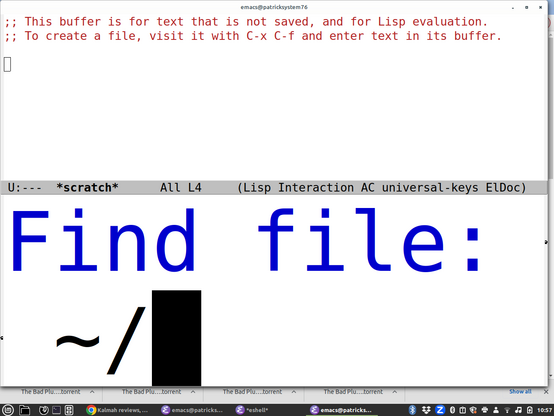
Partially blind guy here with an #a11y PSA:

I'm seing a trend away from "Text Size" sliders or old fashioned font dialogs and towards a few set choices "Default", "Large","Larger", etc.

This is a HUGE step backwards. Your 'larger' is *never* large enough for my crazy busted eyeballs when I'm using my 34" monitor.

If you must do this, please be sure to add "Largest" and even "ZOMG ARE YOU SERIOUS LARGE" options. Some of us REALLY need them, even if it seems insane to you.

@feoh

Yeah I just set my Emacs minibuffer font to be like 140 point. I realized I couldn't see it and was just doing things by memory, even if things get cut off now I'll see something. It looks even more ridiculous in person because my monitor is huge.

@smyth It's like as graphical interfaces become more entrenched and 'mature' they move further and further away from actually being able to accommodate people with non normative interface needs.

It's frustrating. I'd say I'd just go back to 100% text mode all the time, but the web and everything else is so inherently image oriented these days that could get pretty rough pretty quick.

@feoh @smyth

One of the things I really like about running my own web services is that I get to control the damn CSS.

So I guarantee high contrast, decent colors, no minuscule type, and white space where I want it instead of where a "UX designer" who has never taken an accessibility class has decided it should be.

Oh, and one of the things I like about running XFCE on X11 is that writing a window manager theme is easy. So the focus window has a big cyan border, and unfocus windows have narrow but distinct black.white.black borders and high contrast titlebars. Because it should be bloody obvious which window has focus, and easy to find the new window that you want next.

@dashdsrdash @smyth
<kidding>
Oh, so theming your desktop is GOOD, but theming your editor is BAD?

A strange breed, these old school sysadmins are :)
</kidding>

I'm rather enjoying a similar level of customization capability in KDE, but mostly I don't need to write my own theme per-se, as I can tweak existing ones with a fair bit of precision, and KDE is super strict about things like text size being adjustable all the way down.

Because this conversation has delightfully meandered all over the map, I was originally posting about my frustration on installing the Office365 Outlook client, because I'm struggling a bit to find the right notification mechanism for meetings.

I fell back to the web version, but that has problems too.

Note that the problem here is calendaring, which can't be readily solved with 'read yer mail with mutt, brush your teeth, etc." :)

@feoh @smyth

I didn't say that theming your editor was bad. I said that, for me, becoming used to excess editor configs is a problem because I am frequently on some new machine where I do not have the time to set up a new config, nor is it appropriate -- so I would get more annoyed at not having my tools than learning to live with what I've got.

I suppose I could always cut-n-paste to my local, edit, then cut-n-paste back, but... no.

Calendaring: gaaah.

@dashdsrdash @feoh

Is this a good time to say that I do at least some of my calendering in Emacs? Probably not.

I've gone all the way to the other side of the spectrum, but then again, I'm visually imapired, and basically can't use a computer unless I've SSHed into it and messed around, or I've installed a screen reader, so it makes sense to go all the way and customize everything. I try to have a few working machines at any time so I don't get stuck and I can use one to bootstrap another.

@smyth @feoh

Yup, yup.

Which is why we need all the tools, not one tool that does everything.

@dashdsrdash @feoh

I do somewhat similar things (making backups to GitHub of my config files, which are quite portable). And I try to make other computers come to me, by using SSH, Tramp in Emacs, etc. Still, of course you sometimes need to whip out vi or ed (I actually prefer ed on totally bare systems as its pretty visually impaired friendly, the one line interface is kind of how screen readers work).