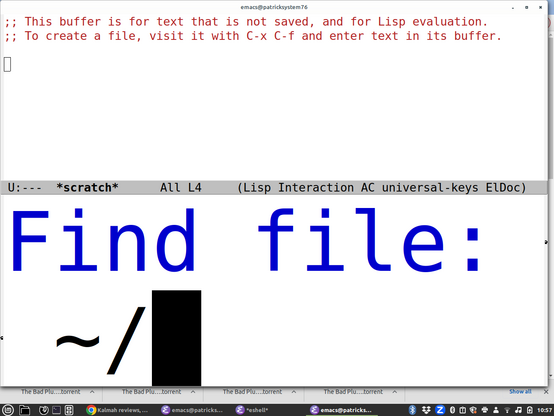
Partially blind guy here with an #a11y PSA:

I'm seing a trend away from "Text Size" sliders or old fashioned font dialogs and towards a few set choices "Default", "Large","Larger", etc.

This is a HUGE step backwards. Your 'larger' is *never* large enough for my crazy busted eyeballs when I'm using my 34" monitor.

If you must do this, please be sure to add "Largest" and even "ZOMG ARE YOU SERIOUS LARGE" options. Some of us REALLY need them, even if it seems insane to you.

@feoh

Yeah I just set my Emacs minibuffer font to be like 140 point. I realized I couldn't see it and was just doing things by memory, even if things get cut off now I'll see something. It looks even more ridiculous in person because my monitor is huge.

@smyth It's like as graphical interfaces become more entrenched and 'mature' they move further and further away from actually being able to accommodate people with non normative interface needs.

It's frustrating. I'd say I'd just go back to 100% text mode all the time, but the web and everything else is so inherently image oriented these days that could get pretty rough pretty quick.

@feoh @smyth

One of the things I really like about running my own web services is that I get to control the damn CSS.

So I guarantee high contrast, decent colors, no minuscule type, and white space where I want it instead of where a "UX designer" who has never taken an accessibility class has decided it should be.

Oh, and one of the things I like about running XFCE on X11 is that writing a window manager theme is easy. So the focus window has a big cyan border, and unfocus windows have narrow but distinct black.white.black borders and high contrast titlebars. Because it should be bloody obvious which window has focus, and easy to find the new window that you want next.

@dashdsrdash @feoh

Yeah, it's really amazing the difference a decent focus border makes. Loves websites that just turn focus borders off :/

@smyth @dashdsrdash @feoh My vision is 20/20 and I still can't tell which window is focused on Mac OS most of the time.

@jeremy_list @smyth @feoh

On Mac laptops, I have taken to the paradigm of making every application use one virtual desktop and be full-screen if at all possible.

I basically don't use Mac desktops/large screens except while fixing things for a desktop user.

@dashdsrdash @jeremy_list @smyth I do much the same but I tend to avoid the native MacOS full screen mode because it fforces the paradigm of whole screen app switching rather than window swapping which I find much less visually jarring and thus preferable.

So I use Rectangle - https://rectangleapp.com/ and simply hit Cmd+Opt+Enter to make each window fill the screen.

Rectangle

Move and resize windows in macOS using keyboard shortcuts or snap areas. The official page for Rectangle.

@feoh @jeremy_list @smyth

Feoh, have you turned on "reduce motion" in A11Y => Display ? Full screen swapping via hot corner is as fast as I can move the cursor and click.

@dashdsrdash @jeremy_list @smyth I haven't but I'll look at that. Thanks!

@dashdsrdash @jeremy_list @smyth Just wanna say this works GREAT!

I'd never taken the time to register how distracting the wierd screen wipe effect they do when switching full screen apps was, but it is indeed a big distraction for me. Turning on reduce motion eliminated it completely.

@dashdsrdash Thanks for this. Your solution TOTALLY doesn't work for me, but you lead me down a rabbit hole that forced me to update my workflow and examine available tools built into MacOS, and the solution leapt out at me.

As previously mentioned the hot corners thing is a SUPER non starter for me. Touching the mouse is screaming evil productivity death when you're fine & gross motor impaired. Imagine your mouse being posessed like some kind of deranged 90s Schwabbie desktop hack where the pointer runs AWAY from where you're trying to make it go and escapes your vision entirely :) (And I'm not even exaggerating.)

However, turning on Stage Manager was the big win I needed.

If you do this, all your apps become windows in stage manager. The one that currently has focus (whether full screen or windowed

@dashdsrdash So, your original solution ended up not working for me (I still got the transitions, and I can't use hot corners - see 900 previous posts about fine/gross motor impairment and mice. I hate meeces to pieces! :)

But I found relief in an odd place - Stage Manager. It will let you herd your app windows in arbitrary ways, and then either Cmd+Tab between them individually or between groups if you set it up that way.

Thanks for the inspiration to dig :)