I understand that visionOS has multitasking, I just don't understand at all how it works. Apps, even when closed, remain open in the background, playing music, and there's seemingly no multitasking screen you can access in the sim to see what's there or to force-quit it. I'm not sure whether Apple just hasn't written one yet, or it relies on some gestures unavailable to the simulator. You can even ‘Hide Others’ to hide apps, but how you bring them back where they were, I have no idea
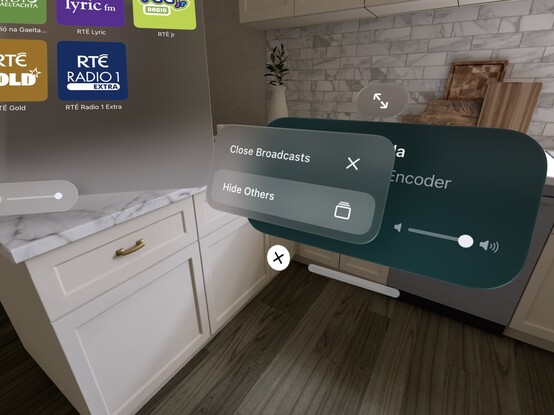
I should add that when you choose an icon from the home screen, all of the app's hidden/cached windows respawn right in front of you. Maybe the idea is to not have a multitasking UI at all? But that seems spatially destructive, especially if you've placed windows in specific locations around your room/house
@stroughtonsmith I love the idea of leaving task-specific windows in places for that task, and I can also 100% see myself “... ok so where did I put that window again?”
@adamwulf @stroughtonsmith would a visionOS Mission Control not move windows but rather show you AirTags-like arrows that point to where they are? 🤔
@chucker @adamwulf @stroughtonsmith Pulling out the Find My app to remember which Starbucks has that comfy booth where I left that Keynote window I was working on