
Please help.

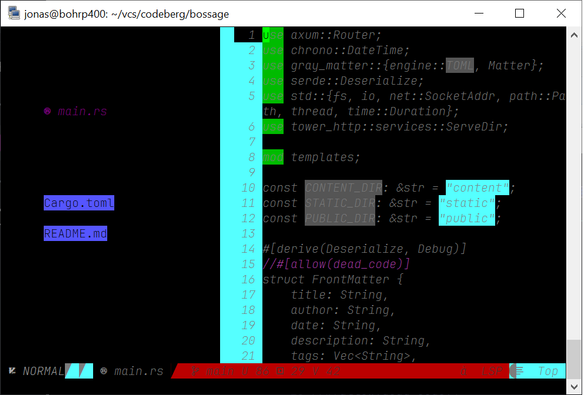
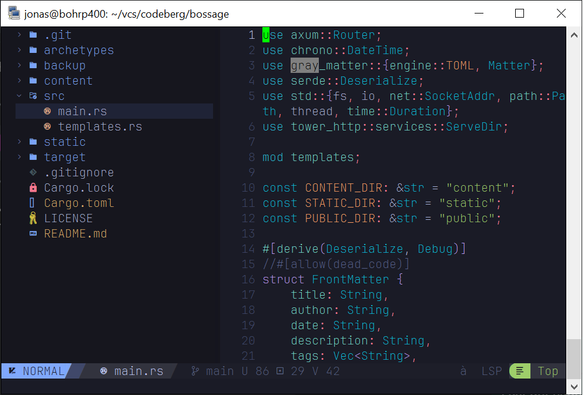
I'm using `kitty` on Windows 10 to ssh into my development environment in `neovim` (0.9.1) on a Raspberry Pi 400. However, using `screen` messes up the colours alot, to say the least. The first image shows `neovim` in `kitty` without `screen`, while the second image is of `neovim` inside a `screen`.

Is there a solution to this problem?

#neovim #nvim #screen #development #programming #rust #rustlang
@jonas `tmux` has better color support IIRC, if you’re open to changing your terminal multiplexer software. It would mean mentally rebinding everything.
I switched way back and can’t use `screen` anymore because of that difficulty, so I can see how this might not be the most palatable advice.
@c0dec0dec0de I better start learning `tmux`, or perhaps `byobu` or `zellij` 😂 then!

@jonas so… how good is your reason for using screen, instead of tmux or zellij?

Because I’ve never had that kind of problem with either.

@mars my reason is but years 😂 I've never used any other "multiplexer"...

So... I'd say my reason isn't that good 😂

@jonas @mars it’s not a bad reason. It’s a big part of your workflow probably. I’d you’re switching to tmux, you may be able to rebind keys so that it acts like screen. Ctrl-A instead of Ctrl-B etc.

@jonas @c0dec0dec0de you can rebind everything in tmux.

The defaults are ok, but not great. With a little time and effort you can get the same workflow you have in screen.

And if you are ready for something different, Zellij has great features an sensible defaults.

@mars I’ve started to look at Zellij. Seems nice! After all it’s in Rust so hits hits close to home 🙂

I’ve been doing so many different tests today so I’m not sure if `tmux` worked or not. Perhaps there were some setting in .tmux.conf… 🤪

@c0dec0dec0de

@jonas @c0dec0dec0de what seems to be the problem with tmux?

For true color you have to add some lines to your config file indeed.

Zellij is great, but the workflow and bindings are weird. I have to keep locking and unlocking.

@mars I’m not even sure there is a problem. Let me get back to you on that 🙂

@c0dec0dec0de

@mars @c0dec0dec0de ok, so I’ve landed this endeavour in Zellij. I have not done any deeper research but the colouring works as expected.

I’ve been on `screen` as long as I can remember so the keybindings are very new! 😂

@jonas `screen -T screen-256color` may do the trick for you
@igrok it did not. Perhaps I also need to configure `kitty`?

@jonas the option sets $TERM inside screen to something 256 color

That's the right name on my distro but yours may call it something else or not have one

Check under /usr/share/terminfo for possible names

@jonas it works without `screen` in the way, so `kitty` is probably configured fine

The main thing is that `neovim` is outputting colors based on what $TERM tells it will work

By default (on my distro anyway, and based on the behavior you're getting, yours too) `screen` picks a conservative value for $TERM that has limited color choices

@igrok I've tested all of `tree /usr/share/terminfo/ | grep 256` over ssh but to no avail.

$TERM gives:
- xterm-256color on the machine
- screen.xterm-256color on the machine inside a screen session (without -T)
- xterm over ssh
- screen over ssh inside a screen session (without -T)

and it only works as expected outside a screen session.

@jonas that's frustrating 😔

But at least you have some detail to provide in a bug report to your distro or in other requests for help. Sorry I can't help more

@igrok very frustrating 😂 but hey, that’s IT for you 😉

A bit weird though since the distro used is Raspberry Pi OS…

Emacs 256 colors not working using PuTTY and screen

I'm having trouble getting 256 colors to work using emacs 23.1.1 connecting using PuTTY and screen. Server is running CentOS 5.6. In my PuTTY config, my terminal-type string is set to xterm-256co...

Stack Overflow