Continued absurd Linux problems:

If I run in Wayland,
and run Chrome,
my custom .XCompose file is ignored.

Chrome on X11 does not have this problem,
Wayland apps other than Chrome do not have a problem,
if I use default XCompose sequences instead of custom XCompose there is no problem.

It's just this one combination of things.

Checking the Chromium bug tracker I find variations of this bug repeatedly filed, then closed, as far back as 2015 and as recently as 2021, closed as "fixed".

So I'm sitting here trying to figure out how to tell if a particular app is running in Wayland or XWayland.

This is the answer I get off Stack Overflow. I'm thinking… No. No, that's too silly. It can't be the best way.

I keep researching. It's the best way.

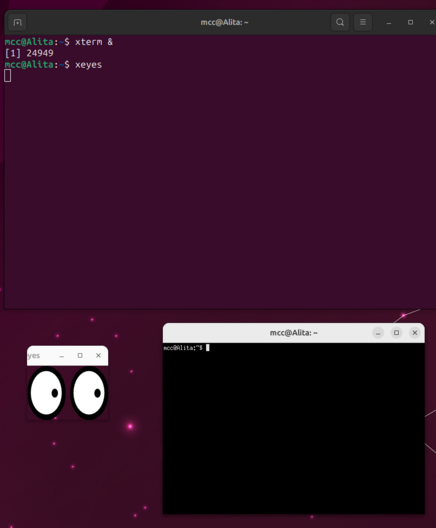
You run xeyes.

Wayland has security that keeps windows from knowing about mouse events in other windows. XWayland doesn't.

Xeyes will track your cursor whenever you're over an XWayland window, then stop if you pass over anything else.

@mcc Ha, ha, ha, ha. I love it.
@mcc This is magically bonkers.
@mcc Wayland has security that breaks a11y tools as well. There was a thread about it (but masto doesn't have useful search so I couldn't tell you it)

@indrora @mcc I'd have to imagine that cursor following magnification apps don't work for the same reason as xeyes.

Such a feature would have to be implemented at the window manager level of wayland instead, much like global hotkeys for applications.

@ChartreuseK @mcc I found the thread: https://tech.lgbt/@xogium/110507457689374019

There's a lot of wayland that feels like "X did it badly so let's not do what X did at all". One thing they haven't touched however is a permissions system that allows applications to have privileged access when required.

A lot of current a11y tools depend on being able to have raw UI access across things and they just don't work well.

Casey Reeves (@[email protected])

Content warning: Linux GUI

LGBTQIA+ and Tech
@indrora @ChartreuseK That is super obnoxious.

@mcc @ChartreuseK GTK and GNOME throwing out their entire a11y teams is too.

@xogium has godlike patience.

@indrora @mcc @ChartreuseK I tried my best for years, tbh. I waited and waited and things never got better. It's ironic that it took this or so it seems for things to move, however slowly. Considering I got attacked by a gnome dev, and that the reaction from the higher ups was "shut up and stop causing problems", it tells me a lot about what's considered acceptable there. For this reason alone, I doubt I'll ever come back to Linux GUI.
@xogium @mcc @ChartreuseK Holy fuck seriously?
@indrora @ChartreuseK @mcc @xogium Yep. It was pathetic. Lots of gaslighting, accusing me of making shit up, also saying my thread was a so-called trauma dump, all of this without linking to my own thread or giving me a chance to defend myself. Made themselves look like the poor victim.

@xogium @ChartreuseK @mcc Fucking hell.

how the fuck is that an acceptable behavior out of someone in the gnome foundation?

@indrora @ChartreuseK @mcc I have no idea, but I can't stand by this and continue using the GUI despite that kind of behavior. It is entirely unnacceptable. How can the foundation stand behind this is baffling to me. I'm not saying every single member of the gnome project behaves this way, in fact there are some gnome devs that agree with what I pointed out and disagree with what they said... But still. I didn't need that. All it managed to do was make me very angry.

I don't use gnome as a desktop, never have. However gtk apps are everywhere, but I've decided enough is enough. Especially after this attack. I've linked it somewhere in that giant thread, btw if you want to look at it. It ain't pretty, fair warning.

@indrora @mcc It feels like Wayland's approach was, we're not going to bother making something and instead rely on the root window/window manager to implement everything in a proprietary way.

@ChartreuseK @indrora I feel like on commercial desktop OSes it's treated as important to have reader accessibility be implemented at the API level so you can wire through all the way from the application semantic content that isn't well captured by the GUI widget graph

Is that approach even compatible with Wayland's "window manager does it" approach?

@mcc @ChartreuseK No, it isn't. KDE, GNOME, Sway, whatever i3 does, GTK, QT, and whatever bespoke software use, will all be different because Fuck You.

unless the FreeDesktop project steps in and sets down a hammer like they did with desktop notifications and several others, we're going to have a whole mess on our hands.

I'm having whiplash flashbacks to Transmission v GNOME: https://trac.transmissionbt.com/ticket/3685

#3685 (Don't use a notification area icon in GNOME 3) – Transmission

@mcc @ChartreuseK @indrora AIUI, the accessibility API you get on a linux GUI, at-spi2, offers a tree with applications at the top level, window below that, and then a tree of containers and nodes that can have roles like "has text in it", "the text can be selected, here's the selection", you have support for formatted text as well, scrolling, images, you can simulate inputs or interact with nodes in a more idealised form ("activate" instead of "clicked with mouse button"), all that stuff.

the built-in stuff you get if you just build your program from, say, QT, can be all-right, but if you make custom widgets, and don't test how an at-spi2 client (accerciser lets you inspect and test all this) causes events to happen and just implement stuff based on for example key events, things may just not work in boring or fascinating ways

all that said, i don't think wayland puts a barrier in this very particular piece of a11y. but the vast majority of tools don't use at-spi2 to do their work i'm pretty sure

@mcc @ChartreuseK @indrora all that said, i think it's currently literally not possible to get a list of open windows and/or the currently focussed window on wayland if your process is not the compositor. big oof!
jookia (@[email protected])

@[email protected] @[email protected] The short answer is that it's not going: Applications can't manage the clipboard (wlroots lets any application manage it, bypassing all security though!) Applications can't set global hotkeys (sorry OBS users!) Applications can't inject keypresses (sorry password manager auto-type!) Applications can't detect if they're focused (sorry gamers that want pausing on focus change!) Applications can't click things on the screen (sorry automation scripts and screen readers!)

Mastodon
@jookia @ChartreuseK @mcc the phrase "maybe capitalism will save us" is a phrase that sends shivers down my spine like emptying a coke in -40F weather.

@ChartreuseK @indrora @mcc

> Such a feature would have to be implemented at the window manager level of wayland instead

the unix philosophy of "do one thing and do it well" and "write programs to interop with each other" is screaming in the corner

every wayland decision just seems like it was made by the same folks who asked "Why do you think a volume control is necessary?" when making a audio player

i still find it funny that macOS -- the OS that markets itsself on security & privacy still lets you do more than Wayland on Linux, the place that people see as infinately customisable

like i like win32 bc it lets you do wacky shit easily (much less important than a11y but i want my blastbtn god damnit), why would i want my desktop computer to act like a phone where apps don't even know if they're in the foreground

@indrora @mcc Mastodon should have an "actual blog" feature so that you could perma-post things from a thread and make that searchable on demand.
@mcc This is ridiculous and I totally love it.
@mcc also true of oneko (hi, @netkitty!). The kitten responds to click-and-drags over its sprite by following the pointer, but only to where you released the mouse pointer. So the motion event security is relaxed during a cursor grab
@mcc fun fact: you can also use oneko for this purpose. Same reason.

@mcc you could also run xprop, If you can klick on a window, then it's X.

I solved it another way in my compositor sway:

for_window [shell="xwayland"] title_format "🦕 %title"
for_window [shell="xdg_shell"] title_format "💻 %title"

Now I see a dinosaur in the title for "old" X-apps or a fancy laptop for modern wayland-apps.

But for gnome, xeyes is probably the best way 🙂

[f38] The Wayland Protocol

Learn more about Fedora Linux, the Fedora Project & the Fedora Community.

Fedora Docs
@mcc You can start the program with WAYLAND_DEBUG=1 env variable and it will print Wayland messages if it is running on it.
@mcc
This is exactly the sort of thing that makes me love working with computers and software, as well as loathe it 😅
@mcc xeyes was visionary.
@mcc This is the exact and only thing I use xeyes for. It's so goofy, I love it.
@mcc That's the best thing I've read today 
@mcc it's not the best way, at least on sway. add `for_window [title=".*"] title_format %title (%shell)` to your sway config (or just swaymsg that. i also put %class, %app_id, and %instance in my title_format, feel free to read the man page if you want) then set the border to normal on the relevant window (i just have a key bound to border toggle, since i use the pixel border by default) and it'll show up as xdg_shell for wayland and xwayland for, xwayland
@mcc Yeah, sadly it's a very common way. Personally I have a rule in my sway config to append `[XWayland]` in the title bar of XWayland apps, which also works very well and doesn't require using the mouse 😊

@schnouki @mcc

I just uninstall Xwayland server, or don't install it in the first place (:

BUT: when I do need to test something that is only X, xeyes is the "is X running" tester I use (:

I wouldn't mind seeing the sway config rule, if you'd like to share, for the machine that I have which DOES have xwayland.

@mjd @mcc Now that Emacs supports Wayland, yeah, uninstalling XWayland is an option 😄
Here's the sway config rule: `for_window [shell="xwayland"] title_format "%title <small>[XWayland]</small>"`

@schnouki @mcc

kiitos! (Danke / Merci / Spazibo / Takk )
works well - I had to do some searching to find an X enabled program on this install (:

@mcc In my former life, we had a saying, "If it's stupid and it works, it ain't stupid."
@mcc yep, this is exactly what I do. It's hilarious.

@megmac @mcc that is so cursed

Ah yes the cantrip 'xeyes' will summon a familiar that can perceive what is hidden from mere flesh

@dcbaok @megmac @mcc holy shit. i’m going to be thinking about what commands are cantrios all weekend.
@mcc This is hilarious, being that X is a remote protocol where you can put clients in a separate privilege domain and they only see the events the server tells them about (it's totally possible to deny them events they shouldn't see; it's an implementation choice not to) and Wayland is necessarily local within a single privilege domain where apps can just ptrace the display process. 🤪
@dalias @mcc
• Wayland is not strictly necessarily local, see waypipe
• clients can only ptrace the display server or other clients if they're allowed to by the other OS mechanisms (running as the same UID or so) — that won't be possible if the client is sandboxed

@bugaevc @dalias @mcc I thought the “only root can ptrace non-child processes” behaviour has been the default everywhere¹ for a decade?

And, yeah, XACE has existed forever, but actually trying to use it would break the exact set of things broken by Wayland anyway.

¹: I'm pretty sure it was Ubuntu sauce originally?

@RAOF @dalias @mcc I don't think it's been the default, I've always been able to strace/gdb other processes by PID. I only remember seeing that on Ubuntu machines
@mcc this is so fabulous I can basically guarantee I will never forget it.
@mcc @Totooria idk I feel like we're gonna need this trick at some point :p
@mcc Huge xeyes fan. Always had xeyes run at startup on SGI at my first "real" job out of college. Still always the first x app I launch when setting up a new desktop.
@mcc linux is the most operating system in the world.
@mcc You could also check the libraries this software is compiled with. If it has X11 libraries, then it's an X software. If it has both X and Wayalnd, then it's running on Wayland.

@vocelia @mcc Sadly, that's not accurate. Chromium links against both, and can switch between the two using either command line args (--ozone-platform=wayland) or chrome://flags

I use xeyes when I'm testing chromium builds. 😀

@mcc I think we have a new philosophical razor in our toolbox that applies to computing:

The silliest way to do something is almost always the best one.