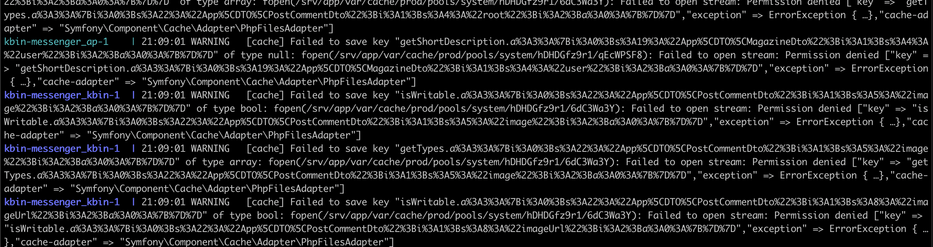
so close to deploying my own #kbin instance but content isn't federating. afaik this is because these "message worker" containers can't append the cache. Anyone know how to fix this? THe docs are still incomplete and it's been a real struggle reading between the lines to get this all configured

#reddit #fediverse #redditmigration

@Bees looks like unix permissions to me, either set chmod 0777 (bad) or chown to the user that's running the processes, or the uid if its in a container?

@matt It's running in its own docker container.
Would I have to modify the docker compose file to include these permissions? Sorry if this is a basic question, I just haven't used docker like this before

#kbin

@Bees its ok, we all have to start somewhere. Not the compose file, the permissions are read from the unix filesystem, for docker the UID for the process trying to write those files is parsed through to the host, so if the process in the contianer runs UID 1000, you will need to chown 1000:1000 ./ or if its in your home dir you might not be able to, in which case you will need to prob 'chmod -Rv 0777 .' or 'chmod a+rw -Rv .'
@Bees I will find out the UID from the container, just a min
@matt ok yea just running 'chmod 0777 .' doesn't seem to have fixed it. From what I can tell this dir doesn't exist until runtime, so maybe that has something to do with it?
@Bees maybe, I'm not sure where it is in your setup tbh, I always map volumes to places where I know where they are, e.g. - /path/on/host/kbin/app:/srv/app:rw

@matt @jimmyb Ok I found the directory and have been trying to adjust the permissions. But they don't seem to carry over to the docker container.

In this image, the top is the live docker container, and below is the local dir

@Bees @matt Did you try restarting the container?
@jimmyb @matt Yea I've restarted the containers several times at this point. It seems like the permissions aren't carrying over

@Bees @matt Oh oh, are you running the container as 82:82?

user: "82:82"

@jimmyb @matt yup! I haven’t edited the docker compose file at all so it’s got the user: 82:82. I chown-ed the dir to 82:82 as well but it’s showing up as root in the docker container
@Bees @matt Hrmmm…🤔…mind sharing your docker-compose?

@jimmyb @matt these are the two relevant containers.

Like I said, I haven't edited this at all so it should be the same as the base repo

@Bees @matt That's pretty much what mine looks like too. Nothing there looks like it would mess with permissions…in fact neither of those mount that directory…I just checked the example docker-compose file and it looks like you're missing some mounts.

volumes:
- ./:/srv/app