Anyone else struggle to understand #docker ? As someone who doesn't use it for any work-related reason, it seems completely unapproachable.

I just ran into the first project I'm very interested in which is *only available in docker*, and requires configuration changes before it can run. Every tutorial I can find feels literally like hieroglyphics.

Once docker is installed, it feels like implementation by obfuscation. Everything is just invisible so there is no clear way to do anything. If you run it, and it doesn't work, it's completely opaque. I pull down an image, no idea where it goes. No idea where to edit the yaml files. Been googling for an hour and nothing has helped.

I've been using #Linux now for 23 years and this is easily the stupidest I've ever felt.

@raineer it and kubernetes push my buttons so much.

@powersoffour Same here for kubernetes. The way they are heralded in the zeitgeist as the greatest inventions ever - I have to assume it's me that is missing something.

I think it's just a tech stack that I let pass me by. Everyone else got good at it and I just never saw the point (until I was forced to)

Maybe this is how init.d people feel about systemd 🤣

@raineer I find Nana's videos to be really useful:

https://www.youtube.com/watch?v=pg19Z8LL06w

Docker Crash Course for Absolute Beginners [NEW]

YouTube
@raineer Yeah, I feel this. I've used it. I didn't grok it. "What's the point?" was my takeaway.

@[email protected] my issue is that i tried using it as a vm first time and that left my brain rotten and incapable of understanding docker correctly.


its a "cli program that sometimes you can asign ports and some acces to your system in some config" more than a vm


@raineer I *mostly* get docker at this point though it definitely has its frustrations. I do however resent having to learn a new "infrastructure as code" or "orchestration" tool all over again every few years (kubernetes, saltstack, terraform ...), Each of which is more obtuse than the last. This industry needs to slow down and take stock of what we have already.

@raineer it is truly nonobvious. it took me a while of working with it at work and having patient coworkers who already understood it explaining things on demand before i was comfortable with it.

one thing that might help some confusion is that Dockerfiles (which i think is what you mean by yaml config) don't exist after you've built the image - it's the input to build the image.

`docker images` will list the already downloaded images.

if you want to run an interactive container (a running instance of an image is a "container"), then you

`docker run --rm -it imagename:tagname` (replacing imagename and tagname with your image and tag)

--rm tells it to clean up when the container exits, -i says make it interactive, -t allocates a tty (and you can combine the single letter flags to -it).

@raineer if you need to maker customizations to the image, you'll need to make your own image based on the existing image, by writing your own Dockerfile in its own directory and then running "docker build -t IMAGENAME:TAGNAME ." (replacing image and tag name)

then you can run the docker run command from earlier but with your new image:tag name

@raineer Docker, my beloved.

It's quite easy once you get the hang of it.

Docker is built on the principle of images in containers.

Containers are a isolated space leveraging the namespaces api in the linux kernel. (1 kernel, many distro)

Images are templates that get overlayed on top of eachother, so you can take an image of Arch and install packages on top of it without building an entire OS.

The CLI is pretty easy too, but it can get very overwhelming like all cli's in linux ;p.

Starting a container can be done with
"docker run --rm -it alpine ash"

What did I do there?

Well first ofcourse I specified the docker command and then the run subcommand.

"--rm" will make sure that the container will be removed after use.

"-it" will say that i want an *i*nteractive *t*ty.

"alpine" specifies the image i want

"ash" specifies the command i want to run inside of it :)

that's the first step of dockering.

Try it, mess around with it and then look up
"docker volumes" and "docker networks"
This is maybe the most useful part of docker as it allows for containers to communicate and persist data between restarts.

GLHF! :) 

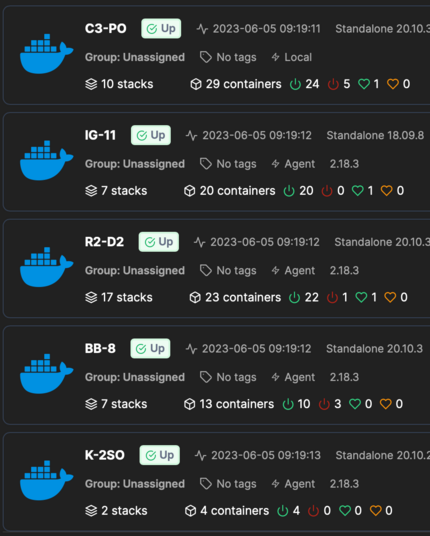
@raineer depending on what you want to use the running containers for.. I think Portainer is a nice web GUI to give some insight in what is going on on the system and running containers.
@raineer for instance this is what I am running on my server...
@raineer learning it, I became convinced the documentation was there to ensure that people who knew docker would be indispensable. It took me MONTHS to figure out how stuff worked.
@raineer the learning curve is pretty steep but Docker is a very valuable tool to know! I find the docs are pretty helpful too. Might be misinterpreting, but the images you have installed can be shown via docker image ls

@raineer I love #docker so much! Let me know if you need any help with it. Also, using @portainerio will help with getting around it.

Some examples of #opensouce solutions running under #docker: https://www.blackvoid.club/tag/docker/

docker - Blackvoid

docker hub synology

Blackvoid

@raineer I've not used Docker myself but I think such customizations go into a dockerfile which is used to build your container.

Maybe following an example at docker.io will shine a little extra light.

@raineer I had similar feelings in the beginning. The learning curve is quite steep. At some point it made click and I understood and started to like it pretty much. Migrated my whole home network to containers by now.