
LOOK. This is just a regular ol' website. No JavaScript whatsoever. Navigation pages with clicks <a> links to other HTML pages. The most basic website in the world. Yet, with a few lines of code to activate View Transitions, KAPOW.

Code is here:
https://codepen.io/chriscoyier/project/editor/ZGxnOb

View Transitions don't work in iframes yet, so you have to see here:
https://000694252.codepen.website/

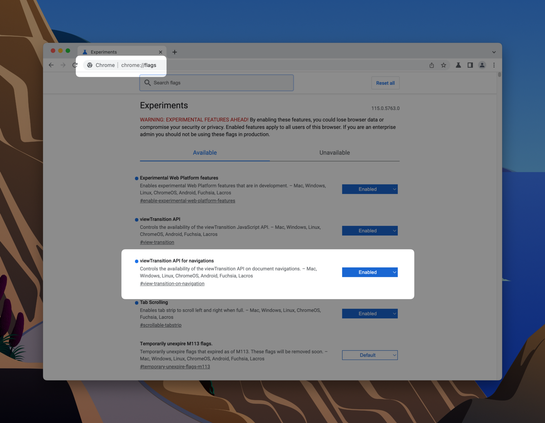
And you have to use Chome Canary and flip on the flag.
Do View Transitions Work Across Pages Yet?

...

CodePen
@chriscoyier What's defining the scaling effect? I don't see any ::view-transition selectors in the css. When I rig together my own demo, it just looks like a crossfade between the two pages...
@keithjgrant you get the crossfade by default unless you've got an element with a unique `view-transition-name` on both the outgoing and incoming pages.
@chriscoyier oh, found my problem. I had put quotes around the view-transition-name

@chriscoyier @keithjgrant What I don't get is *how* you made it work as a scaling animation? Does browser calculate element dimensions and interpolate between them only because you put a unique name?

I don't get this magic, because even if you do `transition-property: all`, it doesn't just give a way to make transition between implicit dimensions (no hardcoded `width`/`height`), but in case of View Transitions... it can?

@vintprox @chriscoyier that’s exactly it, it interpolates the transformation needed to move/scale to the size & position of the new element. You can also write your own custom animation instead
@chriscoyier Thank you so much for this demo. It was exactly what I was looking for. I couldn't find anywhere online that provided a straightforward, no-js, view transition demo. Yours was clear as day. Much appreciated.

@chriscoyier This is wild. Great way to demo the feature.

Do I feel a delay before the animation triggers?

I suppose one could add an immediate 'loading' indication on click, and then the animation would trigger when the additional page is loaded.

@chriscoyier but, once you load in all the JavaScript, and CSS as JavaScript, and HTML as JavaScript, and Images as JavaScript - you'll have to add spinners (JavaScript based if course) and it won't be so smooth and beautiful. Haha! Joking aside; this looks really clean.
@chriscoyier damn, love how clear this code reads. this can't hit browser ubiquitously soon enough
@brianleroux @chriscoyier Yep I'm aiming for us having a headless MPA with as much static content and using the platform, with only light touch for islands and dynamic stuff, we can do a lot of nice stuff with this.
@chriscoyier I dont think I realized this worked for MPAs!!! Amazing.
@chriscoyier OK but where has this been all my life
@chriscoyier Degrades very gracefully too!
@chriscoyier And to think that 15-20 years ago this would have been done in Flash by default! Love the modern web!

@chriscoyier Pretty nice! I will have to check that out.

I'm still using JavaScript for a (kind of related) transition on my site homepage. (Isotope)

@chriscoyier Doesn't appear to be supported yet on Firefox :( looks neat though on Chrome! Excited to see how it gets used on other sites.
@chriscoyier
Wow. I do like such JavaScript free, good looking websites