Huge day for passkeys!

Starting today, you can set up a passkey for your Google account. At this stage of the industry-wide transition, setting up a passkey doesn’t invalidate your password, so it’s 100% safe to set up. https://blog.google/technology/safety-security/the-beginning-of-the-end-of-the-password/

The beginning of the end of the password

We’ve begun rolling out support for passkeys across Google Accounts on all major platforms as an additional option that people can use to sign in.

Google
@rmondello First time I try PassKey.
Damn, this thing is so EASY to setup.
What kind of dark magic is this?
Now I wanna build it in my company’s auth server 😂
@deanatoire but we can’t remove Google Password yet, right?
@longfy 🤷‍♂️ I don’t think so, and I feel more confortable with my password as a backup plan ^^
@deanatoire looking at the Google Security page, I have too many options available to logon to Google. I’m not really sure if that’s secure anymore. Removed many things now that I have passkey - cell number, email verification, Google prompt etc. Yet, even with passkey, my single point of failure is my phone - if it were lost to theft, I’m doomed. Hmm…
@rmondello that was ridiculously easy to setup. What happens when you lose the device where your passkey is stored?
@anestis @rmondello Passkeys sync via iCloud Keychain, so hopefully you have an additional Apple device.
@anestis @rmondello You can still log in with your password
@brandon @anestis @rmondello and you can use another device as the passkey is synced to iCloud.
@anestis @rmondello I don’t know about other platforms, but on Apple devices passkeys are synced via iCloud.

@anestis

You're screwed?

Especially if you're poor and only have 1 internet device?

#BigTechFail

@rmondello

@rmondello This is great! I also like that I don't have to give up the ability to sign in with a password, so if something goes wrong with Passkeys I have another way.
@rmondello This is great. The main thing however that is still holding me back from using them is the poor platform integration. I want my passkeys to sync and the only platform that properly implemented this so far is Safari/iCloud Keychain (they also have the best UI IMO). But Safari is simply not an option for me on desktop and third party password managers are lacking the ability to properly integrate everywhere. That’s really frustrating.
@marius @rmondello BitWarden bought a company that resolves only around integrating passkey support, so I suppose that'll be one of the first 3rd party password managers to implement passkeys.

@ljrk

1Password have been blogging about passkeys too, but I'm holding out for @bitwarden before I make the move.

@marius @rmondello

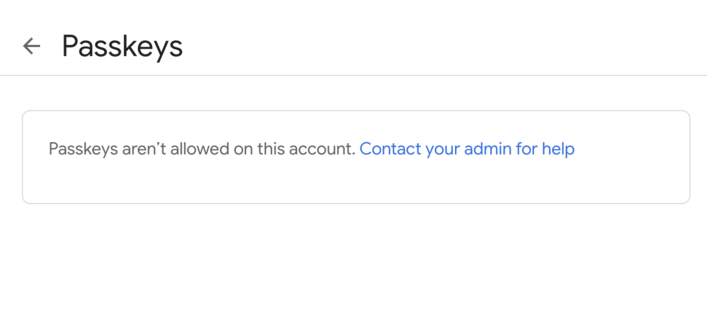
@rmondello Friggin' Google 😑
@sharding This is explained in the blog post. Please read it.
@rmondello I read it. They have a pattern of saying "soon" about features coming to Google Workspace and it taking years (or never happening). I hope it's less true this time, because I'm excited to try it. (I'm not annoyed with you; I'm annoyed with Google, where I used to work, and saw how prioritization of Workspace features happened or didn’t.)
@rmondello that took 15 seconds and most of the time was signing in with MFA

@rmondello This is great!

I'm still looking forward to a future with broader device support though

@emaste What’s your config here? Maybe I can give you some insight.
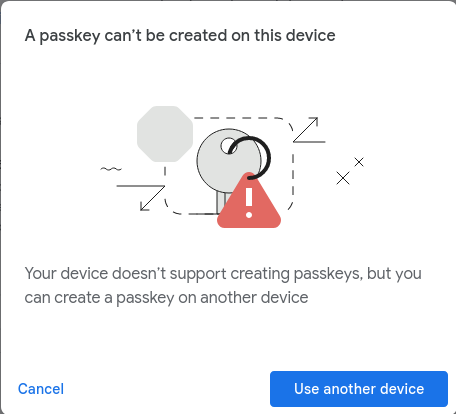
@rmondello This is Chromium on FreeBSD. I expect a somewhat long and winding path ahead...
@rmondello Also it wasn't a Linux device

@emaste @rmondello I mean, I think your device has to support them

Pretty sure that either chromium has to support saving passkeys on googles password thingy or you’d need a password software that supports passkeys

@rmondello it worked like magic with Safari in iOS.
@rmondello I'm curious about the portability of passkeys. How easy would it be to export passkeys from iCloud Keychain and import them into a different passkey-supporting password manager at a future time? Is that a supported use case in the spec/ecosystem?
@rmondello Thanks for the info, passkey created and added to iCloud Keychain. My very first passkey actually 😊
@rmondello so great...Thanks for surfacing this and any work you've done on Passkeys. 🙌
@rmondello Ah yes, Google always treating their paying customers worst
@Bricin i think it’s great they’re taking extra care/time to minimise issues 👏🏾👏🏾

@Craktok I don't disagree with your sentiment ... but why are the Google Suite / paying customers disadvantaged? Seems like a) weird tech limitation, something Azure AD would have and b) contra-purpose to a business.

Or more succinctly "fix whatever discrepancy exists between Gmail and GSuite, you have a bazillion engineers"

@rmondello very cool! Can’t wait to activate it on our google Workspace!

@rmondello

So, call me an idiot here, but I don't see the massive benefit to this over passwords, since it's more or less just putting the access credentials to multiple accounts under access to a single other account or device anyway, requiring the user to have access to multiple services and/or devices that may (or may not) play nicely with each other to begin with.

Just seems like it's trading multiple small-scale failure points for one big one in the long run?

What am I missing?

@rmondello

I know too many folks who already find having to multiple confirm login credentials over multiple devices/identities to be a hassle, not a convenience feature, and more often than not those folks still prefer to keep the same passwords/access credentials between those devices to begin with despite the security risks of that.

Heck, it annoys the bajeezus out of me that Steam more or less requires the user have a smart phone to make use of the application's features half the time.

@rmondello

I also feel like this makes device dependency an even greater risk than it already is/can be for basic day to day tasks, since not all devices (especially not budget ones) have great cameras or fingerprint readers, and PINs are just shorter, more easily deciphered passwords.

Again, I'd love to know why/how something like this is ultimately better, specifically for end users, and most especially for those who may not be hyper-focused on keeping up to date on tech (or just poor.)

@GuerillaGrue @rmondello: I do like the *idea* of unique logins, secure keypairs, all that. But this just seems like it'll increase lock-in for little actual security. I have a flip phone deliberately for better privacy and to avoid distractions; anything mobile-tethered will never work for me. I use pass because GPG is proven tech and if one file's corrupted (which has happened) I'm not going to lose every one of my unique keys. Writing a new browser shouldn't *require* a 1000-programmer team.
@rmondello Sigh, nothing wrong with passwords... Having to use apps for validation/log in only allows for more tracking and restriction of the user...
@arnandegans @rmondello lots wrong with passwords. People use weak or re-use passwords on multiple sites.

@rmondello It was very easy to set up, but now I'm a little confused about how to use it. I set it up in the Google app on my iPhone and the only feedback I got was that it was successful. So, like, am I logged in with the passkey now? Also, do I have to reconfigure my gmail account in Mail.app to keep getting my email?

"Need more input, Stephanie!"

@rmondello enabled it today and it didn't work 😭
@rmondello Is there a place I can go to understand more about passkey and how to setup and use it on iOS devices?
@rmondello Nice to see #Google striving to catch up to #Apple 😉
@rmondello I’d love to be able to use iCloud Keychain just for passkey autofill, but since I use a 3rd party password manager that doesn’t support passkeys yet, I think I’ll have to wait to use it.
@rmondello this is amazing! Great work!!

@rmondello The much-anticipated news has finally arrived for Google accounts, and I've started converting some of mine. Here are my initial thoughts:

The Good: Converting frequently used accounts is a breeze.

The Bad: For infrequently used accounts, the account recovery process (usually through SMS or Email OTP) is necessary before conversion. However, after recovering the account, there's no direct option to use a passkey. Instead, a password must be created first, and only then can a passkey be obtained.

The Ugly: If an account was set up with Google Authenticator a long time ago and it's no longer active on my device, converting to a passkey becomes impossible.

@rmondello just set this up- worked like a charm. Superfan of passkeys
@rmondello I’m so hyped for Passkeys. Like, I actually logged in to Best Buy just to set up a passkey. Passkey access for my Google account will mark the first time I’ve used one for a mission critical login though.
@rmondello I’m having trouble understanding how this is supposed to work. I set up a passkey on my iMac, then when I go to login to Google on my iPhone, it doesn’t recognize that there is a passkey saved in my keychain. I saw the same thing when I set up a pass key for eBay.
@mcelhearn @rmondello Google Chrome support is somewhat half-baked at this point. They can not sync with iCloud Keychain yet: https://developers.google.com/identity/passkeys/supported-environments#macos
Passkey support on Android and Chrome  |  Authentication  |  Google for Developers

Google for Developers
@mlinzner @rmondello I set up the passkey in Safari.
@mcelhearn ugh sorry I misread your first post. This sounds like a Mac to iOS Sync issue then? Did you check if the passkeys are visible on your phone under Settings > Passwords? If not it might be worth checking if Settings > iCloud > Passwords&Keychain > Sync to this device is turned on.
@mlinzner Yes, they sync regularly. But I also saw this when I set up a passkey on eBay. I think there’s something wrong with keychain sync for passkeys.
@mcelhearn ok, that's interesting. For what it's worth, I did set up passkeys for a few of my own implementations, for Mastodon (2FA only) and also for Google. They all synced fine between iPhone and Safari on the Mac.