Mona, the Mastodon client for iPhone, iPad, and Mac is out.

If customization and automation is your thing this is the app to use.

My review on @macstories:

Mona: A Unique Mix of Customization Options and Features You Won’t Find in Any Other Mastodon App https://www.macstories.net/reviews/mona-a-unique-mix-of-customization-options-and-features-you-wont-find-in-any-other-mastodon-app/

Mona: A Unique Mix of Customization Options and Features You Won’t Find in Any Other Mastodon App

Mona is a brand new, highly customizable Mastodon client from Junyu Kuang, the developer of Spring, which is one of the few remaining third-party Twitter clients that still works and pioneered many of the features found in Mona. Mona, which is available on the iPhone, iPad, and Mac, is a power-user app through and through.

@macstories Some of the features and touches you might not notice right away about Mona that I love:

- Scrolling my timeline with the space bar (Advanced Settings)
- The ability to see someone’s followers no matter what server they use
- Opening different accounts in separate divide views
- Timeline search and filtering
- Customizable tabs
- Horizontally scrollable tabs

https://www.macstories.net/reviews/mona-a-unique-mix-of-customization-options-and-features-you-wont-find-in-any-other-mastodon-app/

Mona: A Unique Mix of Customization Options and Features You Won’t Find in Any Other Mastodon App

Mona is a brand new, highly customizable Mastodon client from Junyu Kuang, the developer of Spring, which is one of the few remaining third-party Twitter clients that still works and pioneered many of the features found in Mona. Mona, which is available on the iPhone, iPad, and Mac, is a power-user app through and through.

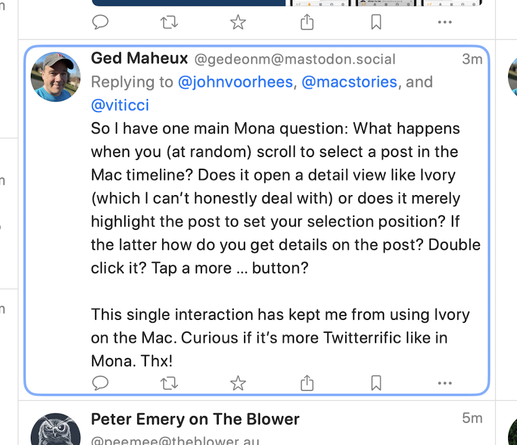
@johnvoorhees @macstories @viticci So I have one main Mona question: What happens when you (at random) scroll to select a post in the Mac timeline? Does it open a detail view like Ivory (which I can’t honestly deal with) or does it merely highlight the post to set your selection position? If the latter how do you get details on the post? Double click it? Tap a more … button?

This single interaction has kept me from using Ivory on the Mac. Curious if it’s more Twitterrific like in Mona. Thx!

@gedeonm @johnvoorhees @macstories @viticci It’s a little of A and B. If you click a random post in your timeline, it opens a detail view just like Ivory, but you can also arrow around your timeline using the up and down arrows to select posts and the right arrow to view the detail view. Here’s what the arrow section UI looks like:
@johnvoorhees @macstories @viticci Ugh. I was afraid of that. Makes it virtually impossible to scroll to a timeline position and set the reading position without extra, annoying clicks. Forcing the user to select only with the keyboard is a non-starter for me. Thanks. Sigh 😞
@johnvoorhees @tantramar Does @MonaApp have a setting to put most recent posts at the bottom? I found “invert threads on timeline” but I’m guessing what I want they would call “Invert Timeline”? That’s my personal white whale feature in a mastodon client.