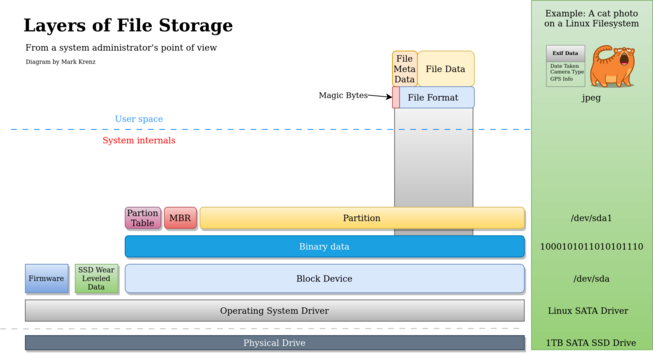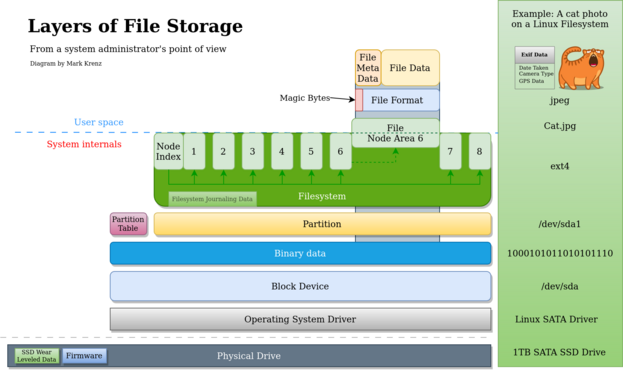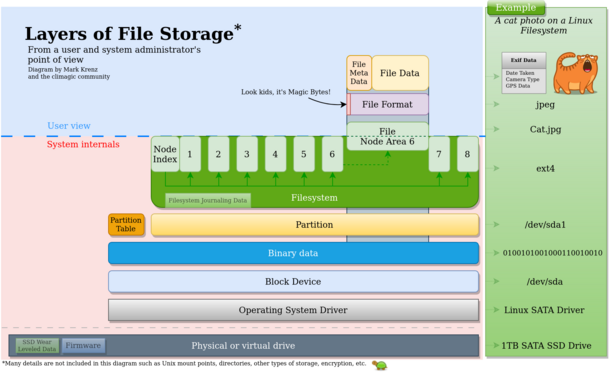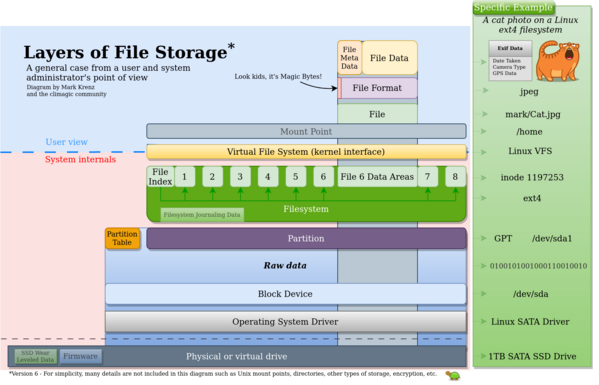
I made these diagrams to generally explain to a college class how file storage layers work on a drive and now when you delete/format the filesystem the file data remains. I couldn't find one online, so made one. What do you think? Any significant issues?
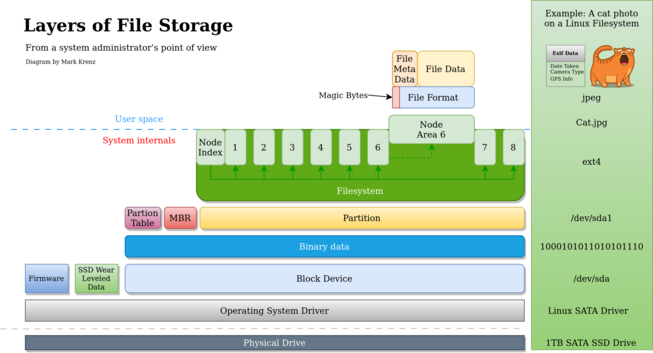
Version 2 based on your feedback. Thank you.
Version 4. Ok, I'm done for tonight. Thanks all.
Version 6. Binary data -> Raw data encapsulating lower layers. Added VFS and mount point. This is getting too big already.

@climagic
I think this picture is close to the limit, if not past it.

It's not possible to visualize all aspects of linux filesystem in a single 2D picture, and with VFS and mountpoints you're already stretching the analogy.

The picture is awesome, don't ruin it by trying to stuff more things into it.

@climagic
as for VFS & mountpoint specifically:

AFAIU they're only involved in metadata operations, once you have an FD and are writing or reading actual bytes in the file they stay out of the way, and that's hard to represent in the picture.

I think their inclusion is a net positive because you already have the block device and its driver, so people might ask "ok but how does /dev/sda1 become /boot", but from the PoV of "which bytes on disk represent what" they're not present.

@climagic "Too big" it's fine, go as far as you like. You aren't approaching the 1906 aerial photo of SF yet: https://www.desktopbackground.org/download/2048x1152/2012/07/27/427440_sanfran-think-atheist_7000x2748_h.jpg
@climagic this is rad
will you publish as SVG?
@duponin Yeah I think I will. Look for an announcement later.
@climagic
I like the sidebar on the right. Makes a nice concrete mapping.
@climagic It sort of implies now that the file has a fixed location on the SSD, though
@climagic I think the VFS filesystem should be under the EXT/XFS/whatever filesystem as the standard calls like fopen, fclose are all fixed kernel functions that are called by all upperlevel filesystems.
@climagic well done, colorful, explicit, beautiful 

@climagic
On most modern systems, the operating system will offer (Linux install) or come with default encryption (Android/iOS) at the OS level. Additional to the (earlier mentioned) possible encryption at the device level.

Also I think _if_ you want a file example with multiple contents. I'd go for a mkv or webm file with 1 video, multiple audio and subtitle streams and their metadata. Or maybe an office file (odt/docx) which are actually zip files that contain a ton of files.

@climagic thanks, exactly what I need to illustrate a conversation with my colleague
@climagic the visualisation of the two top layers may be JPEG specific if it is about the binary file contents.

@climagic you could add more layers if you wanted: gz > tar > eml > MIME > base64 > jpeg > steganographic message.

Of course, you could add infinite containers. Something something it's turtles all the way down.