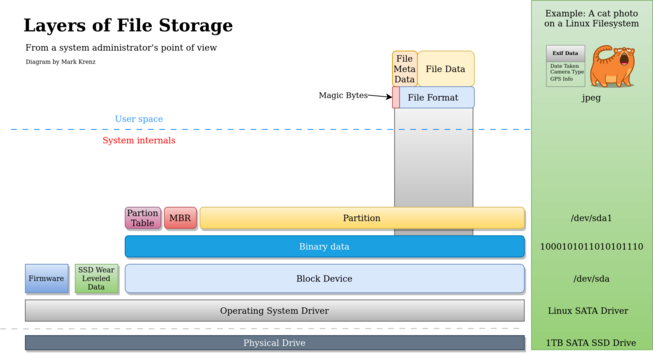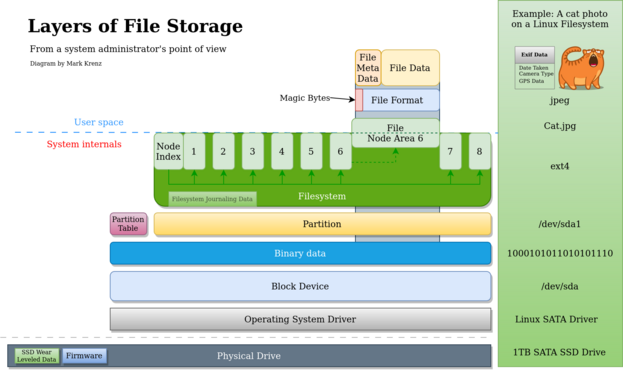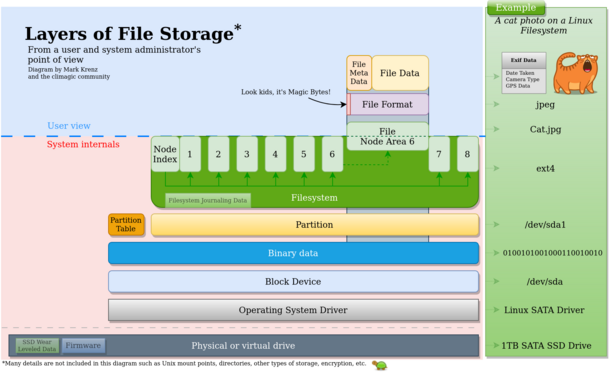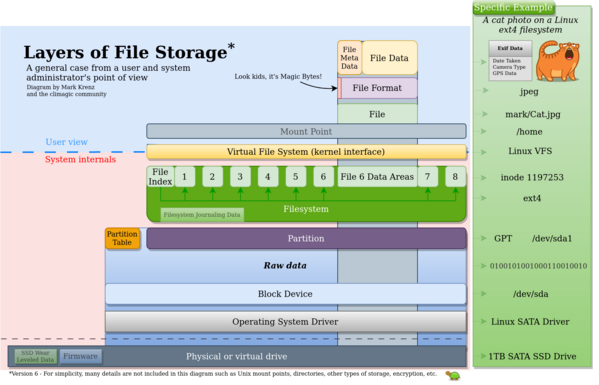
I made these diagrams to generally explain to a college class how file storage layers work on a drive and now when you delete/format the filesystem the file data remains. I couldn't find one online, so made one. What do you think? Any significant issues?
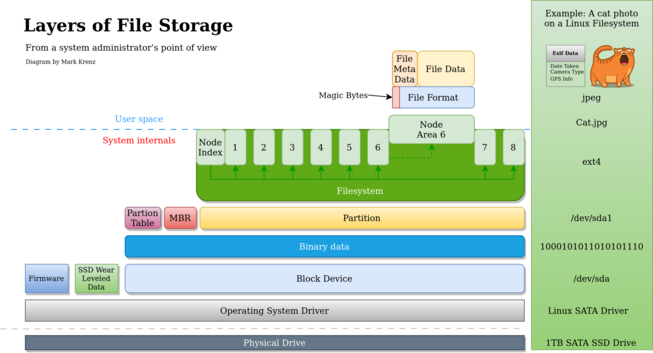
Remember these are beta. There are already some mistakes that people are noticing. For instance the wear leveling and firmware should be at the physical drive layer. Doh!
Version 2 based on your feedback. Thank you.
Version 4. Ok, I'm done for tonight. Thanks all.
Version 6. Binary data -> Raw data encapsulating lower layers. Added VFS and mount point. This is getting too big already.

@climagic
I think this picture is close to the limit, if not past it.

It's not possible to visualize all aspects of linux filesystem in a single 2D picture, and with VFS and mountpoints you're already stretching the analogy.

The picture is awesome, don't ruin it by trying to stuff more things into it.

@climagic
as for VFS & mountpoint specifically:

AFAIU they're only involved in metadata operations, once you have an FD and are writing or reading actual bytes in the file they stay out of the way, and that's hard to represent in the picture.

I think their inclusion is a net positive because you already have the block device and its driver, so people might ask "ok but how does /dev/sda1 become /boot", but from the PoV of "which bytes on disk represent what" they're not present.

@climagic "Too big" it's fine, go as far as you like. You aren't approaching the 1906 aerial photo of SF yet: https://www.desktopbackground.org/download/2048x1152/2012/07/27/427440_sanfran-think-atheist_7000x2748_h.jpg
@climagic this is rad
will you publish as SVG?
@duponin Yeah I think I will. Look for an announcement later.
@climagic
I like the sidebar on the right. Makes a nice concrete mapping.
@climagic It sort of implies now that the file has a fixed location on the SSD, though
@climagic I think the VFS filesystem should be under the EXT/XFS/whatever filesystem as the standard calls like fopen, fclose are all fixed kernel functions that are called by all upperlevel filesystems.
@climagic well done, colorful, explicit, beautiful 

@climagic
On most modern systems, the operating system will offer (Linux install) or come with default encryption (Android/iOS) at the OS level. Additional to the (earlier mentioned) possible encryption at the device level.

Also I think _if_ you want a file example with multiple contents. I'd go for a mkv or webm file with 1 video, multiple audio and subtitle streams and their metadata. Or maybe an office file (odt/docx) which are actually zip files that contain a ton of files.

@climagic thanks, exactly what I need to illustrate a conversation with my colleague
@climagic the visualisation of the two top layers may be JPEG specific if it is about the binary file contents.

@climagic you could add more layers if you wanted: gz > tar > eml > MIME > base64 > jpeg > steganographic message.

Of course, you could add infinite containers. Something something it's turtles all the way down.

@climagic

These are really nice. Good job!

@climagic I'm a fan! If I were to change something, I think the "Binary Data" layer isn't necessary, because there's binary data at nearly all the levels anyway.
@climagic Actually now that I look at it more, I understand why the "binary data" is there, it's indicating that the stuff above it is binary and the stuff below it isn't (or not entirely anyway). I wonder if there's a more intuitive way to convey that without making the diagram more complicated.
@climagic maybe use GPT instead of MBR these days
@Elbrar For a brief moment I read that as ChatGPT. ;) GPT is something specific though and I realized that the partition table is really part of the MBR anyways, so I just removed it and called it partition table to make it generic. Thanks for the feedback.
@climagic the master boot record was just the section in front of the partition table - like you did in the earlier versions.
But we should primarily teach the new GPT layout, that needs Boot entries in UEFI-BIOS and can't be bootet directly into the (now missing) MBR.

@climagic
Might be a bit too much, but maybe include boot code? Also, might want to use gpt instead mbr as that is more common these days.

Not sure why you have partition table separate from mbr, as mbr contains the partition table.

Or do you mean something other than:
https://en.m.wikipedia.org/wiki/Master_boot_record
?

Master boot record - Wikipedia

@encthenet Yeah I messed that up and already changed it to just be partition table. Thanks for the feedback.
@climagic I miss inodes and link count in these pictures.
@bartjan The left side is the general case and the right side green box is a more specific case of each of the layers. I'll try to make that more obvious.

@climagic Another way to approach it is (using typical Linux/UNIX implementation) that each file that you can see in a directory is a directory entry pointing to an inode. Usually there's only one directory entry referencing an inode, so when you delete it, the inode is marked as free, as are indirect blocks and data blocks referenced by the inode. A free block is usually not zeroed. Lots of inode images around.

Kudos for including the overprovisioning (wear leveling) blocks used by hardware.

@climagic
The physical SSD itself does some magic that the operating system may not have access to. I think it does its own wear leveling and manages extra storage that is not even known to the system (overprovisioning). It also may encrypt data itself (a thing that is often implemented badly).
@climagic I think the binary layer does not really belong here. It's not an architectural layer. It's a representation which has nothing to do with the rest?
@climagic VFS is also more of a “container “ for the filesystems that have the “specific” functions that are attributed to them. You can have applications simply bypassing the entire filesystem stack and have their own method of storing and retrieving data. Databases do a lot of work on raw block devices without using any filesystem for example
@climagic let me know if I can be of any help as I’ve seen a humongous amount of problems related to this in my stints as a support engineer for a storage company.
@climagic I love it! Makes me remember the time I did learn that a long time ago. I never donated or sold a hard drive afterwards as I don’t have software to securely erase data 🤪🙃