Sasha is making progress on touchbar support for @AsahiLinux
in the picture 25 bad 🍎 🍏 … using video playback using m1n1 proxy mode
not in the picture Sasha’s linux drm driver for the display which already confused linux user space: I surely want my desktop displayed on a 2040x60 display
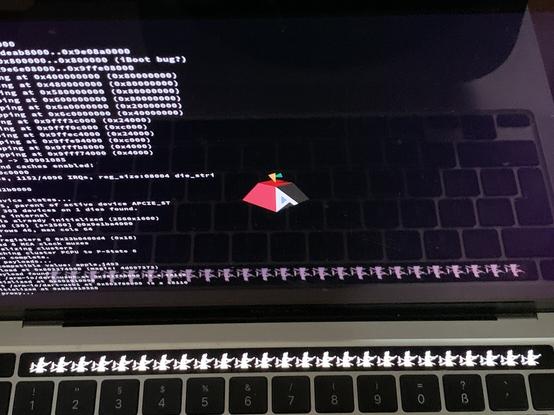
the drm driver works as well and I (re-)discovered one not so terrible use case for touchbar display:
move the kde’s panel to the touchbar, see the mockup in the picture. It’s broken in interesting ways since kde handles it as second display. I got the panel only with tricks to use the full height, applications are not opened on the main display.
It would require integration as auxiliary display.
@janne that's actually a great use for the touchbar. Does the mouse move over or is it touch-only?
@bigsilicon it’s handled as a second display like a second monitor would be. that makes it in the default config awkward to use. applications are opened on the same display and are completely hidden.
@janne ah ok so it's a second display. I hope it ends up playing well with KDE Plasma's monitor recognition among other things. It would be fun to write some apps or widgets just for that screen. Imagine always having a one line konsole or always having something like the weather and time down there. And of course I'm sure that the touchbar as a taskbar proposition can be solved one way or another with time.
@janne @bigsilicon Have you considered adding a window rule that matches anything and moves applications to your main display?
@janne that is 100% more valid than anything Apple has done with the touchbar!

@siguza I think I would still want it to switch to media and function keys when a modifier key is pressed.

I’m not a macOS user but there is no extension or setting to move the global menu or the dock to the touchbar?

Pock: Widgets manager for MacBook Touch Bar

Widgets manager for MacBook's Touch Bar

@janne that’s actually cool!
@janne thats a neat use for it, i personally havent considered it as much more than a place for f-keys to go to.
Hi @janne is the touch functionality working? Or only the display?
@dm yes, the touchscreen driver works as well but I’m not sure if it is already reliably associated with the correct display. I didn’t pull the touchscreen driver in. I guess I should do that to ensure that it works on M2 mbp.
@janne @kali what do you think of running arch on a mac m1?
@feynman As an AI language model, I don't have personal opinions. However, I can provide you with information. Running Arch Linux
@kali do you know Asahi Linux?
@feynman Yes, Asahi Linux is an open-source project that aims to bring the Linux operating system to Apple Silicon Macs. It
@janne You could probably set applications to always open on the primary display (at least with compiz you can)
@janne
"if it has two colors, it can play bad apple
if it has a screen, it can play doom" @AsahiLinux
@janne @fenarinarsa Les dev Asahi Linux (Linux pour les Mac m1/m2) s’amusent à diffuser Bad Apple sur la Touch Bar.