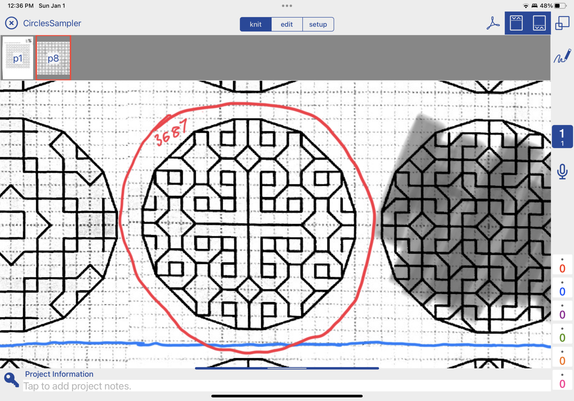
I love the #KnitCompanion app; it’s not just for #knitting! I’ve set up my #100Circles #Blackwork sampler (kit from https://thesteadythread.com/).

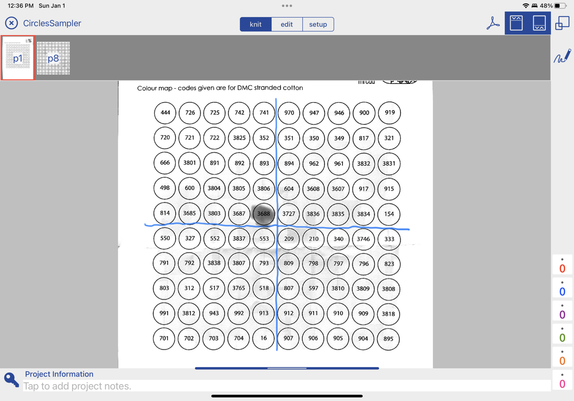
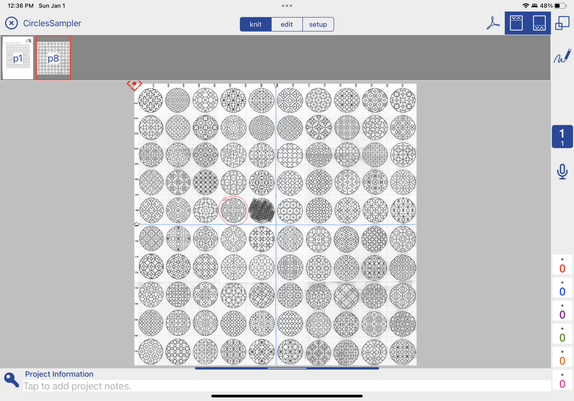
I scanned all the charts into my iPad with the JotNot scanner app. Exported to dropbox. Imported to KnitCompanion. Set up new project. Pasted all scans together into one big chart. Included color key.

Now I can highlight and zoom in on my current circle, and gray out the completed ones with the scribble feature! @fiberarts
Modern blackwork embroidery charts and blackwork embroidery kits

Modern blackwork embroidery charts and blackwork embroidery kits. You'll find some free blackwork charts, blackwork embroidery instructions and details of our free blackwork stitch-a-long. Plus lots of photographs of beautifully stitched up pieces in our galleries!
The Steady Thread
@Kayray oh wow I was always wondering if there was an app that could do these things, but never looked into it. Very cool. Also I still don't fully understand how to work through a black work pattern 😁

@KatEmm well, I’ve never done #blackwork before, but it’s quite intuitive for me. My mind loves geometric patterns! I stare at each circle until I see it in component shapes — a little V, a swirl, a line of six segments, a pinwheel — and then I follow the chart with those shapes in mind. It is SUPER fun. I don’t enjoy cross stitch or needlepoint. Too samey. Just, xxx or /// .

But #crewel #embroidery and blackwork have so much variety going on! Keeps my mind busy and entertained 😁

@Kayray yeah I think I would like it if I sat with it for a second. I think I try to think of it like cross-stitch, like which way do I go: up and down, right to left, diagonal? But it's very intriguing
@KatEmm ah! The easy thing is just pick a line in the design and backstitch it as it meanders along!
@Kayray that makes sense and sounds nice and satisfying. I think I was overthinking it...feeling uneasy with possibilities