 Michael Waaler
Completed my first #frontendmentor challenge using #parcel
There was a learning curve, particularly with regard to how it handles relative paths. But I really liked being able to use custom media queries and nested media queries!

Also, I was surprised to learn that you can use a #CSS custom property as the value for an attribute in HTML, like so:
<svg class="header__toggleIcon" width="20" height="20" xmlns="http://www.w3.org/2000/svg">
<g fill="var(--toggleModeFontColor)" fill-rule="nonzero">
<path d="..." />
</g>
</svg>
I'm not sure yet why it works...
 Massimo Villa
@10high SVG world is full of surprises :) By the way, when using inline SVGs you can just delete
xmlns="http://www.w3.org/2000/svg"
to save some bits.
@massimovilla oh, thanks for the tip!
@massimovilla Actually, it turns out that #parcel (which uses htmlnano) does automatically strip xmlns="..."
After your comment, I was curious to see whether it would.
After your comment, I was curious to see whether it would.
 Ana Tudor 🐯
@10high It works because it's a presentation attribute (spec link https://svgwg.org/svg2-draft/styling.html#PresentationAttributes). That is, can be set both as an attribute on the SVG element or as a CSS property in a stylesheet.
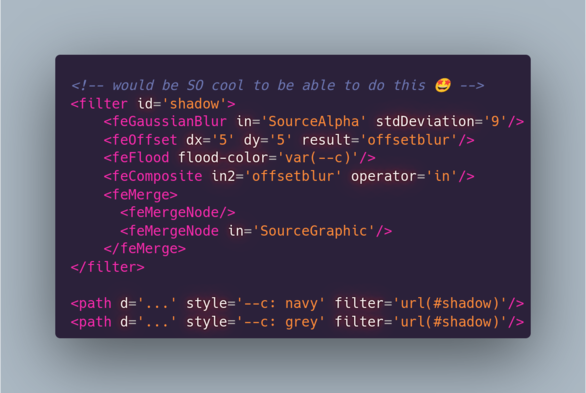
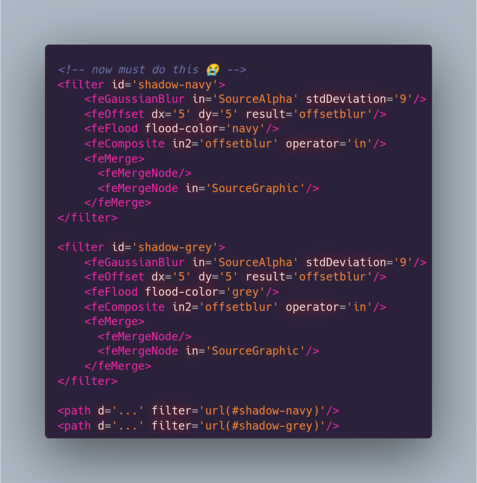
Unfortunately, attributes inside SVG filters or gradients can't be set to custom properties. I'd kill for that to be possible using the value of the CSS custom property set on the element the filter or gradient is applied on. As it is, I need to create two separate almost identical filters or gradients.
@anatudor thank you! I'm gonna need some time decode all the info though 😆