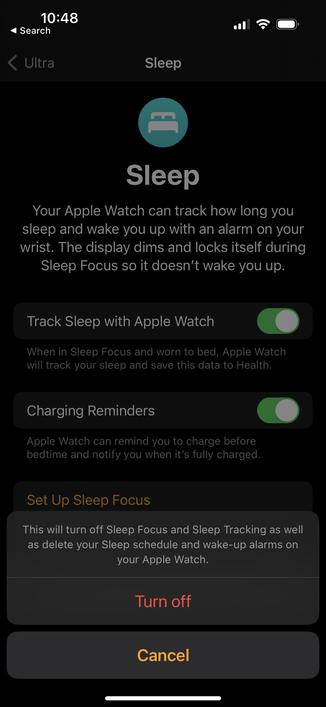
People with multiple Apple Watches for testing or sleep or whatever:

How do you reliably prevent the “other” one (at a given time) from sounding your daily wake-up alarm from your iPhone?

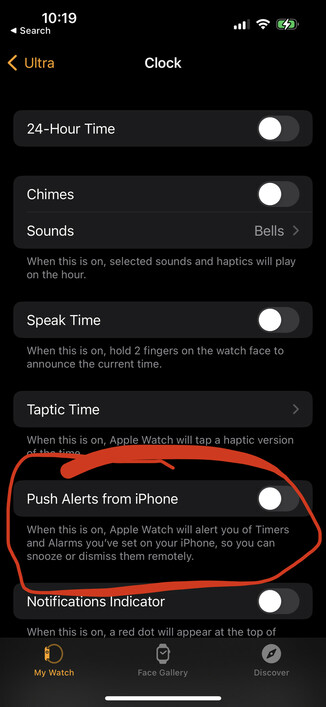
This “Push Alerts from iPhone” setting in Watch -> Clock is off for both watches, but sometimes, the “other” watch sounds the alarm anyway.
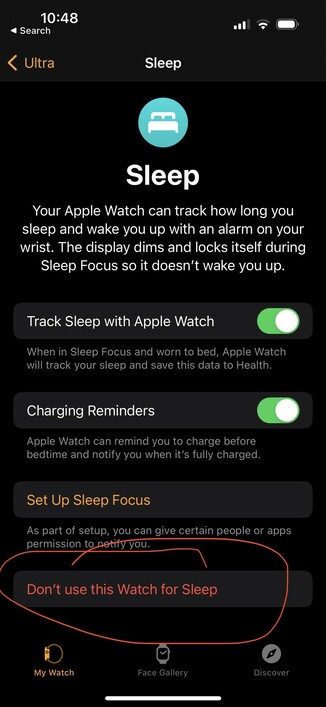
This looks like the answer!

Watch -> Sleep -> Don’t use this Watch for Sleep

Thanks, @captainslim !

https://infosec.exchange/@captainslim/109512751562435199

Chris Johnson (@[email protected])

Attached: 1 image @[email protected] I have two watches, one of which I wear to sleep. I select Don’t use this Watch for Sleep in Sleep settings in the Watch app on the non-sleep one.

Infosec Exchange
(Also, I don’t want to get into a whole thing, but this is a common situation — asking a question, and wanting to share the answer with commentary and thanks — in which I really miss quote-tweeting.)
@marcoarment I mean, it feels like any client should be able to basically build in quote tweet support. It’s just a custom link expansion and a button to make it convenient, no? You won’t get the repost count in the same way, yes, but that seems less important.