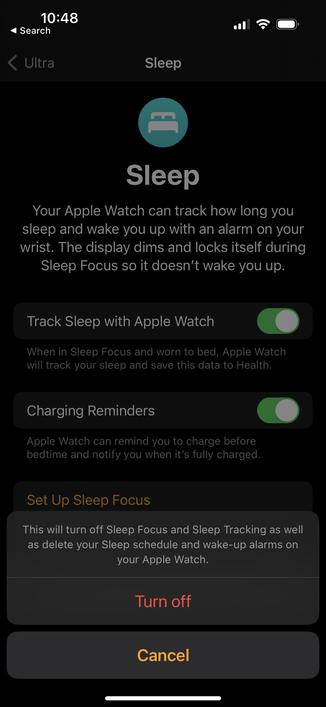
People with multiple Apple Watches for testing or sleep or whatever:

How do you reliably prevent the “other” one (at a given time) from sounding your daily wake-up alarm from your iPhone?

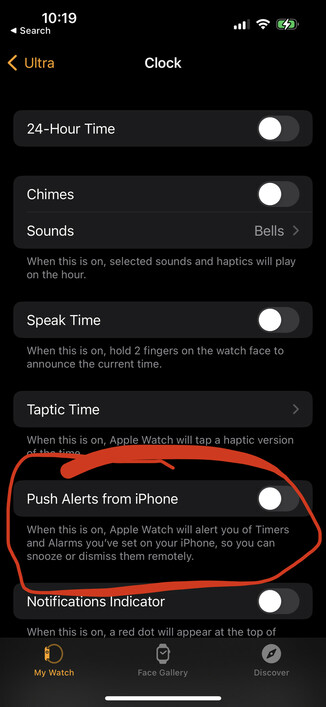
This “Push Alerts from iPhone” setting in Watch -> Clock is off for both watches, but sometimes, the “other” watch sounds the alarm anyway.
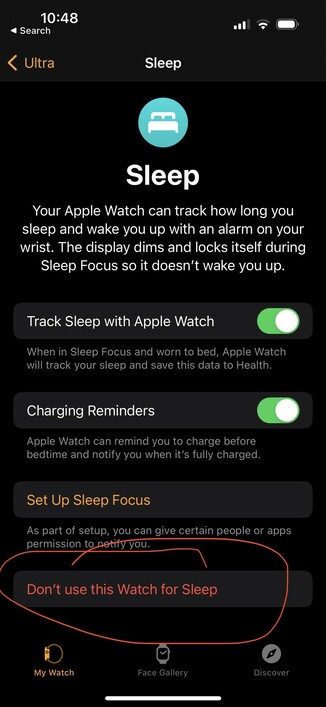
This looks like the answer!

Watch -> Sleep -> Don’t use this Watch for Sleep

Thanks, @captainslim !

https://infosec.exchange/@captainslim/109512751562435199

Chris Johnson (@[email protected])

Attached: 1 image @[email protected] I have two watches, one of which I wear to sleep. I select Don’t use this Watch for Sleep in Sleep settings in the Watch app on the non-sleep one.

Infosec Exchange
@marcoarment @captainslim Oh man thank you so much - it drove me nuts that not only do both watches go off, they also didn't sync and you have to dismiss both separately (even if you cancel your alarm).