 emptywheel
On December 19, 2020 (the day the Jan6 riot was announced), Proud Boy Nicholas DeCarlo was on the phone with Gavin MacInnes.
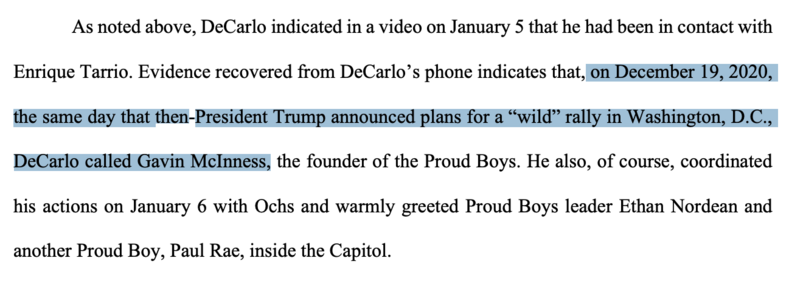
On December 19, 2020 (the day the Jan6 riot was announced), Proud Boy Nicholas DeCarlo was on the phone with Gavin MacInnes.
The Nicholas Ochs sentencing memo describes a "Skull and Bones" chat with 12 people including Enrique Tarrio and Ethan Nordean.
https://www.documentcloud.org/documents/23318823-221125-ochs-sentencing-memo#document/p3/a2176123
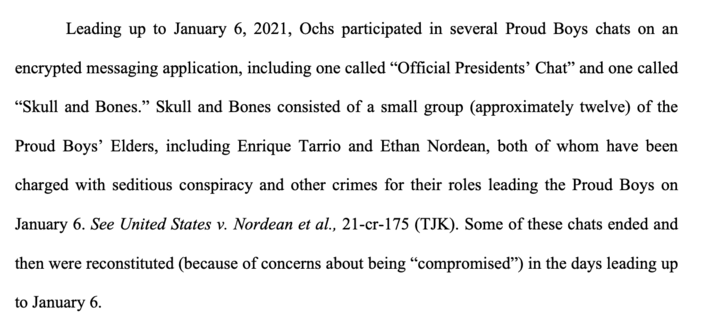
@emptywheel Production thoughts. Mastodon images for some reason overflow the boarder (at least in Chrome browser version), and this makes them impossible to read without expanding the image as illustrated below:
1/4 #USPol #twittermigration #mastodontips #mastodonmigration
@emptywheel It is kind of a pain, but this can be fixed by first pasting the clip into a paint program and giving the clip whitespace on the left and right. For example:
2/4 #USPol #twittermigration #mastodontips #mastodonmigration
@emptywheel One more thing to know is that the entire stupid clipping thing can be disabled by the user.
See this post by the partner account Mastodon Migration @mastodonmigration >>> https://mastodon.online/@mastodonmigration/109412270108506718
Unfortunately clipping is the default setting, so the clipped text is what most users will see.

Attached: 1 image TIP OF THE DAY Change The Image Cropping Setting One thing about Mastodon that is pretty annoying is that by default embedded images are clipped at the edges. This can make it impossible to read text images without expanding the post. You can disable image cropping in your preferences under Post Layout, making it much easier to browse your feed. #twittermigration #mastodonmigration #NewUser #mastodontips #feditips @mastodonmigration
 Rubicon