
Listen up, newbies πŸ“£

You all want to know how to find interesting people to follow on Mastodon -- and I'm going to tell you how πŸ˜ƒ

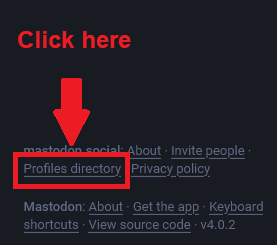
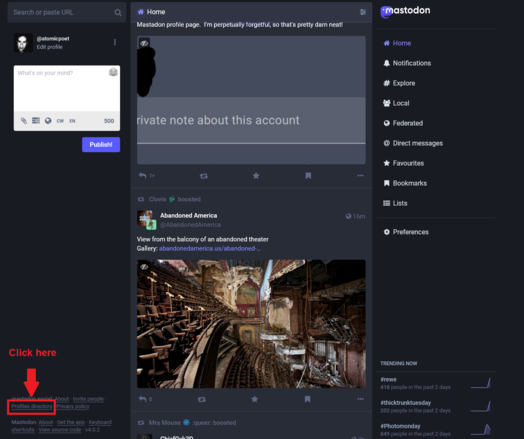
Go to your instance's profiles directory. This is located on the lower left corner of your screen.

Or visit: https://<nameofinstance.com>/directory

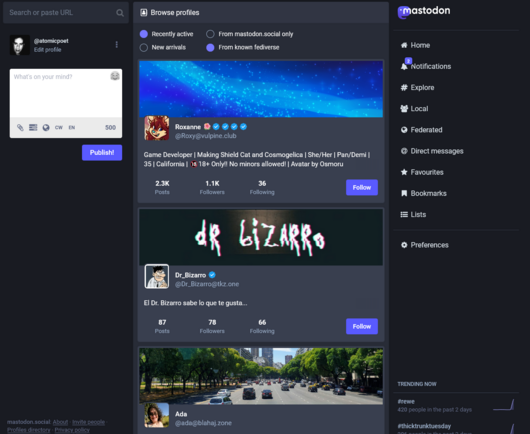
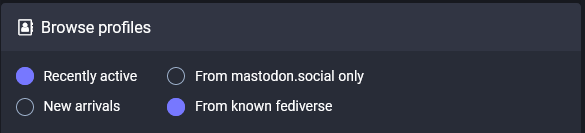
There you can sort profiles by:

* Recently active
* New arrivals only
* From your instance only
* From known Fediverse

See screenshots.
This isn't the only way to find new people to follow. However, it's one very good way that's convenient from Mastodon.

It will also help you find other people on your instance.

The reason I encourage everyone to visit their instance's profile directory is because *this* is your core community on Mastodon.

It's who populates your instance's local feed.

And it's who you'll primarily interact with before you follow folks from the broader Fediverse.

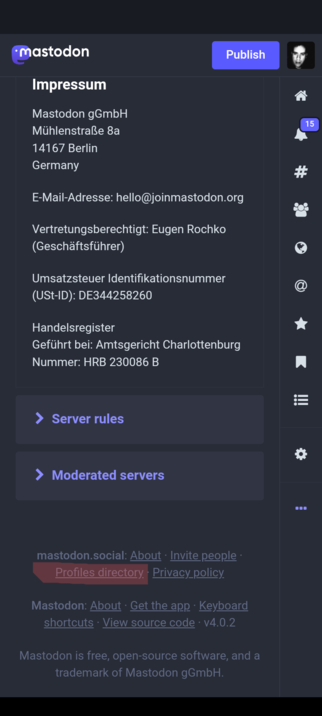
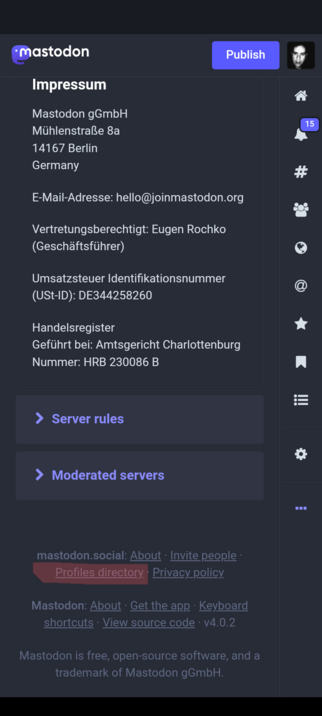
Also, for those wondering how to find this on mobile device.

On the mobile *web* app, look for the "..." icon on the right sidebar. Scroll to the bottom of the page. There you'll see a link to "Profiles directory".

See screenshot.

(NOTE: This may or may not work for dedicated mobile apps found in app stores.)

@atomicpoet I’m trying to figure out how to visit this page from the Mastadon app. Do you know if that’s possible or do I need to view through the site?

@Ace I haven't used Mastodon's mobile app.

When I use Mastodon on a mobile device, it's is through the mobile web UI -- which I've added to my phone's home screen.

It works very well as a mobile app.

@atomicpoet ok, thanks for responding. :)
@Ace use the 3-points button at the bottom right. (on the mobile site)
@atomicpoet
@vosje62 @Ace Yes, this is where you find it.
@atomicpoet
It's also who is collectively creating your server's federated feed through their choices of who to follow and boost. It DOES matter which instance you're on and what their values and reach are.
@atomicpoet it’s also the community that will set the reputation with other instances.
@atomicpoet That just means before five minutes are up.
@atomicpoet Thank you so much, Chris, for making this helpful guide with screenshots. And I absolutely love that Mastodon sent me a notification after I boosted it to show me the edited version. Nobody else in social media that I know about does that. Thanks again!
@atomicpoet Well that is super helpful… thank you! πŸ™
@atomicpoet great tip, thank you. πŸ™‚ Can't see this directly in #tuskyapp but easy enough to use the View in Browser link from your profile to get there.

@atomicpoet A minor correction. Looks like the direct link is:

https://<nameofinstance.com>/web/directory

@daihard Got it. I think it's different on different instances due to differing versions. On yours, it looks like it's https://toot.bike/explore
Explore toot.bike

Discover users based on their interests

Mastodon hosted on toot.bike
@atomicpoet Interesting. Looks like both toot.bike/explore and toot.bike/web/directory work, though showing different UIs. Thank you for trying!
@daihard I think /web/directory is only accessible if you're logged in.
"My browser can't find nameofinstance.com" :innocent:
@atomicpoet my favorite way is to explore a local feed:
For example:
https://hachyderm.io/public/local
Hachyderm.io

Hachyderm is a safe space, LGBTQIA+ and BLM, primarily comprised of tech industry professionals world wide. Note that many non-user account types have restrictions - please see our About page.

Mastodon hosted on hachyderm.io
@atomicpoet mine doesn’t look like that 😩
@atomicpoet So far, 1st wk, I just look at posts on my instance and the 'verse, follow some, reply to some. Get followed. It's gradual.
@atomicpoet Thanks anymore tips will be appreciated.