

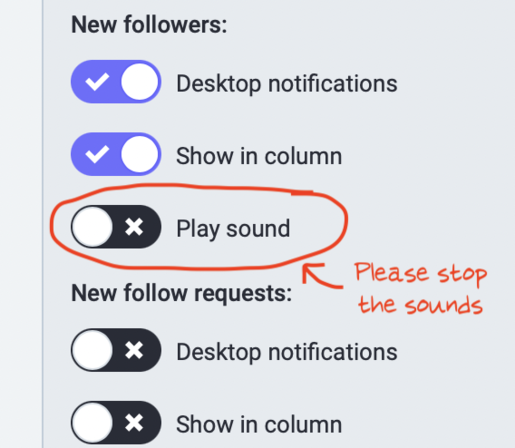
A little embarrassed that it took so long to notice, but notifications have their own settings page where you can turn off sounds. They were really starting to bug me in the web interface.

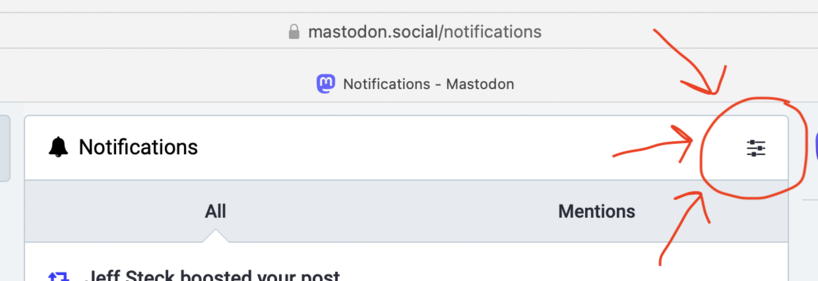
Go to your notifications page, click the sliders button in the upper right-hand side of the middle column, then turn off sounds for everything.
@mcnees Wow, THANK YOU! That was bugging me too! It's odd to me that that menu is *not* included at all under "Preferences", but rather it's own separate menu atop the Notifications page. That is... uhh... not an intuitive interface. But thank you for that, no more useless annoying little "audio blips" when I'm trying to get work done and my browser happens to still be open.
@icesheetmike @mcnees Using the pinafore interface (https://pinafore.social/) which looks more intuitive and ๐Ÿ˜‡ twitter-like... haven't found any audio options, but settings are much more logical and friendly.
Home ยท Pinafore

An alternative web client for Mastodon, focused on speed and simplicity.

@icesheetmike @mcnees Click on the link in my post and enter your instance URL. It will take it from there ๐Ÿ˜‡