 Dr. Emma L Briant🐕🇬🇧in🇦🇺
Anyone know how to silence the annoying noise mastodon makes in the browser version please? I’ve tried looking through my settings…
 Nadine Milde 🌍
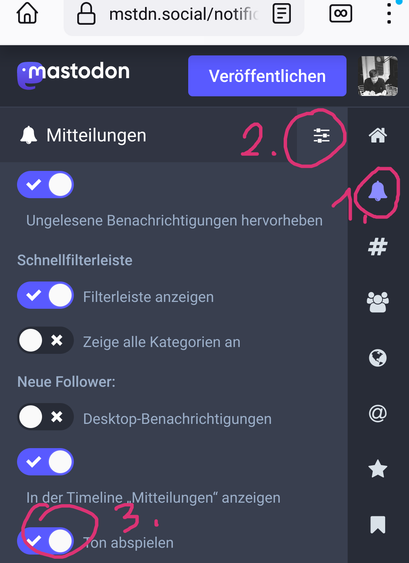
1. Click the "bell" icon for your notifications.
2. Top right of the notifications: click on the settings icon that looks like three slide controls
3. Et voilà: all the settings pertaining to your notifications, where you can toggle on /off sound for favorites, new followers and more.
(Besides the general preferences, the sub-functions have specific preferences that you can always reach w/those same 2 steps: 1.click on the funtion icon to the right, then 2. the slider icon.)