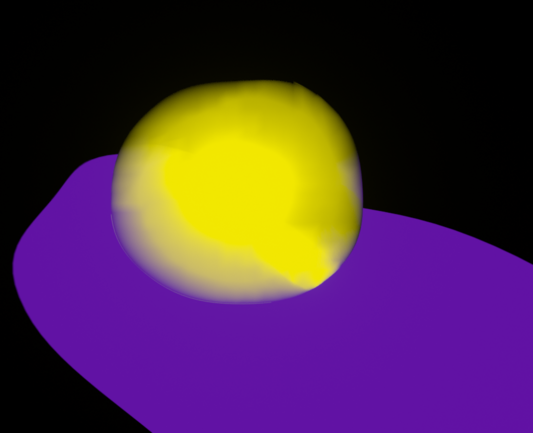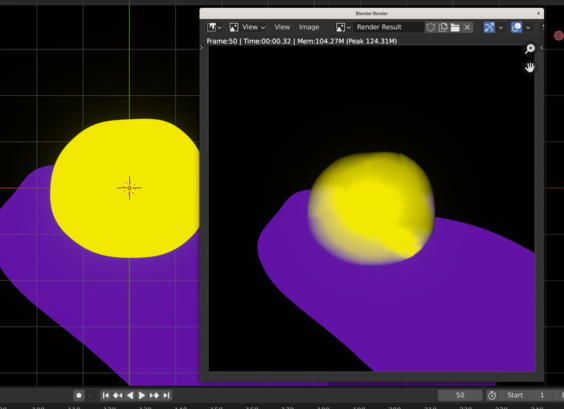
I'm exporting an animation from #blender using #geometry nodes and flat RGB coloring -- but I'm getting a strange flickering on export that is never visible in viewport. Using #eevee for export.

The #node setup basically fills a curve circle with noise-modified points with bezier handles for smoothness.

Anyone have any ideas on why I'm getting this unwanted flickering?

Thanks!

@K_REY_C are you exporting the individual frames, or a video directly? If the former, what do the flickered frames look like?
@tomdavies Video directly (ffmpeg video). Fill Curve is N-gons. Elements are flat, extrusion doesn't seem to have an effect.
@tomdavies The flickering does appear on the "blender render" compositing screen though - but I have nothing set up in a compositing chain.
@tomdavies Just rendering an individual frame also producing this undesirable result. It's odd.
@tomdavies But the viewport shows the same frame without issue.
@K_REY_C I’m sorry, but I don’t know what else the issue might be. I work in Cycles mostly.
@tomdavies Thanks for the assist! Now I'm laughing at myself! You know what it was that was causing this weird issue? "Motion Blur" was checked. Apparently that looks very weird with limited geometry, a flat plane, and no shadows.
@K_REY_C There you go! Glad you managed to get it working 😀
@K_REY_C Could it be some kind of denoising pass?
I would also normally recommend exporting the frames as images, then putting them together using either Blender’s video editor or an external program, but I'm not sure that would help this issue.