Mastodon tips (brief)

1. Server choice - tricky
2. Add a pic and bio
3. I prefer 'Advanced web interface'
4. And the 'Light' theme
5. Listen to long-time users
6. Tip your server admins
7. Hashtags pretty important
8. Put Alt text on pics
9. Use Content Warning if in doubt
10. Pin introduction post
11. Do some boosting
12. Follow interesting people
13. Hashtags can be followed too
14. DMs not secure
15. Be respectful
16. Thank you, people who run this
#mastodon #tips #MastodonTips #tootorial

@davewalker very basic question - there’s no ‘attach’ symbol when I compose a toot - it’s just allowing basic text - so how do I attach a photo? Copy/paste from photos app doesn’t work. I’m mainly here to share my art 😊 Thank you!
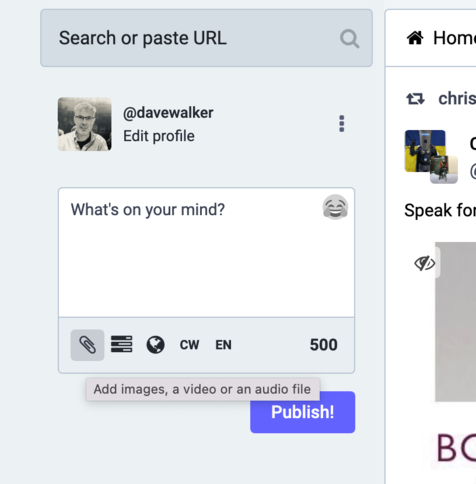
@Rabbithole On desktop there should be a paperclip icon in the grey bar below the compose box allowing you to attach an image. And I'd be surprised if there's not something similar on whichever app you might be using.
@davewalker there’s no desktop - it’s a super-basic view, laid out just like Twitter, but just a handful of icons down the side: 1. Mastodon logo (nothing happens if I tap it) 2. Home 3. Search 4. Notifications 5. My profile pic (account, presumably) and 6. Settings. Plus the compose icon at the bottom, but no sign of an ‘attach’ option anywhere, unfortunately. (Thank you again for trying to help BTW!)
@Rabbithole No problem - let's try and work this out! Do you see this box on the left hand side?
@davewalker no, just the vertical list of icons per my last message
@Rabbithole Are you using an app or a browser? (By 'desktop', I was meaning when you log in to Mastodon on a browser on a computer - sorry for confusion.)
@davewalker I’m on my iPad, hence using the app that’s allegedly for iPhone and iPad (!)
@Rabbithole OK, just put it on my ipad, and I see the problem! Will get back to you shortly.