Mastodon habits I'm trying to lock in, rather than revert to my Twitter habits:

1) use CWs liberally
2) when threading, set first post to "public" and the rest to "not listed"
3) don't forget the description text when posting images (had to work on that in Twitter too)
4) throw in hashtags like it was Tumblr or Instagram when you want to reach beyond your followers
5) pin and visit hashtags to find more people
6) boost a lot

@pbinkley CWs? Sorry, I’m new
An increasingly less-brief introduction to Mastodon

An increasingly less-brief introduction to Mastodon - Mastodon.md

Gist
@straydogstrut aah! Thanks. Presumably that’s a settings thing you choose?

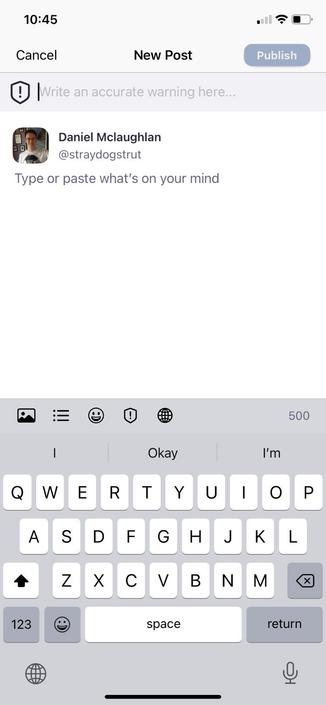
@robtherunt When writing your Toot, there is a ā€œCWā€ button you can select to add a Content Warning.

When you activate the button, another field appears above the edit field where you can enter some explanatory text that will be visible before the option to view the rest of the Toot.

I don’t know Mastodon well enough yet to know what CWs people use, but I’d expect ones for violence/trauma/suicide etc.

There is a similar ā€˜Mark image as sensitive’ option when sharing photos.

@straydogstrut thanks for the explanation. I’m using the mastodon app which doesn’t seem to have that button (or I’ve just not noticed it), so presumably the web version has more functionality.
@robtherunt Looks like it’s the little shield icon with an exclamation mark in the Mastodon app😊

@straydogstrut hmm! I’m not seeing that. I’m using the mastodon iPad/ iPhone app. Maybe it’s not available on that. I’ll check out other apps.

Thanks again for the assistance.

@robtherunt @straydogstrut the official Mastodon app isn't actually very good on iOS or Android. On iOS, Metatext and Toot! seem well regarded, and on Android, Tusky is pretty good
@johnchivall @straydogstrut thanks for the heads up.