 Erik
Erik Scott Hanselman ✅👸🏽🐝🌮
Some Mastodon tips for someone with ONE DAY'S EXPERIENCE. Turn on the Advanced Web Interface - it's like tweetdeck. Make Columns. Verify yourself with links in your sites and rel="me". Consider your sounds/notifications for sanity. Go to https://fedifinder.glitch.me or https://twitodon.com and get an export of who you follow on twitter and import it here to follow the same folks. Turn off sounds. Note that Bridges exist to Twitter for your favs.
 Paul Scott
@shanselman Thanks for the tips! Perfect timing.
 Michael Welch
@shanselman I tried a few years ago to set up links and never understood how to do it. I see you have it working. Are there decent instructions now. I take it you add a link to your domain in your profile and then ???? Do Something on your domain.
@shanselman ok. Looked at your website and see your link back to mastodon. So I got that part. So then you just had a link to your site from your bio?
@shanselman never mind. Think I figured it out. Will wait a bit to see if it worked.
@shanselman oh now it makes sense. The green checkmark is fake. But I can see my blog link is now green/verified. Was expecting a green checkmark. No wonder I couldn’t get it to work 3 years ago. Thanks for serving as an example. 😀
@mgwelch note that I am seeing blue verified checkmarks on other servers but they are just custom emoji on that instance. This instance doesn’t support that emoji.
@shanselman got it. Now I know I need to check the about box to see verified sites. And I need to use the web client. The iOS app I have doesnt distinguish verified sites.
@mgwelch ya they just hired a new iOS developer. This is early days
 𝒜dam 𝒮cheinberg // sethadam1
𝒜dam 𝒮cheinberg ⭕ (@[email protected])
Adding ": verified :" (without the spaces) to your username displays a badge. I love this as a little dig at Twitter. But for real, to verify yourself, you can use a link on your website.
@sethadam1 @shanselman cool. Didn’t work for me. I just ended up with :verified: in my name
@mgwelch @shanselman Do you see that in my name, or do you see a blue check?
@sethadam1 @shanselman I see a blue check for you. But not for me.
@sethadam1 @mgwelch interesting little bit of Mastodon trivia here. Each server has a GET rest endpoint that includes custom emojis. One of your servers has that custom emoji, but the main one does not.
@sethadam1 @mgwelch custom emoji are configured on a server by server basis, and you can literally put anything you want there. So verification checks are not a thing here. Instead, focus on verifying the links that you add to your profile with REL = “ME “
@shanselman @sethadam1 yep. Done already.
@sethadam1 @mgwelch checks out, you are verified, now send me eight dollars in bitcoin
 Thomas Bolon
@shanselman @sethadam1 @mgwelch the verified emoji is just a pun directed at  . Regarding the verified status on your bio, note that for github the only way is to add your mastodon profile as a link in your github profile. See my profile for example https://github.com/tbolon
. Regarding the verified status on your bio, note that for github the only way is to add your mastodon profile as a link in your github profile. See my profile for example https://github.com/tbolon
@styx31 @shanselman @mgwelch Yep - we know. Just fun to mock Twitter, where a blue check is also worthless now.
@styx31 cool. It worked
 Jonathan Joelson
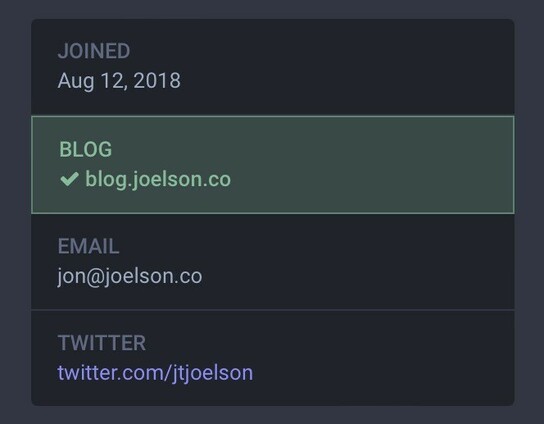
@sethadam1 @mgwelch @shanselman it’s driving me crazy that I added that rel=“me” link to my mastodon profile on my blog 5 days ago and it’s still not showing up as verified… not sure if I did something wrong or if the mastodon.social servers are crapping out under the load 😅
 Juan Alvarez
@shanselman @sethadam1 @mgwelch you can see those emojis, from every instance, here: https://emojos.in/
 n3wjack
 Latchkeycodes
 Rebecca
@shanselman Good advice! It's easy for those of us who've been here a while to forget what settings we changed to make things work smoothly.
 Alexandra Freeman
@shanselman Something else I found really useful when your timeline seems empty was to follow hashtags!
 Miss MattieMac
@shanselman Thanks for this. Would you explain this part further?
Verify yourself with links in your sites and rel="me"
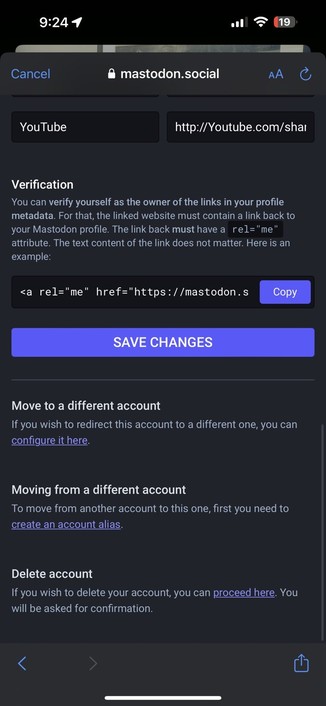
@MissMattieMac surely. You add a meta tag in the header of your own personal website or blog (view source on mine to see) that points back to your mastodon page. Then mastodon will mark your links as verified and turn them bright green, thereby allowing you to "verify yourself!" See details in your account preferences.
Ohhhhh, thank you ! I thought I had to add it to every link I posted here :D
 Michael Kempe
@shanselman Great tip exporting/importing followed Twitter accounts. Used twitodon.com few minutes ago. Sadly only 3 Twitter accounts were found from my followed list at the moment 😕. Let‘s see what the future will bring. 👍
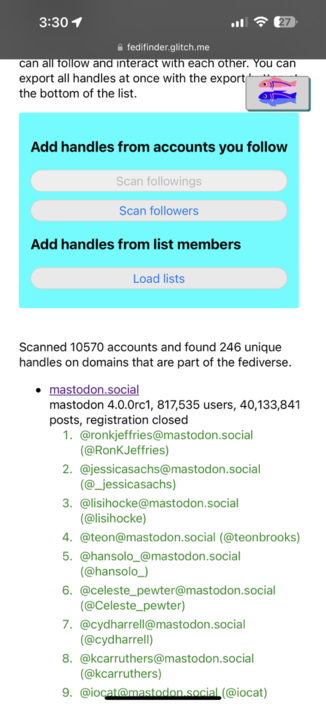
@TheKempe ya try it in a week. Or also try https://fedifinder.glitch.me/
 Kiwidinok
@shanselman
thank you for the advanced web interface tip
thank you for the advanced web interface tip