
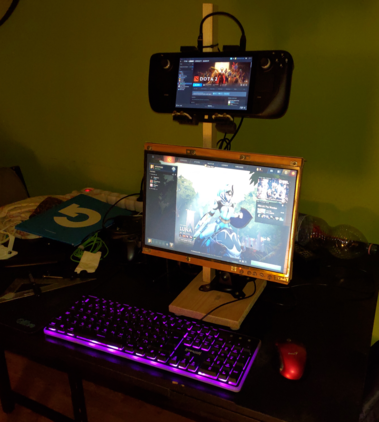
@gamingonlinux I'm ready for the LAN-party this weekend (yes, we still do that). Turns out, the deck is awesome for such use. The monitor is a LCD panel salvaged from an old broken notebook, complete with a hand-crafted wooden frame :D I know, I'm not much for aesthetics, but it works!

@tbari @gamingonlinux

Cool! What games do the kids play at LAN parties now a days? My last LAN we played Battlefield 1942 and the ol' Alien vs. Predator. The old old one. 😎

@tbari

Are you having issues with the external display and the "big picture" interface? I've found if I exit to desktop mode and come back, _some_ pages will fit the screen, but others are just abhorrent... and sometimes scrolling in a list just jumps unintuitively (off by one errors, off by two errors, off by -1 errors...)

If you aren't, I notice you have the interface on the deck screen; did you need to set a variable to do that? (I don't know that I want that, because it's too small for me to read with my eyes...)

@tbari also, got any links for "external screen from old laptop" hardware kits? (:
@Truck https://youtu.be/6L0TPJEXiAI
This is kinda what I did 🙂👍
How to turn Old Laptop Screen into External Desktop Monitor

YouTube
@Truck I don't use the big picture mode. This is desktop mode, the deck's display is configured as the 2nd display. I just moved the steam window onto that display.

@tbari

I've _sort of_ enjoyed big picture mode, but ... some games just plain work better without it.

Of course, slay the spire is currently broken for any external controller no matter WHAT mode you're in, so...
(and yes I said "Nope, this is totally not working properly on steam deck" because it's not working at all on any linux with an external controller after the latest patch.)

@tbari @gamingonlinux all this incredible work and you choose to play dota