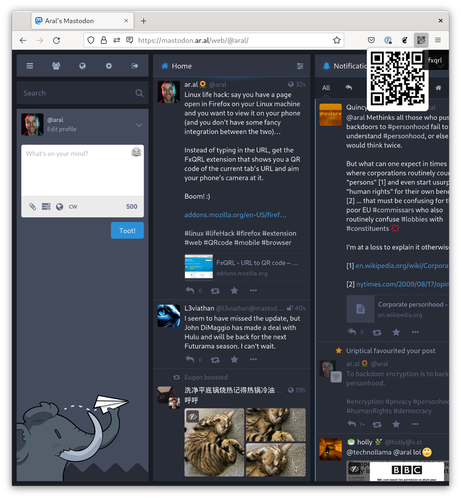
Linux life hack: say you have a page open in Firefox on your Linux machine and you want to view it on your phone (and you don’t have some fancy integration between the two)…

Instead of typing in the URL, get the FxQRL extension that shows you a QR code of the current tab’s URL and aim your phone’s camera at it.

Boom! :)

https://addons.mozilla.org/en-US/firefox/addon/fxqrl/

#linux #lifeHack #firefox #extension #web #QRcode #mobile #browser
FxQRL - URL to QR code – Get this Extension for 🦊 Firefox (en-US)

Download FxQRL - URL to QR code for Firefox. Turns your URLs into QR code images using built-in library, no network connection is made in this add-on.

@aral or you can send it on your phone with KDE Connect 
@Evv1L Hence the “fancy integration” bit ;)
@Evv1L @aral I've used kde's clipboard thingy to turn urls into QR codes also.

@aral
I usually need it the other way round. If I searched stuff on my phone, I want to later read it on my desktop PC in detail.

The problem is, I don't have access to a camera there all the time.

Usually I take the route of syncing via notes app or something and delete the link later.

@chfkch I don't know how it is on Linux, but for me Firefox by default syncs. If I just type in a URL, it will turn up whatever page I have on a open tab from my mobile.
@aral if you are using Firefox sync there is a tab in the new tab drawer on Firefox for Android that shows you tabs open on other devices.
@moftasa Am not. Wouldn’t either :) (I’ll use their browser as long as there isn’t a better one funded from the commons but I won’t be giving Mozilla, Inc., any of my data.)
@aral fair point.
@moftasa @aral Worth noting that you can run your own Sync server if you'd so like: https://github.com/mozilla-services/syncstorage-rs
GitHub - mozilla-services/syncstorage-rs: Sync Storage server in Rust

Sync Storage server in Rust. Contribute to mozilla-services/syncstorage-rs development by creating an account on GitHub.

GitHub
Oh thank you so much! Did not know about this, and it looks super useful!
@aral you have to be in front of your computer with your phone nearby. I'm too lazy for this life 

@aral another option is to use KDE Connect (that works on Gnome or any linux DE. It is not tied to KDE plasma, it is just developed by their community)

https://userbase.kde.org/KDEConnect#Share_and_Receive

One of the features is sending and receiving URLs between your devices.

KDEConnect - KDE UserBase Wiki

@aral
Or if you use DDG just put 'qr' in front of the URL:
@tanghus @aral doesn’t have to a an url, either, any text in quotes will work. Very handy to type iMessages on a proper keyboard and then copy them to the phone’s clipboard by scanning the qr.
@aral You can also use your Firefox-Account. Click on your profile-pic, send tab to device, choose the phone. Done.
@kaffeeringe Thanks, Steffen. But I do not have nor do I want an Firefox account. I have no intention of giving Mozilla Inc. any of my data :)
@aral my command line version: copy URL then: wl-paste | qrencode -t utf8
@aral or sign both devices into A Firefox account and use Send to device