Sony Suspends Orders for the New ZV-E10 as Chip Shortage Continues

Sony has announced that it has suspended orders for the ZV-E10, a camera it only announced this past summer. The company has added it to a list of products it has ceased production for as the chip shortage continues.

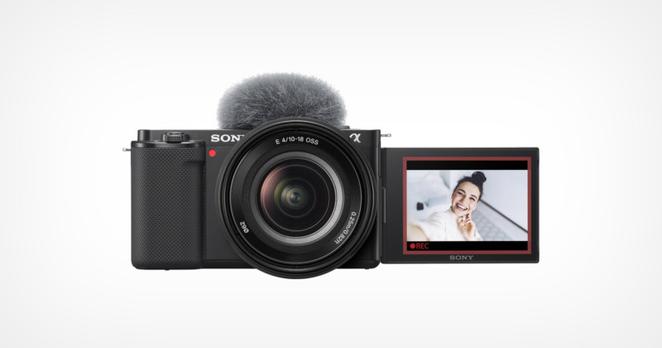
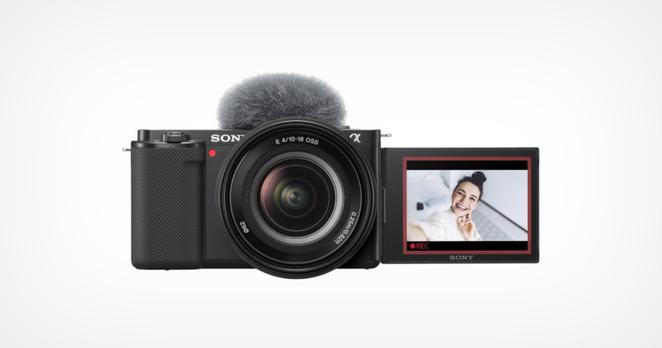
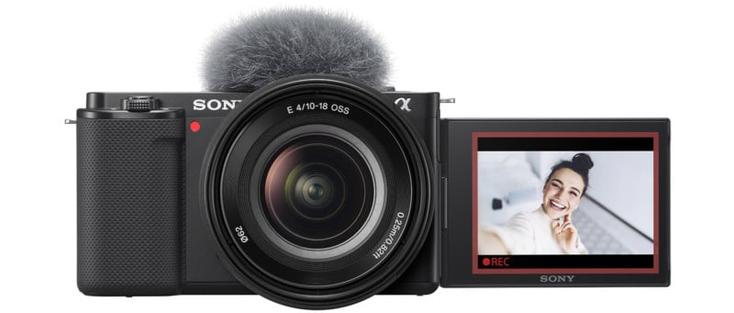
The ZV-E10 was announced this past July and positioned by Sony as a follow-up to the ZV-1. At the time, Sony told P etaPixel that the ZV-1 sold very well and because of that, a more robust offering for the vlogging market was released in the ZV-E10. The camera is mainly a reconfigured a6100 and features a set of hardware changes that specifically target vlogging: a swing-out screen to self-monitor from in front of the lens, the removal of the electronic viewfinder to make the camera even more lightweight and compact, a directional three-capsule microphone for good audio pickup without adding an external microphone, and a one-touch mode button that replaces the dial to switch from stills for video.

The camera was met with mixed reception. While some found it to be a solid addition to Sony's camera line, PetaPixel 's Ryan Mense was less enthused.

"From an ideological standpoint, the Sony ZV-E10 has the potential to be a great content creation camera. There are some simplifications made that for the right person, can be seen as losing distractions rather than losing features," he wrote in his review. "However, when it comes to execution I did not find the camera to be special in many areas. Except for the most basic of well-lit shots, the autofocus is not as reliable as I would want, and worse, filming with the camera feels like I need to rush to beat the overheating."

That opinion might be more widely held than perhaps anticipated, as Sony has decided to cease orders for the camera and is prioritizing other electronics over it, not even six months after it was announced. As spotted by Sony Alpha Rumors, the company published a notice on its website, citing the lack of availability of parts.

Currently, with regard to digital imaging products, parts procurement is delayed due to the effects of global semiconductor shortages.

Therefore, we will suspend the acceptance of orders from our distributors and customers at the Sony store as follows for specific models with tight supply.

Regarding the resumption of order acceptance, we will consider it while observing the status of parts supply, and will inform you separately on the product information page.

We sincerely apologize for any inconvenience caused to our customers.

We will do our utmost to deliver the product as soon as possible, and we appreciate your understanding.

The ZV-E10 joins the Alpha 7 II series, the a6400, and the a6100 as cameras that Sony has paused production of. Sony has been prioritizing its more popular cameras and pausing the production of older and weaker selling units, which points to a likely scenario of poor sales for the ZV-E10 in its sub-six-month stint on the market. It is not clear when or if Sony will offer these cameras again once the chip shortage is finally a thing of the past.

#equipment #news #4kvideo #cameranews #chipshortage #compactcamera #industry #production #sony #sonyzve10 #suspended #vlogcamera #vlogging #youtube

DJI Action 2 Review: A Two-Ounce Action Camera With Kick

What if a company released a high-end action camera that didn’t look exactly like the device that popped into your head when you read “action camera”? That's what DJI did with the Action 2, and it’s got… magnets?

Design and Build Quality

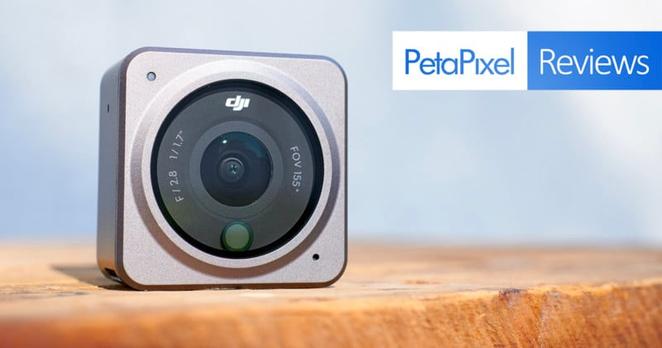
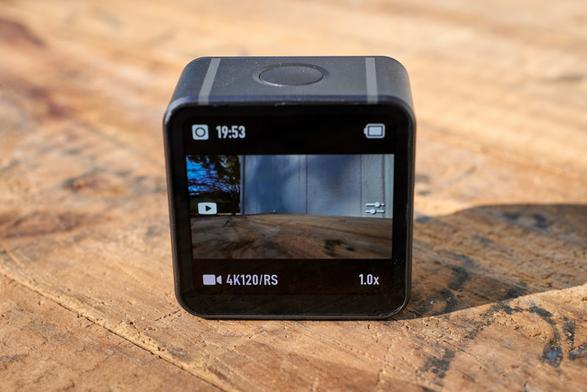
Even though it’s the DJI Action 2 by name, it has been completely revamped and does not hold much in common with the original OSMO Action (its predecessor) as far as its design goes. The camera unit is a compact 1.5 x 1.5 x 0.87 inches (39 x 39 x 22.3 millimeters) in size and weighs only two ounces (56 grams). Perhaps one of the few commonalities with the previous generation is that it’s still dustproof and waterproof up to 10 meters without special housing.

A big lens covers most of the front face and offers a 155-degree field of view with a fixed f/2.8 aperture. At the bottom of the lens is a color temperature sensor, there is also a microphone on the bottom right, and a status light on the top left. The topside of the unit features a prominent dual-purpose power and record button.

On the back of the device is a 1.76-inch OLED touchscreen display covered with Gorilla Glass. Navigating the touchscreen is for the most part responsive, even while wearing bulkier touch-enabled gloves. To make the most of a small display and a device that has no control buttons other than the one to record, swipe gestures and touch is leaned on by the software extensively. As a result, expect an initial learning period you'll have to nail down and figure out to remember where everything is hidden before you can reliably operate the Action 2 on the fly.

One trick I had to learn is that although many of the interface settings are depicted as a wheel you scrub or swipe through, it’s far more accurate to tap along the wheel to the next setting. For example, tapping the shutter speed setting up twice to go from 1/60 to 1/80 to 1/100 rather than attempting to swipe 1/60 to 1/100 in one motion. When I swipe directly to the setting, it never seems to stick to where I want it when I let my finger off the screen.

The biggest omission I’ve come across in using the Action 2 is the lack of profiles for saving a batch of settings. As it is, every time you want to move from shooting a certain resolution at a certain frame rate with certain stabilization, exposure, and color settings, every little thing needs to be individually switched and the adjustments for those span multiple menu locations. I would love to see the ability to save out groups of settings so that they can be recalled with a couple of taps.

The bottom of the Action 2 camera hides what is the camera’s defining feature: a magnetic expansion port. The magic of this device is its ability to magnetically attach other modules and accessories without always needing the physical screw-in connectors. When I reviewed the GoPro HERO 10 earlier this month, I was tempted to criticize the prong-style connector in that system because it has always been so annoying to work with compared to any quick-release system out there. While that’s true, it’s also been around forever, and the decade or so's worth of accessories exist for it making it almost above critique at this point. Call me shocked when I saw what DJI had cooked up.

Magnetic Modules

The DJI Action 2 ships in a combo with either the Front Touchscreen Module or the power module. The Front Touchscreen Module adds a front-facing monitor that acts the same way as the one on the back of the camera. Additional benefits to using this module are an extra 90 minutes of battery on top of the 70 minutes of the camera, plus an additional three microphones to record stereo audio coming from every direction.

If you choose to use the Power Module, that’s an additional 110 minutes of power to the camera. This module does not have extra microphones, however both modules do have a microSD card slot to expand the 32 GB internal storage of the Action 2 camera.

Magnetic Accessories

Like any action camera, the mounting accessories are what takes the system up a notch. DJI has a number of new magnetic products available that make use of the unique Action 2 connection system including a lanyard and headband. The headband wasn’t yet available for review and I found the lanyard to be frighteningly dicey and wouldn’t hold the Action 2 securely enough. The two that I found most compelling were the Remote Control Extension Rod and the Macro Lens.

This extension rod is of course useful for self-filming and has built-in mini-tripod legs. Of note here is the tiny, detachable remote control that can be magnetically attached to the rod to operate the Action 2 from your gripped hand or removed and used to remotely trigger the camera via a Bluetooth connection. I really like the usefulness of this, but one big flaw is that the magnetic connection between the extension rod and remote is very weak. I’ve had it accidentally pop off a couple of times and I’m just lucky I saw it happen before it was lost forever.

The other Action 2 accessory worth mentioning is the Macro Lens. The Action 2, like any other action camera, has a fixed focus lens that depends upon the fact its vast depth of field inherently covers almost everything in front of it. Almost everything, because it still has its limits when objects are very close to the camera. The DJI Action 2 Macro Lens is a magnetic attachment that simply pops right onto the front of the camera and allows for focus to be achieved at extremely close distances. It’s an either-or situation, so anything that’s not in the macro range cannot be in focus. What I like is that it brings a new type of look to an action camera with its out-of-focus blurring and has the potential to add variety to a video sequence. One problem though is that it does not come with a case, so you have to find your own way to keep the glass safe and clean.

All these magnetic products do share something in common in that they love to pick up sand. Before connecting anything, I would need to wipe items clean of magnetized sand as I learned the security of the connections can be finicky with a little debris in there.

Image Quality

Inside, the Action 2 sports a 1/1.7-inch sensor and is capable of recording video up to 4K 120p. For stills shooting, the camera captures 12-megapixel images in RAW or JPEG. The ISO range in both stills and video is 100 to 6,400, and in my testing, the noise is well-controlled for much of that. The below photos show a downscaled version on the left and a 100% crop on the right.

At ISO 1,600, we see the first notable drop in image quality but details still hold good enough for me. I think for stills, ISO 3,200 is more questionable as the fine line details disappear, however on the video side of things it’s not entirely bad. For video, I think the only ISO I would be cautious of is the maximum of 6,400. Then again, for a casual vlog, I don’t think anything here is entirely off the table and to the point where it’s a complete distraction of the content.

To give you a sample of real-world use, the video below was recorded entirely with the DJI Action 2. It was all done in 4K with various frame rates conformed to the 24p project timeline. The camera was set to the flat D-Cinelike color profile and I corrected that as well in the finished video. For the sake of this review, I only used the internal microphone and recorded at various distances away from the camera to give you a sense of its limitations. External microphones may be connected to the Action 2 by a USB-C to 3.5mm adapter.

At the end of the video, there are a couple of different clips where I used timelapse mode in-camera. One thing that I liked here is that timelapses can be recorded as both a finished video as well as simultaneously saving individual RAW files. The first time I did a timelapse, I forgot to change the resolution from 1080p to 4K, but in the end, it was saved by allowing me to use the RAWs instead.

Much More Than a Refresh

I have a great appreciation for the concept of this modular action camera and how easy it is to work with the magnetic expansion port. The ability to slap together different modules or even run the Action 2 bare depending on the need is smart and effectively forward-thinking.

From the standpoint of image quality, I would not suspect that the footage came off of a tiny little camera that weighs just a couple of ounces if I hadn’t been there to see it happen. Footage can hold itself together even in low light up to ISO 3,200 which is impressive in its own right.

On the software side, it could use refinement in its touch sensitivity and I would appreciate DJI building out the ability to save a batch of settings to be recalled later. It’s a brand new camera with a brand new interface, however, so I’m more understanding that these things aren’t permanent and can be fixed down the line.

Are There Alternatives?

The GoPro HERO 10 Black was just released and follows more in the footsteps of what the original DJI Osmo Action was. It features 5.3K video recording at up to 60 frames per second, a dual-screen design, greatly improved responsiveness over the previous model, and all the other reliable features that have made GoPro the king of action cameras for so long.

If you’ve been waiting around to see how the DJI Action 2 would compare and are disappointed in this totally different direction it went with, I believe that the GoPro HERO 10 is a worthy alternative.

Should You Buy It?

Yes. The clever people at DJI have come through with a unique camera and a budding ecosystem of accessories that deliver high-quality performance.

#equipment #reviews #4kvideo #action2 #actioncamera #camerareview #compactcamera #dji #djiaction2 #macrolens #magnetic #module #review #video #vlogcamera #youtuber

DJI Action 2 Review: A Two-Ounce Action Camera With Kick

A radical redesign that pays dividends.

Sony Unveils the ZV-E10: A 4K Camera for Self-Filming Vloggers

Sony has announced the ZV-E10, an interchangeable lens APS-C camera that targets vloggers. With a larger sensor and the ability to swap lenses, Sony believes this camera steps up what the ZV-1 started.

While the ZV-1 was largely based on the RX100 pocket cameras, this new ZV-E10 takes many aspects of the Alpha 6100 and reconfigures them to primarily support video creation. Among the modifications are a swing-out screen to self-monitor from in front of the lens, the removal of the electronic viewfinder to make the camera even more lightweight and compact, a directional three-capsule microphone for good audio pickup without adding an external microphone, and a one-touch mode button that replaces the dial to switch from stills for video.

Inside, it uses the same 24.2-megapixel sensor used in the a6100. The camera does not have sensor-shift image stabilization, but it does have digital stabilization for video by way of a small crop. The lens mount accepts any of Sony’s 50-plus E-mount lenses, not to mention countless third-party offerings.

The ZV-E10 can record video up to 4K 30p and also do slow motion in camera in 1080p up to 120 frames per second. Both of these do a maximum bitrate of 100 Mbps. There’s also Real-time Eye AF, face detection, and touch tracking while recording video. On the stills side, there’s subject recognition for humans and animals.

Some of the new tools for vlogging include a variable soft skin effect, background defocus button for one-touch change of aperture, and a product showcase setting where the object closest to the camera will pick up focus with a smooth transition.

Also, what would a YouTuber be without livestreaming? The ZV-E10 can simply plug into a computer or compatible smartphone to work as a webcam. It uses USB Video Class (UVC) and USB Audio Class (UAC) standards for quick plug-and-play compatibility.

The new mirrorless camera uses the Sony NP-FW50 battery and takes a single UHS-I SD memory card through the battery door. Connectivity options include a microphone jack, headphone jack, USB-C port for file transfer and charging, and a micro HDMI port out.

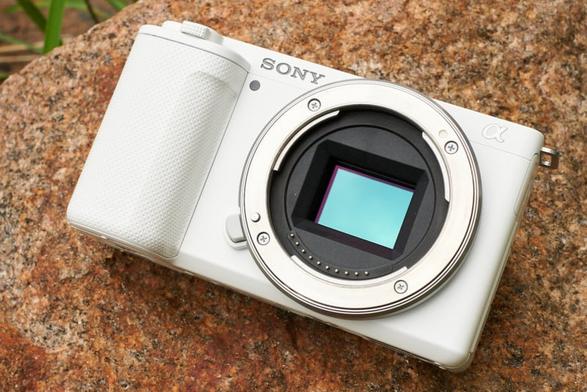
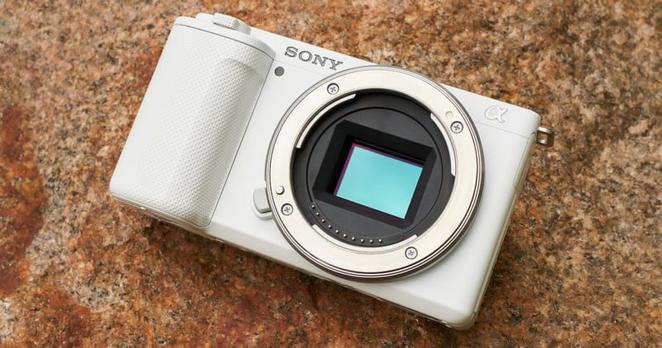
The Sony ZV-E10 will be available in either black or white and be priced at $700 for the body only. There is a kit option available that comes with the Sony 16-50mm f/3.5-5.6 OSS lens that will cost $800.

#equipment #news #4kvideo #cameranews #compactcamera #sony #sonyzve10 #vlogcamera #vlogging #youtube

Sony Unveils the ZV-E10: A 4K Camera for Self-Filming Vloggers

Sony believes this camera steps up what the ZV-1 started.

Sony ZV-E10 Review: Small, Simple, and Suffering Because of It

Just as the Sony ZV-1 modified the RX100 compact cameras to put vloggers first, the new ZV-E10 is streamlining the Alpha 6100 to focus on creatives primarily dabbling in self-filmed video.

A 2019 survey showed that 29% of children aged 8 to 12 years old aspire to become a YouTuber. This was three times the number of those that wanted to be an astronaut. Regardless of anyone’s personal stance on vloggers, it’s undeniable that as a company expected to make a profit, catering to these creators is important. With that in mind, Sony is continuing to refine its product line with ZV cameras.

Build Quality and Design

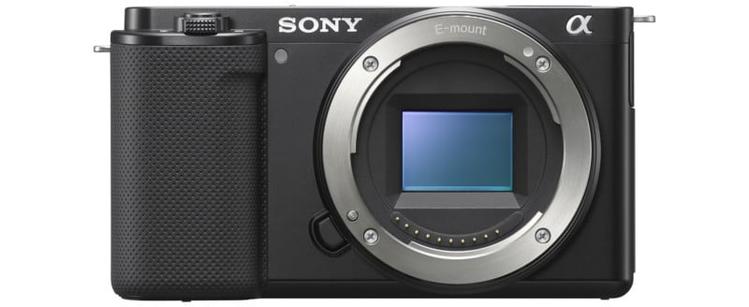
If you were tasked to design the smallest possible camera that featured an APS-C sensor, an E-mount, and an adequate grip, the ZV-E10 would be that camera. There is nothing in the form factor that is extra. It’s quite thin, barely housing a good-sized sensor before falling out the other side. The height could not possibly be made any shorter as the lens mount butts up against the top and bottom edges. While the grip is minimal, it does enough to improve handling and makes room for the shutter button and zoom control, not to mention the battery housed within. It’s immediately clear that having a compact size was one of the primary goals with this product and has an effect on everything else to fall in line.

The ZV-E10 weighs 12.1 ounces (343 grams) with an NP-FW50 battery and UHS-I SD memory card installed. Add in the 16-50mm f/3.5-5.6 OSS kits lens, and we’re talking about a one pound (0.5 kilograms) setup good to go. For most people who record themselves with one arm extended out, the lightweight camera is a strong positive.

Unfortunately, yes, it does take the smaller “old-style” Sony battery and not the ones present in the company’s newest full-frame cameras. Coming back to the size, though, the width of the NP-FW50 is already much thicker than the depth of the ZV-E10’s main chassis, and the battery’s height completely takes up the vertical height within the grip. A larger battery couldn’t work unless drastic changes were made.

As a camera meant to look inward on the person handling it, there wouldn’t be much point in having a viewfinder. The ZV-E10 goes without, and once again the size is compacted further. There is, however, a more suitable implementation of the vari-angle touchscreen LCD that can flip out to monitor oneself in front of the camera. The default screen brightness is too dim to monitor outside and needed the “Sunny Weather” setting enabled in the display settings, leading to faster battery drain.

The camera uses a more simplified set of physical buttons and dials on the body compared to the Alpha 6100. Rather than a mode dial on the top, there is a mode button that cycles between stills mode, video mode, and S&Q (slow and quick) mode. In order to further specify what shooting mode I want to use, such as shutter priority, aperture priority, and manual, it’s a dive into the menu. There is a philosophy you need to buy into with the ZV-E10, and that’s "less is more." Having a simplified camera with only the controls needed most, to its prospective owner, will be seen as a positive.

The buttons themselves, especially the ones on the back and the shutter button, feel cheap. They have prominent clicks and are loud and full-on plastic, things that come across as feeling like a toy. That said, I think this is by design. Recording myself in front of the camera means having to juggle a lot of things, both on the production end and the presenting end. It’s not uncommon to think I pressed a button but it actually didn’t register, and there is a lot of good that comes from buttons that make it clear that they were pressed without having to double-check it.

Image Quality

Sharing more commonalities with the Alpha 6100, the ZV-E10 sports a 24.2-megapixel APS-C sensor. The dynamic range appears to be OK, but not what I’m used to seeing from the Sony full-frame cameras. Stepping up the ISO and losing even more of that dynamic range will be one of the challenges in owning this camera.

The new camera features Real-time Eye AF and Real-time Tracking, including subject detection modes for either humans or dogs and cats in stills mode. From my experience shooting stills, the autofocus is slow when it comes to tracking moving subjects. Even with Sony’s highest quality APS-C lens, the 16-55mm f/2.8 G, the camera would not keep up with my dog running around. One thing missing in the menu compared to other Sony cameras I’ve used are the tracking sensitivity settings for stills which offer graduated steps between “locked on” and “responsive.” I assume this is because Sony knows the autofocus isn’t sophisticated or fast enough to break it down into levels.

Below is a set of images shot at ISOs ranging from 100 to 12,800. I see the color fidelity make its first drop at ISO 800. By ISO 3,200 the noise level starts to really interfere with detail and sharpness.

ISO 100 ISO 800 ISO 3,200 ISO 12,800

Video

In the video below, I brought out the ZV-E10 to film a little vlog. I was using just the camera and the 16-50mm kit lens on top of the Sony Shooting Grip with no external microphone.

Here are the main takeaways I found when vlogging with the ZV-E10.

First, the internal sound recording is done with a directional, three-capsule microphone and it actually sounds good for speaking when the camera is at most an arm’s length away. Looking at the top of the camera, the microphone grill takes up about a third of the space and I think it was put to good use. Sounds that aren’t voices or more in the distance aren’t great, but the camera does have both microphone and headphone jacks to step up quality when needed.

Another positive is the overall image quality. There is no denying that one of the main competitors to this camera will be simply using a smartphone already being carried. To me, this footage far surpasses the video quality of what my iPhone is putting out to the point where it’s worth the extra carry.

Now, the negatives. The camera does not have in-body image stabilization, but it does have an electronic “Active” stabilization that works in real-time. Unfortunately, this crops in on the image and results in a very noticeable loss of image quality. It’s also not as “active” as the name would suggest since I wouldn’t use it for anything other than a locked-off type shot without a tripod. It does not hold up very well to walking while recording.

Likewise, another good sounding feature is the S&Q mode where the camera can record up to 1080p at 120 frames per second. Again there is a slight crop and a noticeable drop in image quality here as well, and I wouldn’t suggest buying this camera for its slow-motion functionality.

Another problem I encountered was how the camera’s face detection did not work very well outdoors. Whether it be from standing in the shade or wearing a hat, it was not reliable to track focus on me and it would hunt constantly in use.

Worst of all was having the temperature warning come on after hardly 10 minutes of regular on-off recording time in 4K. I was outside and the temperature was only 74 degrees Fahrenheit, plus I was mostly under shade as you can see. Shortly after, the camera turned itself off to cool down. It felt like I had barely gotten into the swing of things filming a video before it needed to come to a stop. It’s just not enough time to comfortably create a short video.

Before you say it, yes, in the menu there is an option to change how hot the camera can get before automatically turning off (“Standard” or “High”), but I disagree with this being some sort of simple solution. Think of how many times you hear about overheating when a new camera comes out. Of course, Sony would love to never be brought up in this conversation. Yet, Sony doesn’t just set all of its cameras to the “High” setting and forgo “Standard” altogether. Why? Because “High” isn’t an acceptable, long-term answer to dealing with this. It can cause component failure by running at temperatures it really shouldn’t be doing on a regular basis. For a camera leaning so heavily on vlogging, it’s disappointing that under standard use it can’t hold up to making a quick video.

There are a few other video-specific tricks of the ZV-E10 not clearly shown above including “background defocus.” The camera comes programmed with background defocus set to a button on the top. One press will enter this mode, which will effectively replace the display of the real f-stop value. Continuing to press the button cycles between the two options of “clear” which stops down the lens for more depth of field and a less blurry background and “defocus” which opens the aperture all the way for maximum subject isolation from the background. I actually do like this toggle for making vlog-style videos where picking an exact f-stop is just not at all important. I want to either be isolated or I want the background to play a role in what I’m filming and there is no reason to overcomplicate it.

There is also a product showcase mode where objects closest to the camera will be given focus priority, that way if I’m trying to talk about something I’m holding in my hands and I hold it out in front of me for a better look, the autofocus picks up on it rather than sticking to my face. It appears to work well, but a downside is that face and eye detection will be turned off the entire time this mode is on. When I only need to show something close to the camera for a few seconds during a video that goes on for a few minutes, it’s not worth the tradeoff of Eye AF reliability.

A Bit of a Mess

From an ideological standpoint, the Sony ZV-E10 has the potential to be a great content creation camera. There are some simplifications made that for the right person, can be seen as losing distractions rather than losing features. However, when it comes to execution I did not find the camera to be special in many areas. Except for the most basic of well-lit shots, the autofocus is not as reliable as I would want, and worse, filming with the camera feels like I need to rush to beat the overheating.

Are There Alternatives?

The Alpha 6100 would be a good alternative. Where the ZV-E10 hits the upper limit, the Alpha 6100 is more adaptable for someone to fall out of being a vlogger and still have a good camera with a viewfinder and extra controls.

The ZV-1 would also be preferable in that it takes the idea of the ZV-E10 further being more compact and streamlined with the built-in lens and even a built-in two-stop ND filter. It even costs a little less than the camera and kit lens combo of the ZV-E10. I’d use those savings to get a second battery for it.

Should You Buy It?

No. If I bought this camera and kit lens for $800 and went out to film what I did in the video above, I’d be returning it with that never-good feeling of “oh no, I made a terrible mistake.” That’s too much money for this kind of output.

#equipment #reviews #camerareview #compactcamera #review #sony #sonyzve10 #vlogcamera #vlogging #youtube

Sony ZV-E10 Review: Small, Simple, and Suffering Because of It

The new Sony ZV-E10 focuses on creatives dabbling in self-filmed video, but should you buy it for your YouTube channel?